Pentesters too often assume a security issue is an omission on the part of their client or their IT team. In my experience, it’s often something imposed by the vendors the client uses.
Too many of the issues I find on engagements were never set up, caused or even known about by the IT team of my clients. A large share of them trace directly back to vendor products: either the product changed a setting automatically, or the vendor’s own documentation told the customer to change it. And when the client follows the vendor’s instructions, the finding lands in my report with the sysadmin’s name on it.
This fact is not referenced or talked about enough in the security community. It’s easy to blame Microsoft for insecure defaults (which, as I argued in a previous X post, they often couldn’t change because of your vendors). It’s easy to blame the sysadmins of the organization. Both of those spare the biggest vendors in the world from their rightful and outsized portion of the blame.
This blog isn’t the first of its kind btw as a lot of the most popular AD CS escalations also stem from vendors, which you can see in From vendor to ESC1 by Debugger, who exposed vendors providing setup instructions that leave you vulnerable to ESC1. I’ll be covering a similar concept here, as I’ll go through some of the biggest vendors in the world and showcase the variety of security settings they degrade, and the sort of damage that causes.
An overview of the vulnerable settings I researched
The following list includes the settings I have researched and covered today as well as covering why a pentester cares about each one as I appreciate not all my readers may come from purly offensive backgrounds:
- SMB signing: Without it, NTLM relay to SMB works. This is the single most common path from “one coerced authentication” to “local admin on a server.”
- SMBv1: As a deprecated service, there are big vulnerabilities such as EternalBlue, no signing present, and the Computer Browser service. Note that Microsoft deprecated SMBv1 in 2014.
- LDAP signing and channel binding: Without them, NTLM relay to LDAP works, which can lead to machines being compromised via RBCD, as well as users and machine identities being compromised via Shadow Credential Link attack.
- NTLM, and NTLMv1 specifically: NTLMv1 responses can be cracked fairly easily using rainbow table attacks. NTLMv1 and v2 both lead to relay, while NTLMv1 makes this worse as it inherently is less modern/security focused and so you can get SMB to LDAP relay without issue.
- Kerberos RC4: RC4 tickets are kerberoastable relatively easily with sufficient hardware, as opposed to AES which are a lot less practically crackable. Additionally, Microsoft since April 2026 has deprecated RC4/eliminated from environments.
- Hardcoded IP addresses: Windows will not attempt Kerberos to an IP by default, unless you configure Kerberos Over IP. Any product/service that connects to a remote resource will always silently falls back to NTLM, however well you’ve configured Kerberos.
- Protected Users: Microsoft’s own control for privileged account which leads to the identities having no NTLM, no RC4, no delegation, no cached credentials as well as more limited ticket life times(4 hours by default)
- Credential Guard: Keeps NTLM hashes and Kerberos keys and other credential material in a isolated process that’s protected by the hypervisor and thus defeats most credential extraction tool/techniques available.
- Domain Admin service accounts: A service account with Domain Admin, that also often have an SPN configured, can be chained with RC4 to lead to potential cracking of the credentials and domain admin access for an attacker.
Cisco
Cisco is first because its the vendor I see my clients have the most of and have first hand experience with its vulnerability profile.
Meraki MX
Meraki’s official documentation for Active Directory integration on the MX states that it “is only compatible with version 1 - NTLMv1. Any other version will fail.”. The same page tells you Windows Server 2025 disables NTLMv1 by default, and the workaround it offers is to keep Microsoft’s BlockNtlmv1SSO control in Audit mode rather than Enforce. In other words: Microsoft removed NTLMv1, and a major security vendor’s documentation tells you how to turn it back on. The account the MX uses must also be “an AD administrator account.”
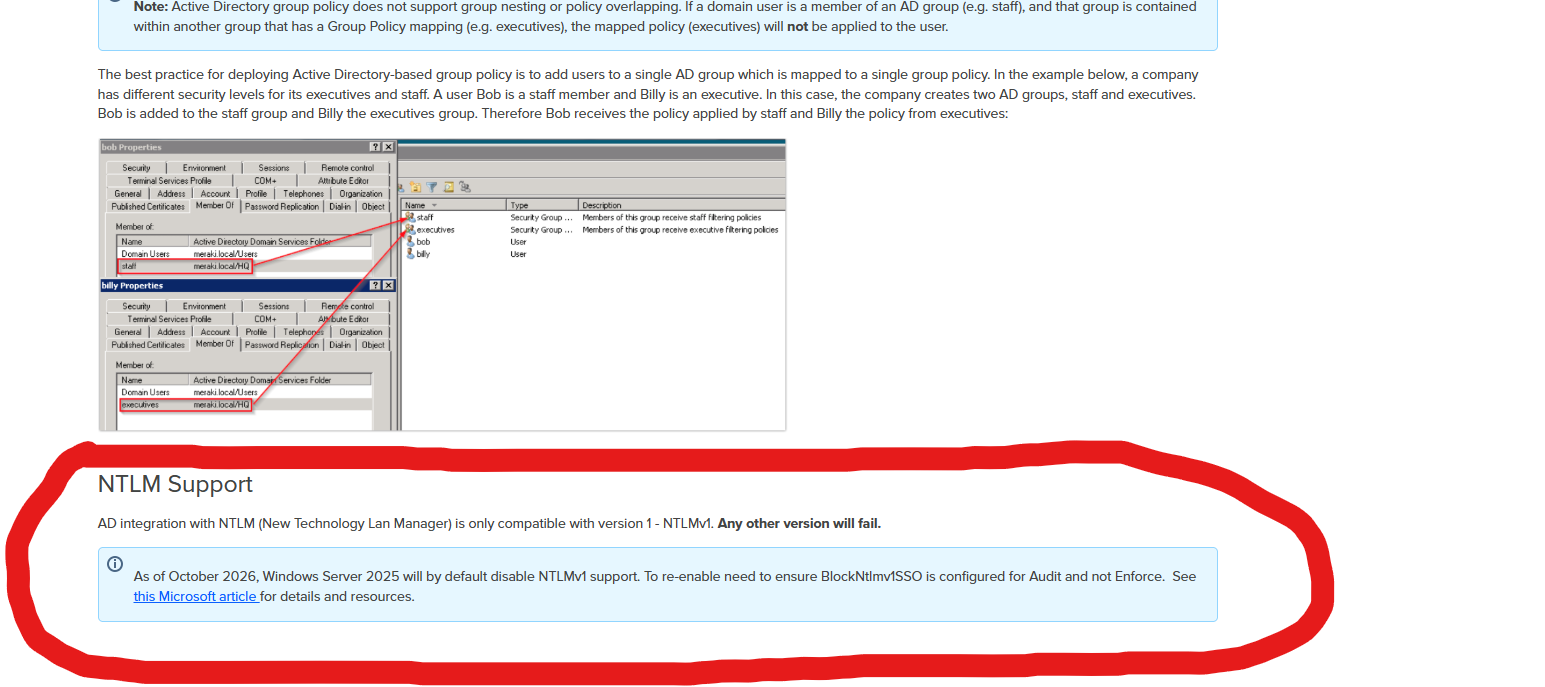
Cisco even provides a workaround, in the big old 2026, to keep your environment terribly insecure
Source: Configuring Active Directory with MX Security Appliances
Identity Services Engine (ISE)
ISE’s AD integration guide lists “Active Directory Domain Admin credentials” as a prerequisite for joining. Separately, ISE offered RC4 for its Netlogon secure channel for years (enhancement CSCvo60450), with a Cisco employee on the Cisco community conceding that “ISE should probably not be offering RC4 in its requests.” AES negotiation arrived in 3.1 Patch 8. Older still with ISE 1.2 and below used SMBv1 to talk to domain controllers; SMBv2 arrived in 1.4.
Sources: ISE AD integration guide, CSCvo60450 thread, ISE and SMBv2 support
Duo Authentication Proxy
Before version 5.0, the Duo Authentication Proxy had no support for LDAP channel binding. Duo staff on the Cisco community confirmed that “channel binding support requires Duo Authentication proxy v5 or later.” This has been in effect since around 2022 or 2023.
Sources: Enable LDAP channel binding thread, Duo Authentication Proxy 5.0.0 release notes
Umbrella AD Connector
Cisco’s own KB documents that the Umbrella AD Connector will fall back to NTLM when LDAPS and Kerberos fail, and that on that path “the data transfer between the DC > Connector happens without encryption.” The connector account also has to be a member of Enterprise Read-only Domain Controllers.

Sources: Understand Umbrella encryption for AD, Required permissions for the Umbrella connector
Enterprise Chat and Email (ECE)
Cisco Field Notice FN70548 told customers that if LDAP signing requirement was enforced, “LDAP connections to Active Directory from these applications will not work unless LDAPS is configured.” Which an issue as ultimately; I have seen many clients not properly set up LDAPS but have LDAP functional, and at times with signing enforced.
There’s no reason why if I don’t have LDAPS then it iherently means I need to downgrade my security further with removal of LDAP singing
Source: FN70548
VMware / Broadcom / Omnissa
App Volumes
The App Volumes 2212 admin guide says “Currently, App Volumes Manager does not support LDAP Signing.” Then it tells you “To use LDAP insecure, LDAP Signing must be deactivated in the Active Directory,” by setting LDAPServerIntegrity to 1 on your domain controllers.
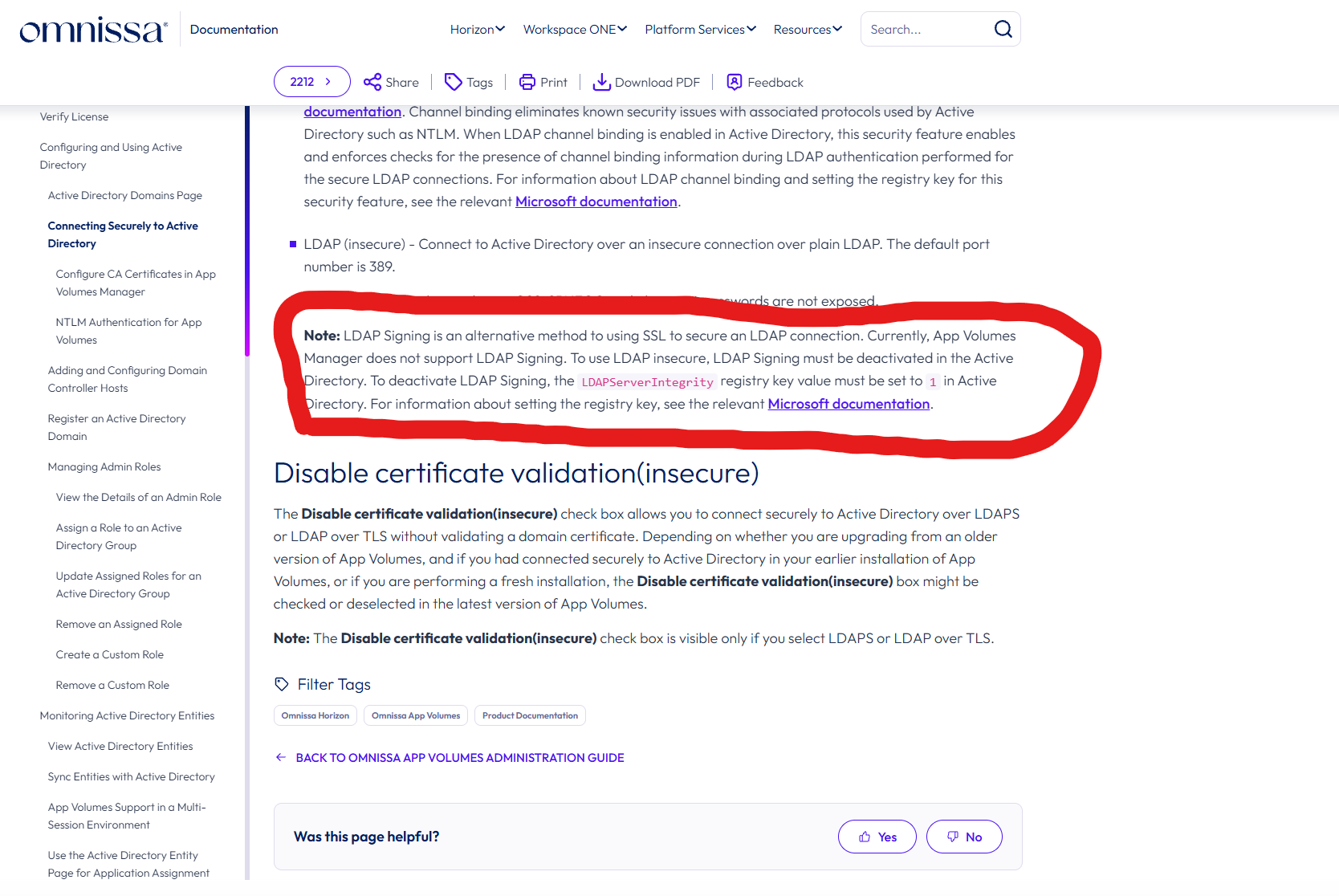
Source: App Volumes 2212 admin guide
vCenter Server
Broadcom KB 422528 states that vCenter identity sources configured with Integrated Windows Authentication “strictly utilize RC4 encryption,” on 7.x and 8.x. KB 344879 documents authentication failing outright once DCs were patched to disable RC4. KB 344915 says there is “no global setting to disable RC4 usage everywhere in either Windows or vCenter” and that VMware does “not recommend enabling the RejectMd5Clients at this time.” And on VCSA 6.x, if you hand-edited the Kerberos config to remove RC4, “if domain is rejoined, RC4-HMAC enabled configuration is restored.”
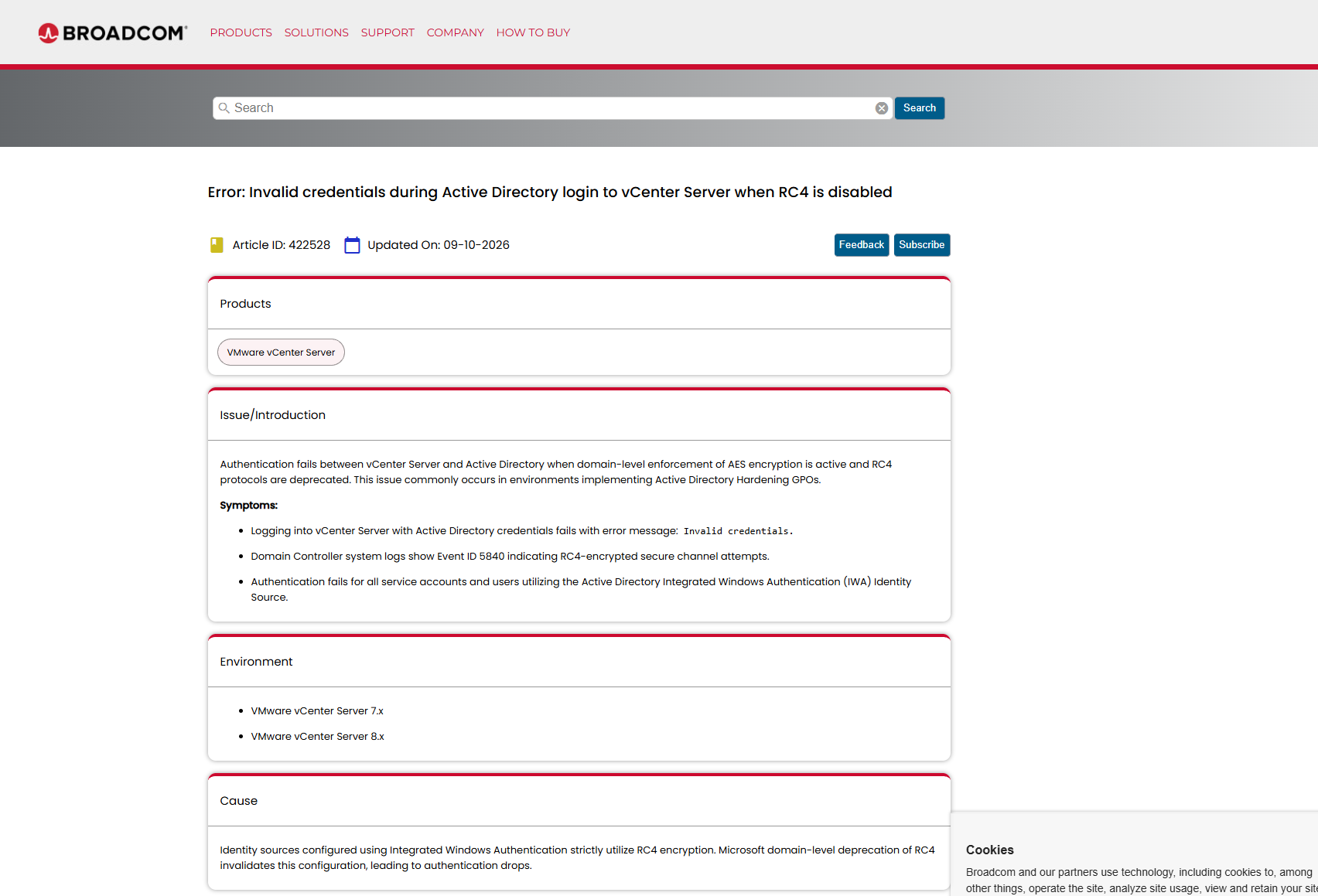
Sources: KB 422528, KB 344879, KB 344915, KB 324328
Citrix
Workspace app for Windows
For versions before 2607 LTSR, Citrix’s documentation for domain pass-through SSO says: “When Windows Defender Credential Guard is enabled on the client device, single sign-on into the session will fail.” The documented workaround is to “disable Windows Defender Credential Guard,” either through the Virtualization Based Security group policy or by setting LsaCfgFlags to 0.
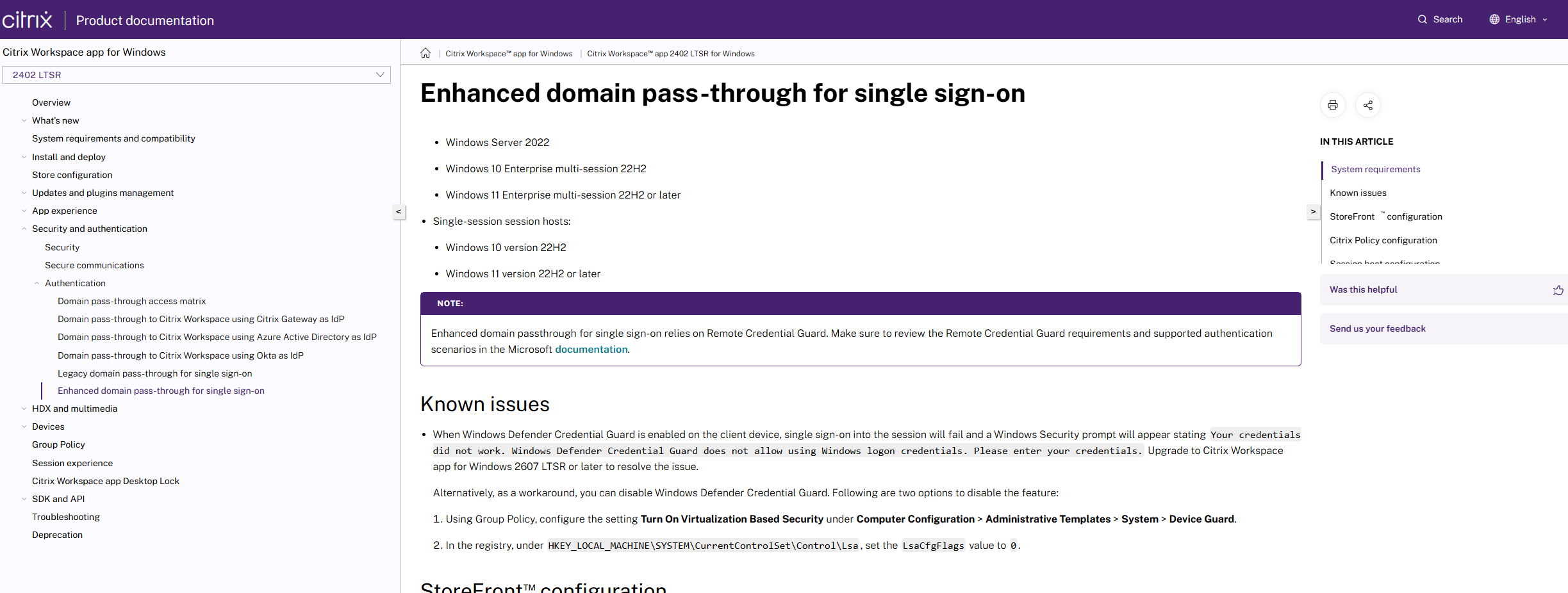
Note that by default, Windows Credential Guard is enabled by default on supported devices starting with Windows 11 (version 22H2) and Windows Server 2025 and this leads to you rolling back a good security measure to accommodate vendor tooling
Source: Domain pass-through SSO, 2402 LTSR
NetScaler
NetScaler needs a dedicated documentation article, “Protected user authentication,” to make members of Protected Users authenticate at all through its normal LDAP and NTLM flows.
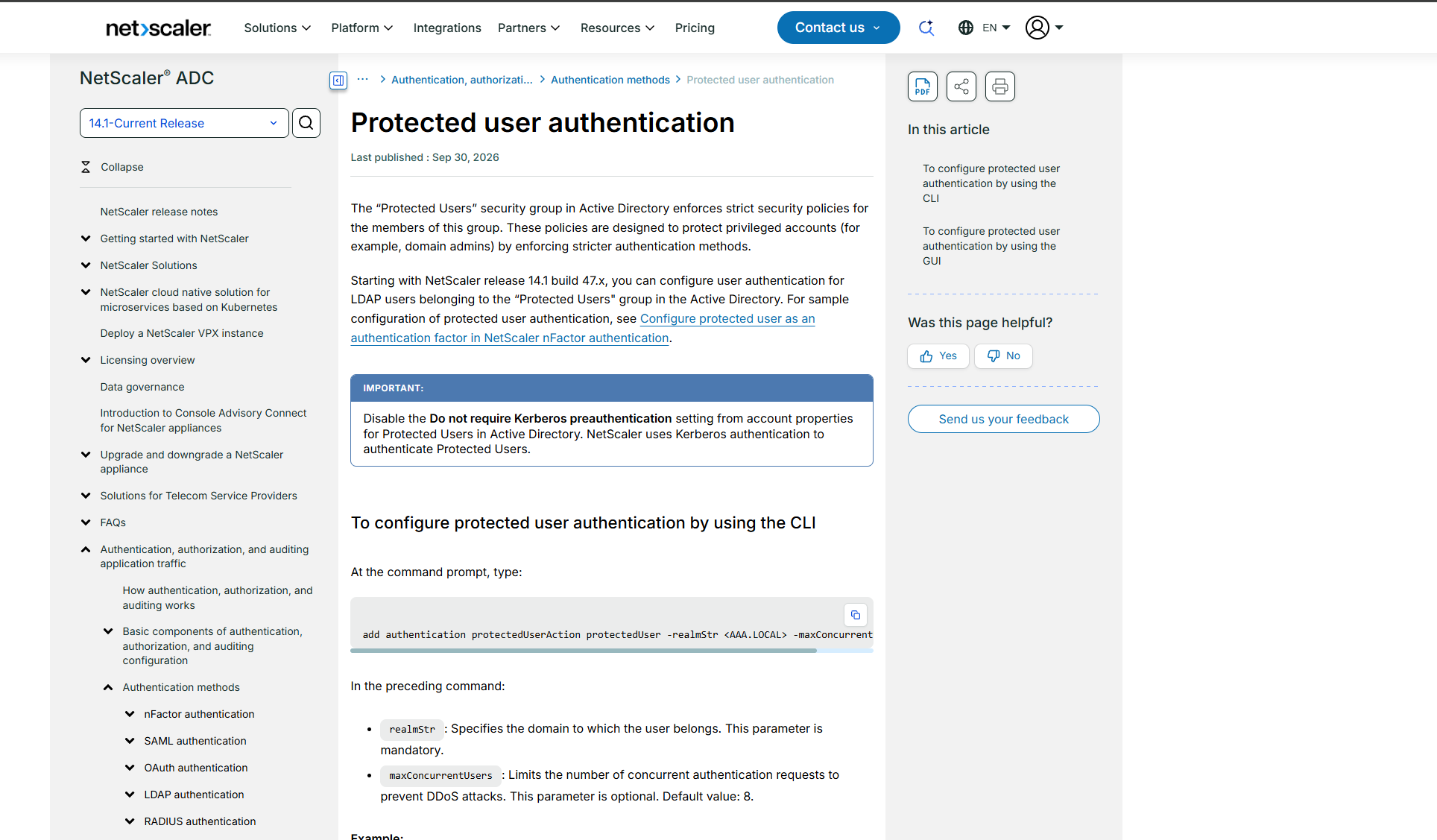
Note that This was only introduced somewhere during 2025
Source: Protected user authentication
Fortinet
FortiGate
Fortinet’s own technical tip for the “Strong(er) authentication required” LDAP error tells you to go to the domain controller and set ldapserverintegrity to 0 or 1 “when Secure Connection is disabled in the FortiGate.” That is the registry value behind Microsoft’s “LDAP server signing requirements” policy. The tip does offer LDAPS as the alternative, but the first fix it gives you is to turn signing off on the DC, which will make the DC vulnerable to NTLM relay attacks. Note that going to LDAPS is not inherently secure either as by default, it also will be vulnerable to NTLM relay attacks unless Channel Binding is enforced.
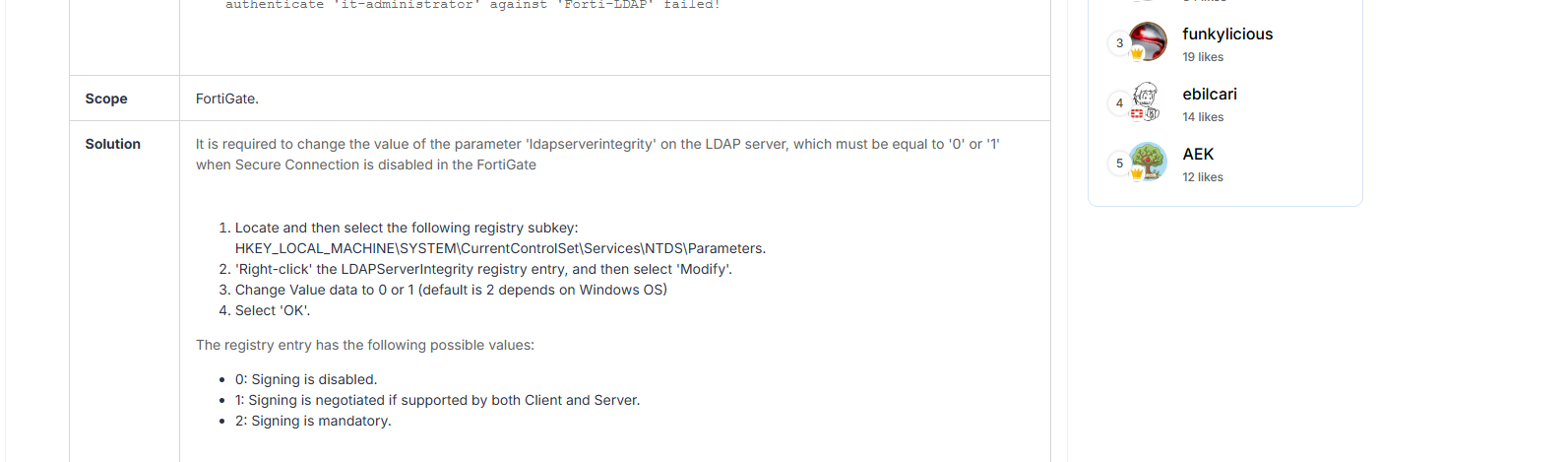
Source: Technical Tip: LDAP connection status ‘Strong(er) authentication required’
FortiAuthenticator
The RADIUS troubleshooting tip states that when NTLMv1 is disabled on the LDAP server, “the authentication will fail because MSCHAPV2 uses NTLM v1.” And the FSSO admin guide for 6.6 ships with NTLMv1 enabled by default, telling you to “optionally, disable NTLMv1, as NTLMv2 is supported.”
Sources: RADIUS failure when NTLMv1 disabled, FortiAuthenticator 6.6 admin guide
Check Point
Identity Awareness (AD Query)
The R80.20 admin guide, quoted on CheckMates, says “For AD Query you must enter domain administrator credentials,” and the R82 troubleshooting guide still has you test with “your domain administrator user name and password.”. As recently as 2022, a customer’s packet capture showed the gateway authenticating with NTLMv1 until “Use NTLMv2” was manually enabled via adlogconfig a (sk91462); by late 2023 a CheckMates admin described NTLMv2 as the default.
Sources: Identity Awareness LDAP account creation, R82 Troubleshooting AD Query, IA Enabling NTLMv2
Zyxel Firewalls
Zyxel released a KB warning users about the fact that there are issues with Windows Server 2025 compatibility KB. One recommendation is using LDAPS(which I have seen some not use for one reason or another) and the other is to simply disable LDAP signing.
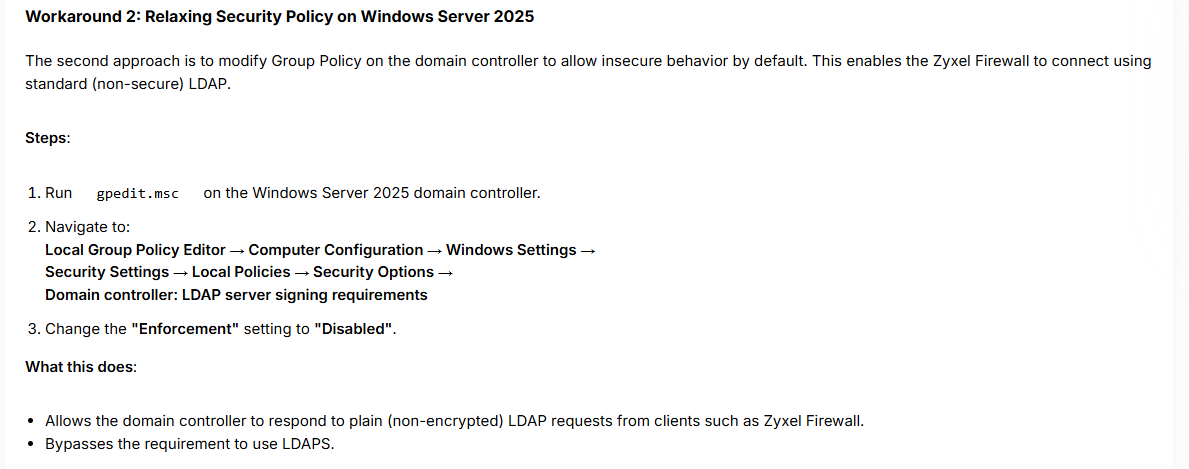
Source: Zyxel Vendor Doc
Palo Alto Networks
PAN-OS User-ID
Palo Alto’s documentation on client probing admits that probing on untrusted interfaces can expose “the username, domain name, and password hash of the User-ID agent service account,” and that Palo Alto “strongly recommends disabling client probing.” It’s documented, which is to their credit. It’s also been enabled in a lot of the environments I’ve tested, because it was the default for years. The same docs note the integrated agent needs Server Operators to monitor sessions, labelled “Not Recommended.”
Sources: Client probing, Dedicated service account for User-ID
Symantec / Broadcom
ProxySG
In 2024, a Broadcom employee answered a customer asking to disable NTLM on newly deployed ProxySG appliances: “There is no option to disable NTLM only nor any plan for it in the future.”
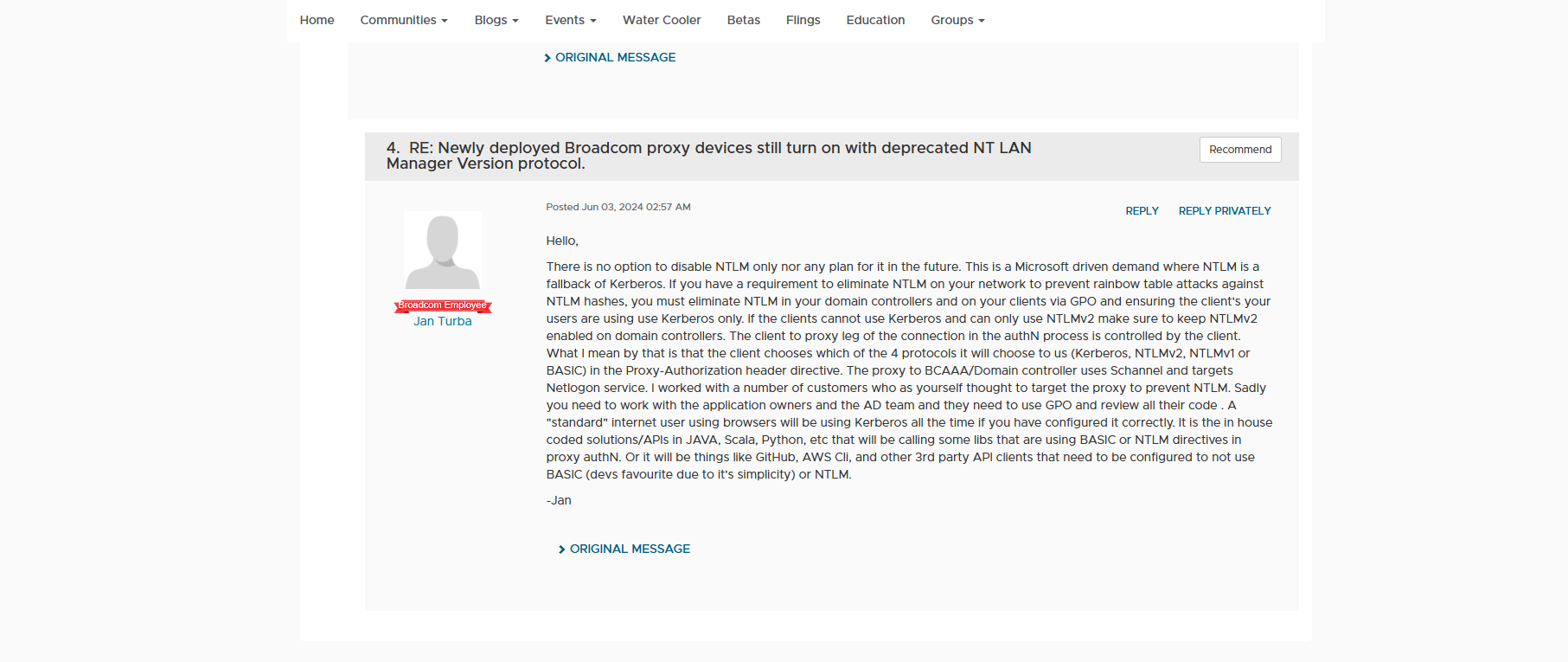
Source: Broadcom community thread
CA Privileged Access Manager
A privileged access management product, whose entire purpose is protecting privileged accounts, with a KB stating it “is not compatible” with AD’s Protected Users group because “members of this group cannot use NTLM, digest authentication, or CredSSP.” Affects 3.4.x, 4.0.x and 4.1.x.; basically For versions prior to 4.1.5
Source: KB 17076
The rest of the PAM and identity market
Broadcom isn’t alone. The products you buy to protect privileged accounts have a remarkable record of not working with Microsoft’s own protection for privileged accounts.
- Okta AD Agent: the service “will not start” when its account is in Protected Users. Resolution: take it out. KB
- One Identity Safeguard for Privileged Sessions: “Sessions fail when using an account that is a member of the ‘Protected Users’ AD Security Group.” KB 4251649
- One Identity Safeguard for Privileged Passwords 7.3: password check fails for Protected Users accounts when the asset is configured by IP address, because that forces NTLM. KB 4382488
- One Identity Active Roles: service account in Protected Users is not supported. KB 269450
- Quest Active Administrator: Protected Users “Not supported.” KB 338183
- Quest On Demand Migration for AD: the agent stores credentials in “RC4-encrypted form, which PUG does not support,” and the service account it describes is a domain admin. KB 4379111
- Delinea Secret Server: “RDP Proxy requires NTLMv2,” and the default AD heartbeat attempts NTLMv2, which fails for Protected Users unless you force the Kerberos method. KB summaries
- Devolutions Server 2025.3: password rotation and heartbeat fail for Protected Users; with LDAPS enabled it tried a simple bind first and never fell back to Kerberos. Devolutions staff suggested disabling LDAPS as a workaround. Forum thread with staff
- Softerra Adaxes: console uses NTLM by default and as a result Protected Users need a hand-edited
.dll.configto set an SPN. Vendor Q&A
Nine products in the PAM market that are either NTLM first, cant support LDAP/LDAPS signing, or cant support the protected users group.
Riverbed
SteelHead
Riverbed’s documentation argues the case against SMB signing in its documentation, something that rather surprised me. The Secure-CIFS feature “automatically stops Windows SMB signing,” and the user guide justifies it by saying that SMB signing “adds minimal additional security at a significant performance cost,” because “many enterprises already take additional security precautions (such as firewalls, internal-only reachable servers).” That reasoning is from an era when relay attacks were already well understood.
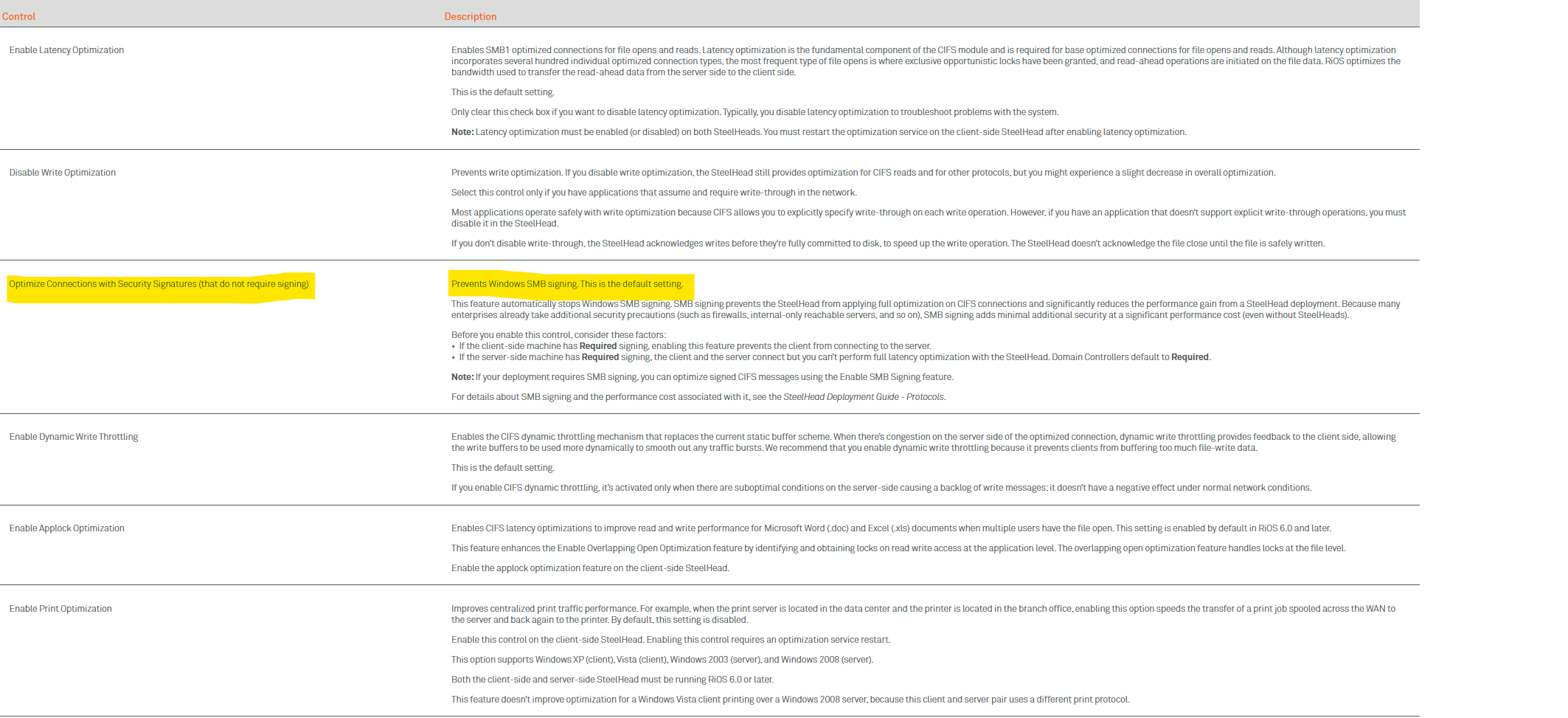
It gets worse once you ask for the secure option. The Kerberos end-to-end optimisation mode requires a “replication user” that must be granted Replicating Directory Changes and Replicating Directory Changes All. Those are DCSync rights. The guide adds that “the username can be an administrator.”
Sources: SteelHead user guide, optimisation protocols, CLI reference: secure-sig-opt, Windows domain authentication setup
NetApp
ONTAP
NetApp’s ONTAP is probably the most common non-Windows SMB server I run into, and the official defaults deserve a paragraph each.
- SMB signing: “By default, required SMB signing is disabled.” The docs warn that enabling it causes “a performance impact.” Doc
- NTLMv1: the default minimum authentication level is
lm-ntlm-ntlmv2-krb, which accepts LM and NTLMv1 unless the admin raises it. Doc - Kerberos RC4: “By default, when you create a SMB server on the SVM, Advanced Encryption Standard (AES) encryption is disabled.” AES only became the default in 9.13.1, and RC4 advertisement couldn’t be fully disabled before 9.12.1. KB
- LDAP channel binding: unsupported until 9.10.1. NetApp’s ADV190023 KB told customers “Do not use enforce DWORD value 2 for LdapEnforceChannelBinding” on their domain controllers, and stated there were “no plans to implement this feature for 7mode.” KB
- Protected Users: members fail to access CIFS shares via the LIF IP address, because connecting by IP forces NTLM. KB
A domain where the DCs enforce channel binding, require signing and reject RC4 is a domain where an unpatched ONTAP filer stops serving files. That’s why the DCs in most of my clients don’t.
Dell
Data Domain
Dell’s own documentation shows SMB signing disabled by default on Data Domain, and a Dell community answer quotes the DDOS admin guide: the feature is “disabled by default because it degrades performance.” SMBv1 stayed enabled by default until DDOS 7.5. Kerberos and Netlogon used RC4 until DDOS 8.8. The CLI domain join requires a member of Domain Admins (or a delegated pre-staged object), and DDOS “supports both NTLMv1 and NTLMv2.”
Sources: SMBv1 default KB, Kerberos encryption enhancements, AD operations KB, community thread quoting admin guide
PowerScale / Isilon OneFS
The clearest statement in Dell’s catalogue: for the Swift protocol on OneFS, “Swift authentication with NTLMv2 does not work. It does work with NTLMv1.” This applies to “all versions of Isilon OneFS and PowerScale as of and through 9.x and going forward,” and Dell has “no present plans” to fix it. Elsewhere, OneFS 9.4 and earlier used RC4 for the NTLM Netlogon secure channel, and setting Microsoft’s RejectMd5Clients broke authentication. SMBv1 was enabled by default until OneFS 9.6. And a Dell support KB from the 6.5/7.0 era, quoted on the Dell community, resolved Veeam “Invalid Signature” errors by telling customers “the fix is to disable SMB packet signing.”
Sources: Swift NTLM KB, RC4 Netlogon KB, SMB1 on a cluster, Isilon and Veeam thread
HPE
StoreOnce
StoreOnce 3.15.x and earlier could not join a domain with SMBv1 disabled on the domain controllers. An HPE employee on the HPE community confirmed SMB2 only became the default (and SMB1 disabled) from 3.16.3.
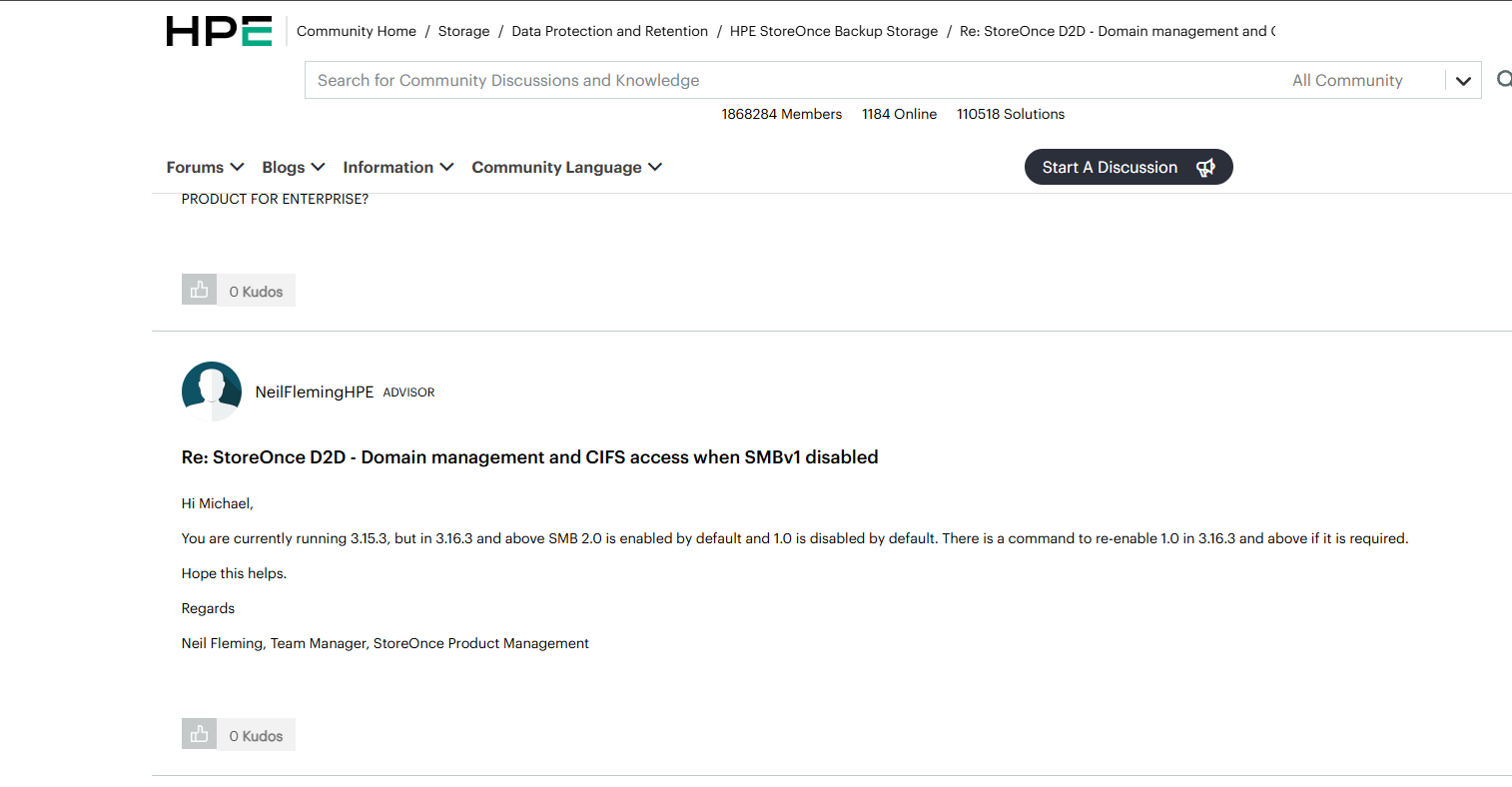
Source: StoreOnce domain management when SMBv1 disabled
Aruba ClearPass
HPE staff on the Airheads community, 2017: “When using MSCHAP-based authentication methods, SMBv1 to domain controllers is required.” SMBv2/3 support arrived as a hotfix for 6.6.7.
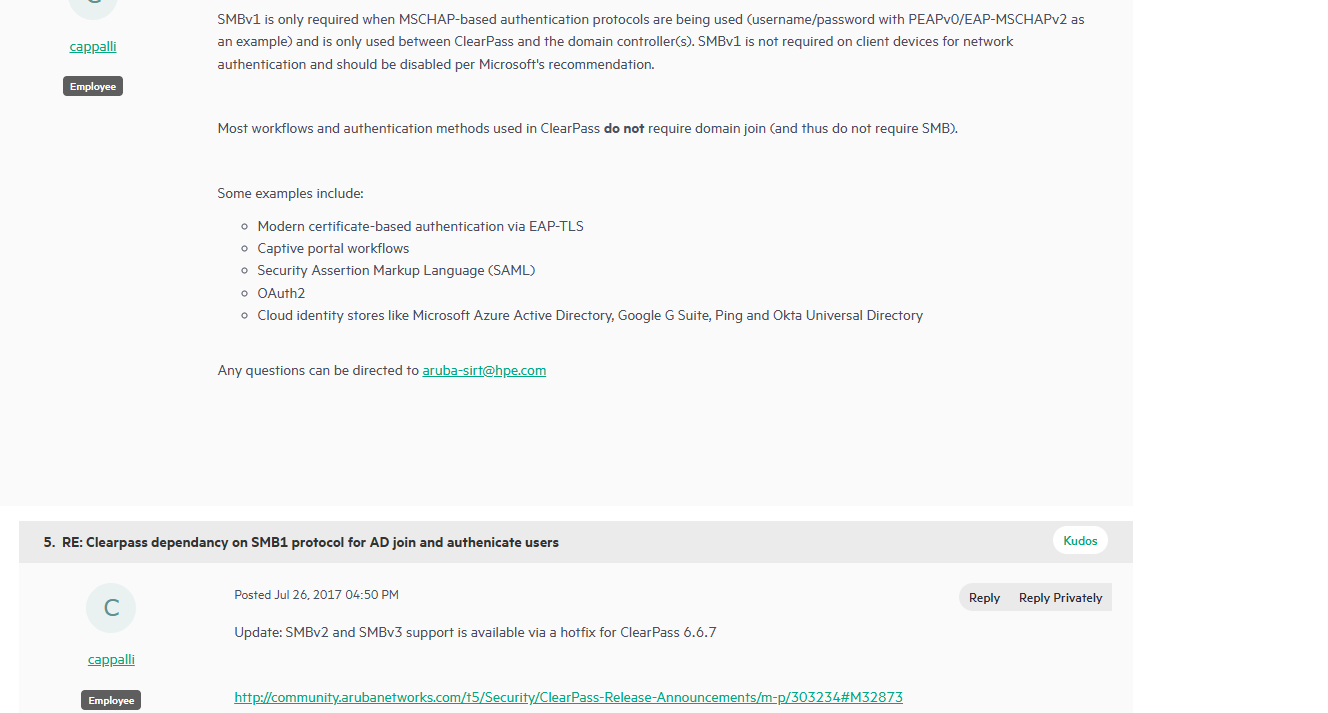
Sources: ClearPass dependency on SMB1, ClearPass 6.6.2 SMB version
Pure Storage
FlashArray and FlashBlade
Pure’s KB on SMB signing scanner findings says “FlashArray and FlashBlade products set SMB signing to optional by default,” to balance security and performance. On FlashArray, enforcing it requires opening a case with Technical Services. In my experience, if the default doesnt do it; no client would end up going the extra mile to open a ticket to enable something out a real need arising.
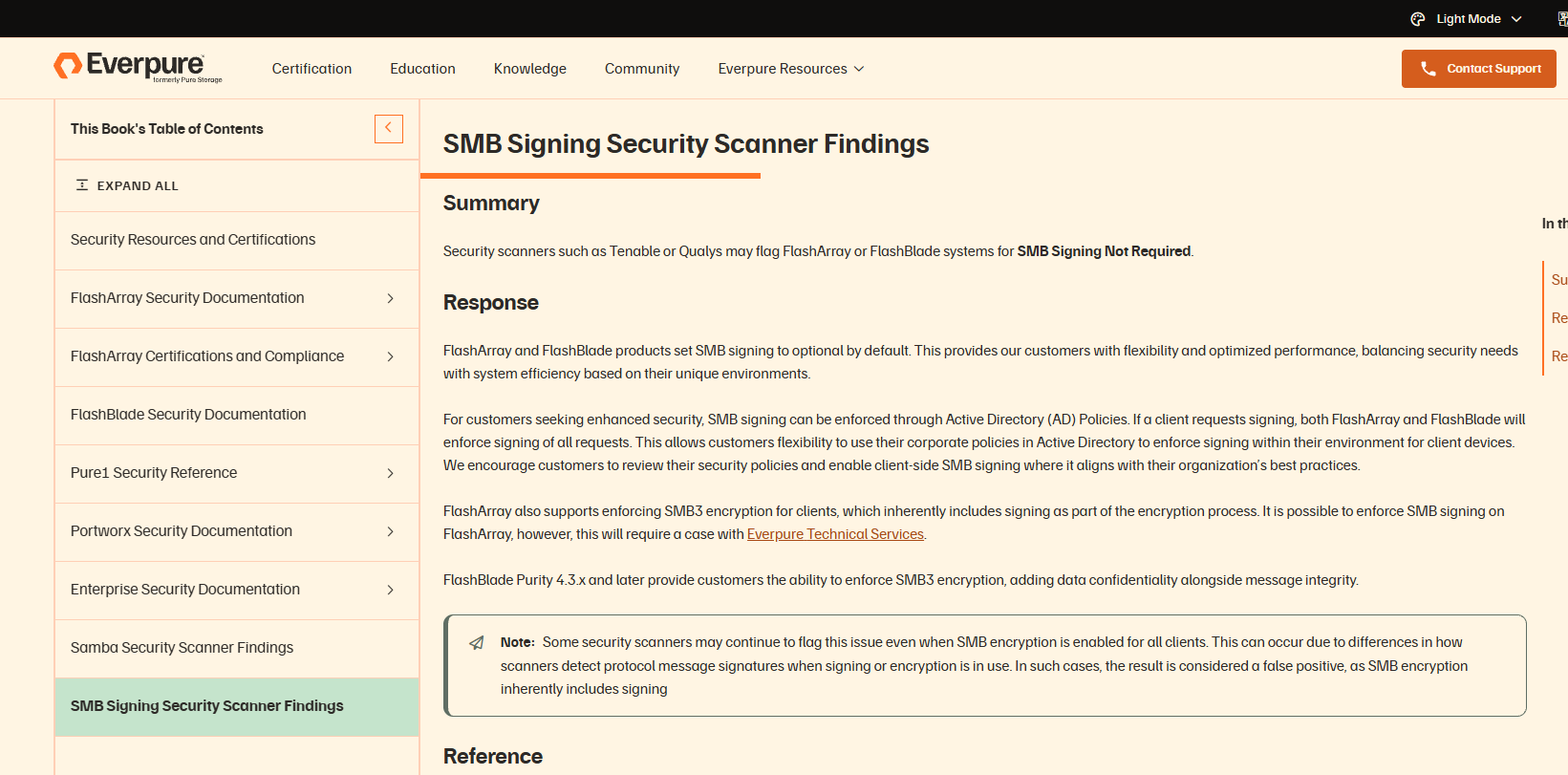
Source: SMB signing security scanner findings
Backup vendors
Veeam Backup & Replication
Veeam is in nearly every environment I test, which makes it one of the biggest potential gaps in my clients environments.
Veeam product management on the Veeam forums stated that through v11, NTLM “is still mandatory for the communication between all veeam infrastructure servers,” listing the backup server, proxies, repositories, guest interaction proxies, log shipping servers and mount servers.
V11 did not support service accounts in Protected Users as Kerberos-only arrived in V12. For the Veeam Agent for Windows, when a customer’s NTLM-restriction GPO broke backups, the workaround Veeam staff offered was to exclude the Veeam servers from the GPO. And even on v12.3, a File Copy job that targets a host by IP address drops back to NTLM and fails for Protected Users accounts, because, as Veeam’s own Kerberos documentation implies, everything has to be added by FQDN.
Sources: Service accounts hardening, Protected Users console logon, Agent with NTLM restricted, VBR using IP as destination, Kerberos authentication doc
Datto SIRIS / ALTO / NAS
Datto’s KB warns that “Enabling SMB Signing can break ShadowSnap backups,” that devices which have ever had ShadowSnap configured may still have signing disabled, and that disabling SMBv1 will “prevent paired Server 2003 ShadowSnap agents from performing their backups.” It closes with: “Datto is not responsible for service degradation caused by disabling the SMBV1 protocol.”
Source: Datto KB
Unitrends
Unitrends’ KB on SMBv1 states that Hyper-V instant recovery, SharePoint and Oracle protection all required SMBv1 shares, and advised that “patching Windows systems is sufficient to prevent threats” rather than disabling the protocol, which Microsoft itself says should be disabled as its been deprecated for some time now.
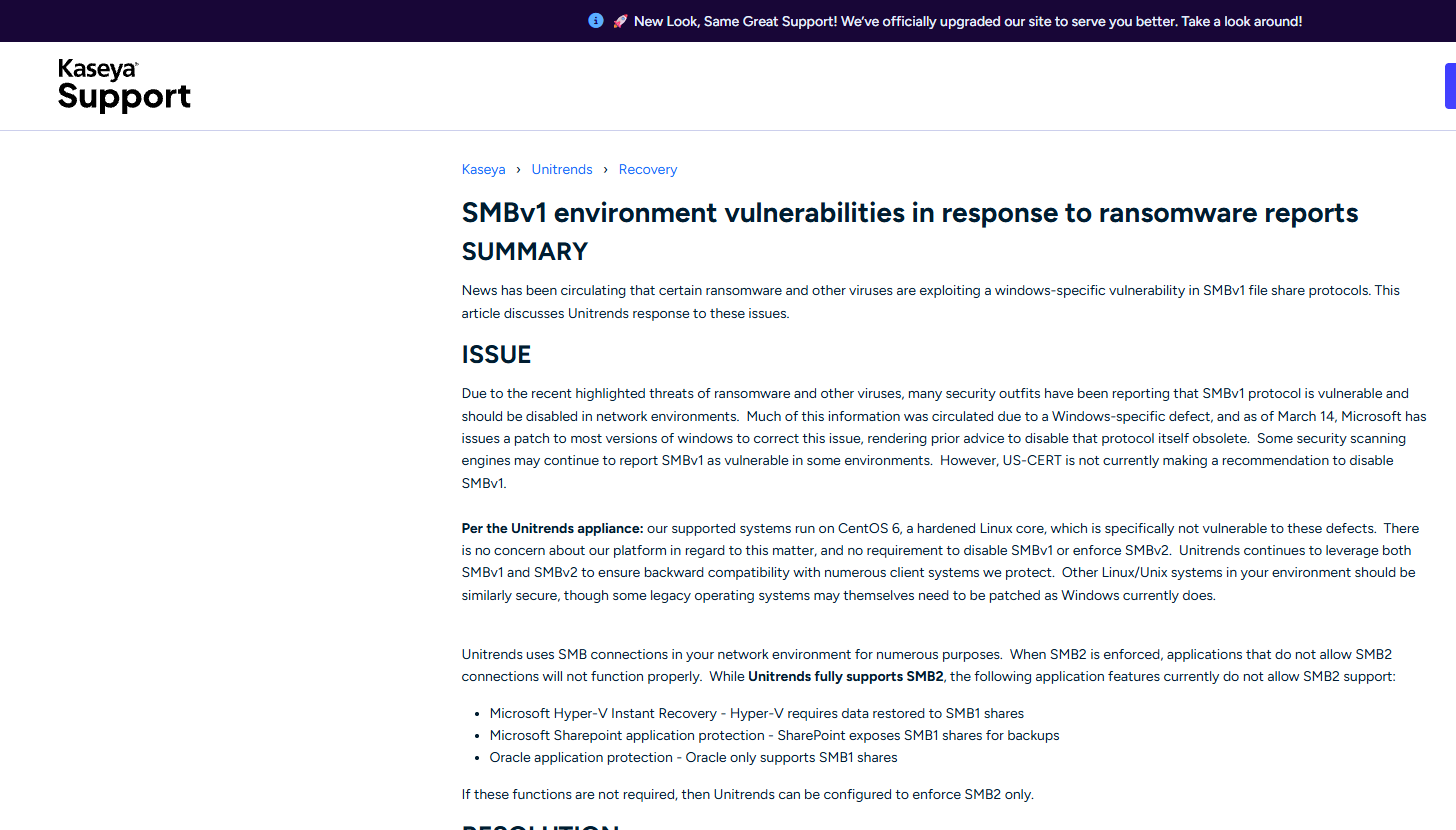
Source: SMBv1 environment vulnerabilities
The same software also appears to have a known issue with AD authentication, in which Kaseya directs clients using Unitrends to disable LDAP signing on their Domain Controllers
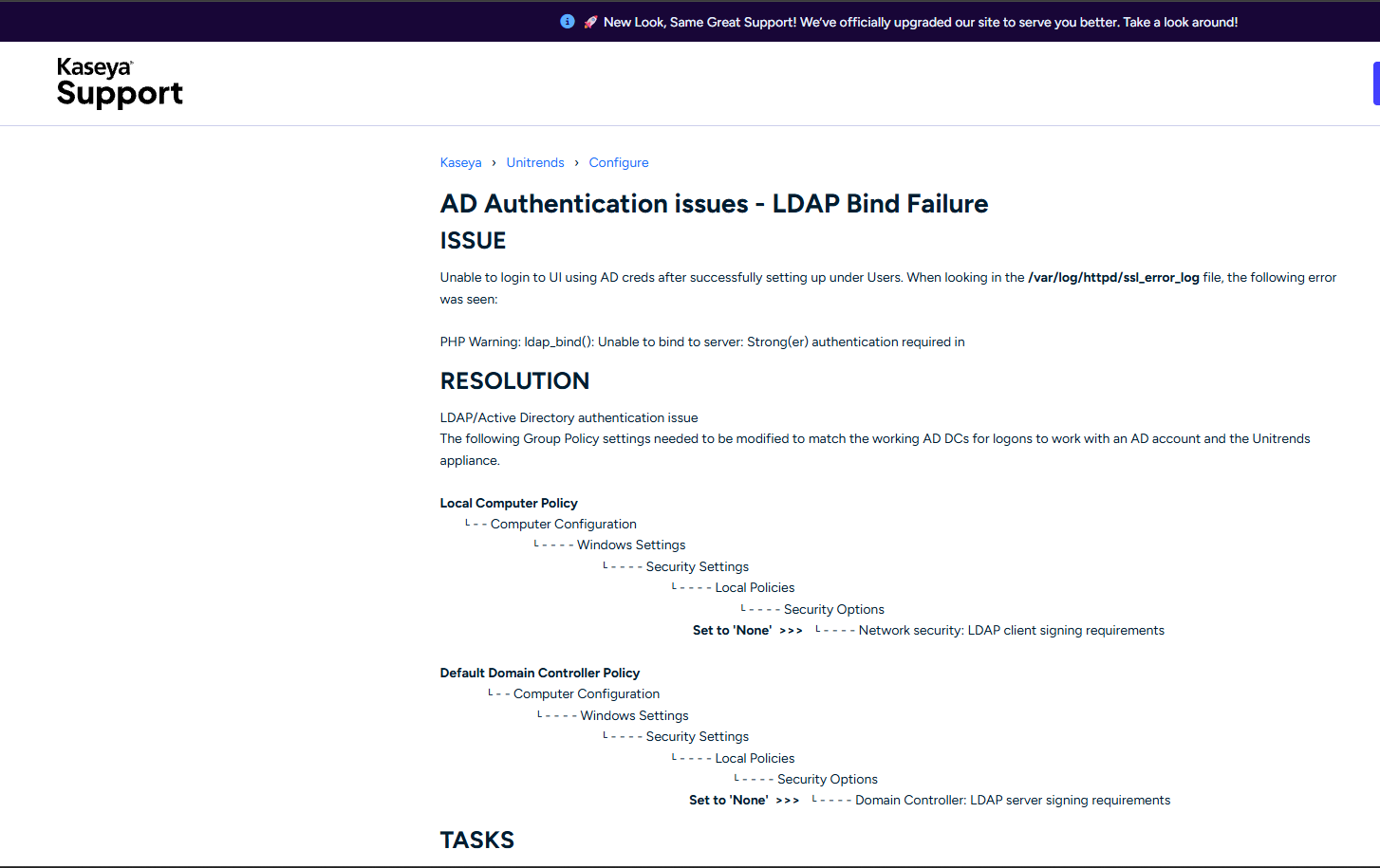
Source: Following Article
Acronis and Arcserve
Acronis Cyber Protect 16: “On a domain controller, the user must be included in the Domain Admins group.” Arcserve UDP 9.0: AD protection, Exchange log truncation and AD/Exchange restores require the “Domain administrators group.” Backup agents run on every server. A backup service account in Domain Admins is a Domain Admin credential on every server.
Sources: Acronis service logon account, Arcserve UDP privileges
Monitoring, scanning and RMM
SolarWinds
SolarWinds documents that WMI polling in “Default” mode “uses NTLM,” that Kerberos requires nodes to be added by FQDN, and that several modules (VMAN Hyper-V polling among them) cannot use Kerberos at all. In 2022 it got a CVE for exactly the hardcoded-IP problem: CVE-2022-47508, rated High, because Server & Application Monitor 2022.4 queried hosts by IP address, so “customers who had configured their polling to occur via Kerberos did not expect NTLM Traffic.” On THWACK, a customer who enabled Credential Guard to meet a STIG found it broke polling across modules, and SolarWinds support treated Credential Guard as a “3rd party tool.”
Sources: Configure Kerberos, gMSA limitations, CVE-2022-47508, THWACK Credential Guard thread
Paessler PRTG
A customer asked Paessler support in 2018 whether WMI sensors could use Kerberos instead of NTLM. Answer from Paessler staff: “Nope, cannot be changed.” Could they at least disable NTLMv1? “Same goes for that I’m afraid.” The thread runs to 2022 with Kerberos for WMI still an open feature request. Paessler has since archived the article, but it’s still online.
Sources: WMI: NTLM still necessary?, Kerberos authentication
Tenable Nessus and Rapid7 InsightVM
Both vulnerability scanners document that you need Domain Administrator accounts to scan domain controllers, and Nessus additionally requires Remote Registry, the admin shares, and LocalAccountTokenFilterPolicy=1 on every target. Those are Windows facts, not vendor bugs. The result is the same either way: a Domain Admin credential authenticating over SMB to every host in the estate on a schedule, which is the dream scenario for anyone running Responder on the network.
Sources: Nessus credentialed checks on Windows, Rapid7 Windows authentication best practices
NinjaOne, Kaseya and PDQ
NinjaOne’s AD discovery: “You must have domain administrator credentials saved in the credentials store.” Kaseya VSA Domain Watch: “A domain administrator credential provides the necessary authorization.” PDQ Deploy and Inventory: deploying to a domain controller requires the account to be a Domain Administrator, and before version 19.3 the console-to-server connection was NTLM only.
Sources: NinjaOne AD discovery, Kaseya Domain Watch, PDQ DC deployment, PDQ NTLM-restricted environments
Netwrix and ManageEngine
Netwrix Auditor 10.6: “If network traffic compression will be enabled, then the account must belong to the Domain Admins group.” ManageEngine ADAudit Plus: “ADAudit Plus instantly starts to audit activities upon providing Domain Admin credentials.” These are AD auditing products. Their quick start is to hand them Domain Admin.
Sources: Netwrix Auditor permissions, ADAudit Plus privileges
Enterprise applications
Atlassian Jira, Confluence and Crowd
Atlassian’s bug tracker has issue CWD-3746, “JIRA can’t communicate if LDAP server signing requirements used.” The Atlassian response: “Currently, our application doesn’t provide any mechanism allowing us to talk with AD configured in this way.” Resolution: Won’t Fix. The listed workarounds are to use LDAPS, or to change the AD “LDAP Server Signing Requirements” policy. Confluence’s own KB on directory sync says that without SSL, “credentials will be sent in plain text.”
Sources: CWD-3746, Unable to synchronize with AD due to SSL requirement, Security protocols Confluence uses for AD sync
Oracle Database
Oracle’s Windows native authentication adapter used NTLM for domain users on every release before 18c, and is “the default setting” after install. Even on 23ai, local connections still use NTLM, and Oracle’s documentation walks you through setting SQLNET.NO_NTLM=FALSE on client and server if things break.
Sources: About Windows authentication protocols (18c), Windows authentication NTLM (23ai)
SAP
SAP’s documented SNC option for Windows SSO uses “the Microsoft NTLM SSP” via gssntlm.dll. On the Kerberos side, SAP’s KBAs 3086252 and 3773455 cover RC4 deprecation for NetWeaver, SAP SSO 3.0, SNC Client Encryption and HANA, and as Onapsis noted, “SAP has not published a Security Note for Kerberos RC4 deprecation.”
Sources: SAP NetWeaver SNC with NTLM, KBA 3086252, Onapsis on SAP SSO RC4
SAS, SecureAuth and Trend Micro
Three more products that bound to AD with a simple bind over port 389 and broke the day Microsoft’s LDAP hardening was enforced. SAS 9 and Viya: “a simple bind to Active Directory without Transport Layer Security (TLS) fails.” SecureAuth IdP: “the SecureAuth Standard authentication method will no longer work.” Trend Micro Mobile Security 9.8: customers “using None as Encryption Type will be affected.”
Sources: SAS note 65600, SecureAuth KB, Trend Micro KA-0010249
F5 BIG-IP APM
Bug ID 634217: AD authentication fails when Kerberos pre-authentication is set to AES and cross-domain support is enabled. The workaround is to set pre-authentication to “None,” which is also the documented default. Fix information: none.
Sources: Bug ID 634217, APM AD authentication
Printers and MFPs
Scan-to-folder is the most reliable place to find NTLMv1 and SMBv1 in my experinces at least, when doing pentests. Some below are the examples I have either personally dealt with on engagements or that were found otherwise during research:
- Xerox: Xerox’s support site lists KB articles titled “Digitally Signed Communication Policy Must be Disabled When Scanning to Microsoft Windows 2008 Server or Windows SBS 2011” and “Enable send NTLMV2 response only when Scanning to a Windows 2008 or 2012 Server.” A vendor KB with “must be disabled” in the title. Xerox
- Konica Minolta: current ineo+ manuals offer NTLMv1 as a scan-to-SMB authentication option, “Invalid” as an SMB client signing option, “Enable SMB1.0” on the server side, and a fallback to NTLM v1/v2 when Kerberos fails. On the copier technicians’ forum, a tech confirmed the bizhub 363 is NTLMv1-only with “no plans to provide firmware for this machine.” Manual, bizhub 363 thread
- Lexmark: “If Negotiate (Kerberos) is selected and Kerberos is not configured, then NTLM is used.” Silent fallback, in the official admin guide. Lexmark
- HP: HP publishes a per-model SMB compatibility list; a number of LaserJet models are flagged SMBv1 only, and HP’s own forum is full of customers re-enabling SMBv1 on Windows 10 to get scanning working. HP M475 thread
The Microsoft SMB1 list
Just to understand the scale of the vendors that have currently, or histotically brought down your enviroment security then look no further than the fact that Microsoft maintains the SMB1 Product Clearinghouse, a public list of products whose vendors state, in their own documentation, that they require SMBv1. Early entries included Canon, Cisco, F5, IBM, McAfee, NetApp, QNAP, Sonos, Sophos, Synology and VMware.
You can find the list here at SMB1 Product Clearinghouse
Open source and non-Windows platforms
Many open source and non Windows based commercial tooling also unfortunately include these issues. Some examples include:
- Samba shipped with SMBv1 enabled by default until 4.11 in 2019, allowed NTLMv1 by default (
ntlm auth = yes) until 4.5 in 2016, had the DC signing default set wrong (CVE-2016-2114) with file-server signing “off because of performance reasons,” and used RC4 for Kerberos session keys by default until CVE-2022-37966. 4.11 announce, 4.5.0 notes, CVE-2016-2114, CVE-2022-37966 - macOS needs RC4 (“weak crypto”) to bind to a domain below the 2008 functional level, and on the Jamf community one admin measured roughly 60,000 unsigned LDAP binds a day from Macs, with
dsconfigadsigning “allowed but not required” by default. Apple, Jamf thread - Synology and QNAP both shipped SMBv1 as the lowest allowed version for years, and Synology DSM still carries an “Enable NTLMv1 authentication” checkbox that its support recommends “as a last resort.” QNAP FAQ, Synology spec
Microsofts Own Product Shortcomings
It bears saying that there are valid counterpoints to all of this, and the biggest one is that Microsoft’s product teams behave like third-party vendors toward Microsoft’s own platform.
- Hyper-V live migration used CredSSP by default on Server 2012 through 2022. Moving to Kerberos requires constrained delegation, which I’m actually not even sure why that is. Server 2025 turns on Credential Guard by default, at which point “you can’t use CredSSP-based live migration.” Doc
- SQL Server’s Dedicated Administrator Connection “is only available using NTLM authentication,” and if SPN registration fails at startup it’s logged and “startup continues,” so every client silently falls back to NTLM. Doc
- Exchange didn’t enable Extended Protection by default until 2019 CU14, and EPA “isn’t supported in environments that use SSL Offloading,” while “SSL offloading for Outlook Anywhere is enabled by default.” Doc
- SCCM grants site server and SMS Provider machine accounts
db_owneron the site database, which is why coerce-and-relay to MSSQL gives Full Administrator. SQL Server has supported Extended Protection since 2008 R2, while Configuration Manager only added support for it in version 2409, released December 2024. [2409 notes](https://techcommunity.microsoft.com/blog/configurationmanagerblog/-/4351640. - Windows itself won’t attempt Kerberos to an IP address by default and falls back to NTLM, and Microsoft’s own docs admit applications “are sometimes hardcoded to use IP addresses.” The fix,
TryIPSPN, is off by default and needs manually registered IP SPNs. Doc - The archived TechNet guidance for SQL Server Reporting Services told admins to configure “Kerberos with full delegation,” never mentioning the constrained option. Doc
So this isn’t a story about Microsoft versus the vendors. It’s a story about every product team, Microsoft’s included, shipping for the environment as it was, and leaving the customer holding the finding.
Fixed, a little too late
Some of the vendors above have fixed some of the problems above. I’d normally count that in their favour. The problem is the dates. Kerberos AES has been in Windows since Server 2008. Protected Users shipped with Server 2012 R2. Microsoft’s LDAP signing and channel binding guidance went out in 2019, with enforcement in 2020. SMB signing is thirty years old. A fix that lands in 2024, 2025 or 2026 for any of these is a fix that took a decade or more, and in my view it deserves nearly the same questioning as the examples that are still broken. Here is what landed in the last two years or so.
- Cisco ISE stopped offering RC4 for its Netlogon secure channel in 3.2 Patch 5, which customers confirmed working in February 2024. Microsoft’s RC4 hardening for Netlogon (CVE-2022-38023) had shipped in November 2022, and the enhancement request (CSCvo60450) predates even that. Thread
- Oracle Database only made
SQLNET.NO_NTLMdefault to TRUE in 23ai, generally available in 2024, and the same documentation page tells you how to set it back to FALSE. Doc - VMware vCenter deprecated Integrated Windows Authentication, the RC4-only identity source, in vSphere 7.0 (2020), but only removed it in vSphere 9.0 in 2025. Five years of a deprecated, RC4-only option sitting in the default dropdown. KB 314324
- Veeam discontinued NTLM in the v13 Software Appliance, released in 2025. In the v13 Windows installable it is only deprecated, which means it’s still there, and users were still tracing NTLM fallbacks in May 2026. Veeam community
- Devolutions Server fixed Protected Users password rotation in 2025.3.12.0, after a release in which the vendor’s suggested workaround was to disable LDAPS. Customers then reported it regressing on 2026.2.7.0. Forum
- Citrix resolved the Credential Guard single sign-on failure in Workspace app 2607 LTSR, in 2026. Credential Guard shipped with Windows 10 in 2015. For eleven years the documented answer was to turn it off. Doc
- Dell Data Domain is removing RC4 from Kerberos “starting with DDOS 8.8.0.0,” with backports to 7.13.1.80, 8.3.1.40 and 8.6.1.20 listed as “expected.” The KB was last modified in August 2026, and as of October 2026, DDOS 8.8 doesn’t appear on Dell’s release list. This fix is timed to Microsoft’s forced RC4 removal (CVE-2026-20833), not to anything Dell decided on its own. KB
- Microsoft Exchange only enabled Extended Protection by default in Exchange 2019 CU14, in February 2024, a full twelve years after EPA was introduced in Windows. MSRC
- Microsoft Configuration Manager added support for SQL Server Extended Protection in version 2409, December 2024. SQL Server has supported it since 2008 R2. Release notes
- Microsoft Windows removed NTLMv1 in Windows 11 24H2 and Server 2025 (late 2024), enabled EPA by default for AD CS and LDAP channel binding in Server 2025 (November 2024), and is only now, in 2026, moving the Kerberos default from RC4 to AES (CVE-2026-20833). LLMNR is still on by default. MSRC
Other, a bit older examples also include Dell OneFS turned SMBv1 off by default in 9.6 and moved its Netlogon channel to AES in 9.5 (both 2023), NetApp made AES the Kerberos default in ONTAP 9.13.1 (2023), PDQ added Kerberos for client consoles in June 2023, and SolarWinds fixed its IP-polling NTLM fallback in 2023.1. Every one of those is a 2023 fix for a 2008-era control.
And then there are the ones that haven’t been fixed at all. As of this writing, Meraki’s documentation still says NTLMv1 is the only version that works. Broadcom still says there’s no plan to let you disable NTLM on ProxySG. Dell says it has no plans to fix NTLMv1-only Swift on OneFS. Atlassian’s answer on LDAP signing is still Won’t Fix. Okta’s resolution is still “remove the account from Protected Users.” And Broadcom’s PAM KB still lists no version that works with Protected Users at all.
What this means for your next pentest
Next time you’re on an engagement and you have a finding, take some time to figure out whether a product introduced it, and write that down in the report. For me personally, I have three reasons I do this and why I think other pentesters should do the same as well.
First reason is that it changes the remediation. “Enable SMB signing” is usually straight forward only if it was because my clients skipped it over or never got to doing it as a priority. When It’s a vendor upgrade, a support case, or a product replacement if the reason it’s off is the Datto appliance, the Riverbed in the WAN, or the NetApp filer. Telling the client to enable something without some effort to know if its product introduced would be not only a security nightmare for clients but also mean that they are less likely to close the vulnerability out.
Second reason is that it helps shift the blame. Findings that read as sysadmin negligence are less received, less likely to be actioned and more likely to leave a sour taste in the clients mouth then from findings that read as “your vendor’s documentation told you to do this.” I have often seen security leaders take out findings on lower level employees, even tho more often than not, the finding was a default by Microsoft or a by product of using a specific vendors tooling.
Third is that it can act as a form of early warning. If you’ve identified that the NTLMv1 in the environment is the Meraki MX, the client knows exactly what will break when Windows Server 2025 enforces BlockNtlmv1SSO. That’s worth more to them than the finding itself as it means there’s less friction, and less likihood of push back against remediation.
Microsoft shipped insecure defaults for twenty years because it had to work with all of this. The defaults are finally changing. The products in this post are the reason it took so long, and some may still be lingering in your next pentest with the same potential issues.