I was doing an internal engagement some time ago for a client and noticed that the CA was configured for constrained delegation with a system that looked like a Web Server. I first noticed this using nxc’s --find-delegation switch present in the LDAP module, but also confirmed it with BloodHound as follows:

A side note: if you want to make the delegation check using the AD PowerShell module due to its ability to bypass AMSI/Defender since its Microsoft-signed, as well as being exempt from PowerShell’s constrained language mode/AppLocker (when using the DLL import method), then you can do that via:
(Get-ADForest).Domains | % { Get-ADComputer -Filter {msDS-AllowedToDelegateTo -like "*"} -Properties msDS-AllowedToDelegateTo,TrustedToAuthForDelegation -Server $_ | select Name,TrustedToAuthForDelegation,msDS-AllowedToDelegateTo; Get-ADUser -Filter {msDS-AllowedToDelegateTo -like "*"} -Properties msDS-AllowedToDelegateTo,TrustedToAuthForDelegation -Server $_ | select Name,TrustedToAuthForDelegation,msDS-AllowedToDelegateTo }
More of these can be found on wadcoms, a project I maintain :)
Back to the point, having noticed the presence of delegation between a random web server and the CA, I was naturally intrigued and so I put in the system’s IP address in my browser and got something that looked suspiciously like the Web Enrollment endpoint access page. Theres one way to further check if you have found a web enrollment endpoint and that was to use curl -v on http://<webserverip>/certsrv/certfnsp.aspx and observe the returned response. If it is indeed an enrollment endpoint, we should see in the authentication headers (WWW-Authenticate) the authentication type accepted and a prompt for credentials when using the GUI/web browser. The added benefit of the curl method is it allows you to preform this check without having domain creds and so you can use other methods like IPv6 + WPAD spoofing to relay to the web enrollment endpoint(as long as it isnt enforcing EPA) to gain valid creds from nothing more than a network position.
Having confirmed the presence of the Web Enrollment endpoint on the web server, I went back to check my Certify and Certipy outputs, since I knew I didn’t see that come up:
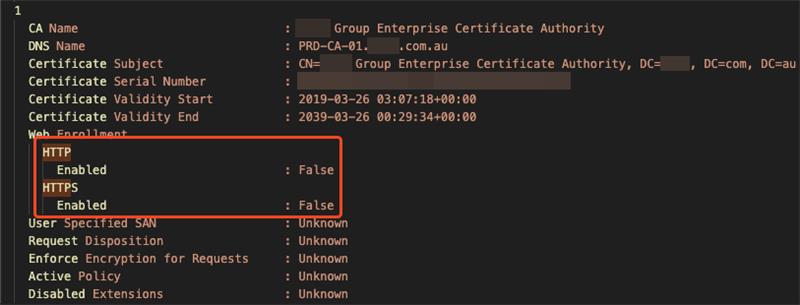
A good thing to flag before continuing is that this isn’t a “strange” or special edge case per se. This is what Microsoft recommends you do when setting up the Web Enrollment Service if you expect high load/traffic on your web enrollment service, such as when you have configured it with Citrix Endpoint Manager.
Microsoft’s documentation:
You can install CA Web Enrollment on a server that isn’t a CA to separate web traffic from the CA. Installing CA Web Enrollment configures the computer as an enrollment registration authority. You must select a CA to use with the CA Web Enrollment pages. The CA that CA Web Enrollment uses is the Target CA in the user interface. You can select the target CA you want to use by using either the CA name or the computer name associated with the CA.
If you install the CA Web Enrollment pages on a computer that’s not the target CA, the computer account where you installed the CA Web Enrollment pages must be trusted for delegation.
We can now continue, keeping in mind that the Web Enrollment endpoint can live on any system with the IIS role installed, as long as it’s configured for delegation to the CA. I had actually never once seen this flagged or noted anywhere before, including in SpecterOps’ Certified Pre-Owned paper, as the security community appears to always point towards the Web Enrollment endpoint being on the DC or the CA if they are in separate places.
I thought it would be best to do a deep dive into both code bases to confirm my guesses before claiming someone missed something. I focused mainly on Certipy for this blog, but Certify’s code base has the same limitation.
What does and doesn’t get checked by Certipy
Certipy does check for ESC8 conditions, but it does so with a very specific assumption: that the relevant Web Enrollment endpoint will be found on the CA host itself.
In the current find logic, Certipy enumerates CAs from AD, takes the CA object’s dNSHostName, and then probes http(s)://<that host>/certsrv/. If HTTPS is present, it also tests whether EPA/channel binding is enforced.
That means Certipy does check:
- whether
/certsrv/is reachable on the CA host - whether that endpoint is exposed over HTTP or HTTPS
- whether HTTPS appears to enforce EPA
But it does not check:
- whether Web Enrollment exists on a separate IIS server
- whether a delegated Web Enrollment server is tied to the CA
- whether
/certsrv/is exposed anywhere other than the CA host itself
In Certify, the function in charge of detecting the ESC8 vulnerability, CheckVulnerableEsc8(), follows Certipy in that it checks http(s)://{DnsHostname}/certsrv/, and its web-service enumeration also builds service URLs from that same CA hostname.
That is a limitation for both tools, because Microsoft explicitly supports (and recommends this if, for example, you want users to enroll in certificates over the internet or for load balancing web and CA traffic) installing CA Web Enrollment on a server that is not the CA, with delegation back to the target CA.
I have experienced this on two separate occasions now during engagements in which Certipy/Certify have missed finding ESC8 vulnerabilities due to the narrow lookup process.
I hope my blog showed that its worth checking whether the CA is trusted for delegation with any other systems, especially anything that looks like a web or IIS box. If you spot that kind of relationship, don’t just stop at the CA, checl those systems directly by IP/certsrv/certfnsp.aspx and see whether they’re actually exposing Web Enrollment. That’s an easy way to catch ESC8 setups that the usual CA-focused checks can completely miss.