Introduction: The Day My Toolbox Failed Me
Picture this: You’re deep into an engagement, credentials in hand, ready to unleash your best, brightest ideas And then… nothing. Almost every single one of your tool throw the same error:
{'desc': 'StrongerAuthRequired', 'result': 8, 'message': '...'}
Welcome to my recent engagement, where I learned that modern AD hardening doesn’t just make exploitation harder but also can materially impact the tooling used for the job. In my case, the casualty list was pretty much every Python tool using the ldap3 library:
- krbrelayx (addspn.py, dnstool.py)
- rusthound-ce(uses the rust-ldap3 library which suffers from the same issue)
- bloodhound-ce-python
- gMSADumper
- Impacket’s badsuccesor and likely others
If you’ve never encountered this error before or never thought about how authentication in Windows happens then I hope that this post can give you some practical information for you to take into your next engagement.
The Problem: Understanding “StrongerAuthRequired”
When LDAP signing (for this demo I did so via GPO; Computer Configuration → Policies → Windows Settings → Security Settings → Local Policies → Security Options → “Domain controller: LDAP server signing requirements”) is enforced, the domain controller requires that all LDAP binds be either:
- Performed over LDAPS (LDAP over TLS/SSL on port 636)
- Performed using SASL, which has integrity protection (sealing and/or signing)
- Preformed over LDAP using a TLS certificate(called starttls)
Here’s what that looks like when enabled:

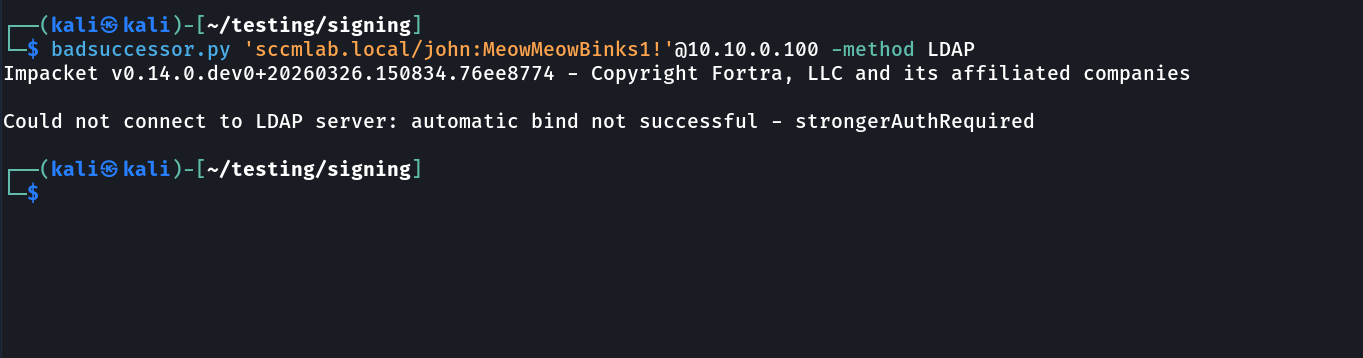
And here’s what happens when you try to use Impacket’s badsuccesor:
Same story with bloodhound-ce-python:

The error is consistent: StrongerAuthRequired. The DC is telling complaining about something so lets understand what that is.
LDAP Authentication: Simple vs. SASL Binds
LDAP supports two primary authentication methods:
Simple Bind
Simple binds provide no integrity protection. A simple bind is the straightforward LDAP username(Usually Distinguished Name)/password style of authentication. By itself, it does not provide integrity protection for the session. That is why a domain controller that requires LDAP signing will only accept a simple bind when it is protected by TLS, such as LDAPS or StartTLS.
So when LDAP signing is enforced, the real issue is not just “can the DC validate the credential,” but “is this session protected strongly enough for the DC to trust the traffic that follows?”
SASL Bind
SASL (Simple Authentication and Security Layer) is a framework that provides authentication and optional security layers on top of connection-based protocols. Think of it as a wrapper, whcih allows new protocols to reuse existing mechanisms and allows old protocols to make use of new mechanisms.The framework also provides a protocol for securing subsequent protocol exchanges within a data security layer. For the purposes of this post, I’m going to focus on five of the main SASL mechanisms most relevant in Windows/Active Directory environments: SPNEGO, GSSAPI, EXTERNAL, DIGEST/CRAM-MD5 and NEGOEX.
- SPNEGO: Simple and Protected GSSAPI Negotiation Mechanism, is is a protocol that lets two peers negotiate which GSS-API security mechanism to use, for example, when they support different options(one supports Kerb5 and NTLM while the other peer only supports NTLM) or multiple mechanisms such they can agree on a common one to proceed with authentication.
- NEGOEX: The SPNEGO Extended Negotiation Security Mechanism (NEGOEX) protocol is designed to address the drawbacks of the SPNEGO negotiation model. When negotiated by SPNEGO, NEGOEX uses the concepts developed in the GSS-API specification. The negotiation data is encapsulated in context-level tokens. Therefore, callers of the GSS-API do not need to be aware of the existence of the negotiation tokens but only of the SPNEGO pseudo-security mechanism. Its just a newer, more secure version of the original SPNEGO implementation and supports newer authentication methods such as using Pulic Key Peer 2 Peer(PK2U2) Protocol to authenticate to Entra/Hybird based systems/resources that prior were done using NTLM or Kerberos.
- GSSAPI: General Security Service API provides a standard, secure way for communication but while is broad in scope; in AD its only for Kerberos. Its a library to allow vendors to implement Kerberos authentication via exposed APIs without relaying on vendor lock in
- EXTERNAL: in the SASL framework, EXTERNAL mode is used by the client to tell the server to use information provided outside of what is strictly considered LDAP communications, for example, a TLS client certificate if the connection is done over TLS. Active Directory exclusively deploys this mode to support TLS authentication via Schannel.
- DIGEST-MD5/CRAM-MD5: This legacy protocol is based on the HTTP Digest Auth. Its similar to NTLM, a challenge/response authentication method that is deprecated. Side note with CRAM-MD5, while very similar to DIGEST-MD5, its slightly more secure since the client sends the LDAP server some random data.
TLDR: CRAM-MD5, DIGEST-MD5, GSS-API(Kerberos), and SPENGO/NEGOEX can simply be thought as elements provided/offered/supported by Simple Authentication and Security Layer(SASL). Mechanisms that allow for a secure method of information exchange without requiring TLS by trying to address the network communication encryption problem at application layer.
The GSS-API Ecosystem: SPNEGO, GSS-SPNEGO, and Friends
Now that we have covered SASL to a good level, we need to talk about the plumbing that makes SASL come together to give us marvelous Windows authentication.
GSS-API: The Generic Security Services API
GSS-API is a standardized API that provides a consistent interface for security services to be implemented in applications by different vendors. Think of it as an abstraction layer, applications can use GSS-API without worrying about whether they’re using Kerberos, NTLM, or some other mechanism underneath. Its addressing vendor agnostics by providing flexibility and no complexity of maintaining the wide number of authentication methods available in Windows.
GSS-API provides:
- Authentication
- Integrity protection via SIGNKEY (through its
gss_wrapfunction) - Confidentiality via SEALKEY (encryption)
- Context establishment and management as the receiver uses the same negotiated keys to verify the signature and decrypt the data
Kerberos natively supports GSS-API. This is why I mentioned earlier that we can focus on GSS-API as just being Kerberos, unless you are in the unix world that is. It was designed with these capabilities from the ground up. NTLM, however, was not.
SPNEGO: The Negotiation Protocol
SPNEGO (Simple and Protected GSS-API Negotiation Mechanism) is a pseudo-mechanism that allows clients and servers to negotiate which actual security mechanism to use.
Here’s how it works:
- Client sends a list of supported mechanisms (e.g., Kerberos, NTLM)
- Server picks one from the list
- They proceed with that mechanism
A more in-depth, RFC’y explanation:
- The initiator(the client or you) proposes a
mechTypessequence containing supported security mechanisms in decreasing preference order (most preferred first) - The acceptor(Server Or DC) either accepts the initiator’s first-choice mechanism or selects an alternate from the offered list
- If no proposed mechanism is acceptable, the acceptor(Server or DC) rejects the negotiation entirely
- The acceptor(Server or DC) returns a
negTokenRespindicating the negotiation state and chosen mechanism (if any)
SPNEGO is what allows Windows to seamlessly fall back from Kerberos to NTLM when Kerberos isn’t available such as when there’s no DNS, no line of sight to DC, use of IP addresses instead of FDQN to access resources and more.
A related detail worth knowing about is NEGOEX (SPNEGO Extended Negotiation). Rather than being a totally separate replacement for SPNEGO, its an extension that can be negotiated within the SPNEGO flow. In Windows, it is used for newer negotiation scenarios, including things with PKU2U, a authentication method that allows Kerberos authentication between two peers without line of sight to the KDC. Additionally, it introduces additional protection for the negotiation itself by way of new random tokens being exchanged. It is not directly necessary for understanding this LDAP issue, but it is a useful rabbit hole to be aware of if you keep exploring Windows auth internals.
GSS-SPNEGO: Making NTLM Play Nice
It all comes together now as: GSS-SPNEGO wraps NTLM to make it GSS-API compatible.
NTLM by itself doesn’t natively support the full GSS-API feature set. But when wrapped in SPNEGO within a SASL context, NTLM can provide:
- Signing (via NTLM session specific key and generation of MAC to sign the actual message)
- Sealing (done via the SEALKEY from with the use RC4 or AES, with variable length bit keys for encryption of messages)
- Session Specific Integrity tokens that prove the authentication exchange wasn’t tampered with.
NTLM by itself is not the same thing as “a signed LDAP session.” What matters here is that, when NTLM is carried through the right SASL/GSS-SPNEGO path, the client and server can establish the keys and context needed for LDAP session protection.
That is why SASL + GSS-SPNEGO + NTLM can satisfy LDAP signing requirements, while a weaker or legacy NTLM-over-LDAP path will not.
SASL + GSS-SPNEGO: The Full Picture
When you perform a SASL bind using NTLM with GSS-SPNEGO:
- SASL provides the framework for authentication with security layers
- SPNEGO negotiates which mechanism to use (Kerberos or NTLM)
- GSS-API provides the interface for signing/sealing
- NTLM (when wrapped appropriately) provides the actual authentication material that you need to confirm who you are
This entire stack is what creates a “strong” authentication that satisfies LDAP signing requirements.
What This Looks Like on the Wire: Wireshark Deep Dive
let’s see what this actually looks like at the packet level. This is where the rubber meets the road and evidently where a lot of the most impactful attacks and CVEs have been discovered ; )
Simple Bind: The Insufficient Approach
When tools like using the ldap3 library perform password authentication without proper SASL support, here’s what happens:
Packet 1: Initial LDAP Bind Request
The client sends a bind request to the LDAP server:
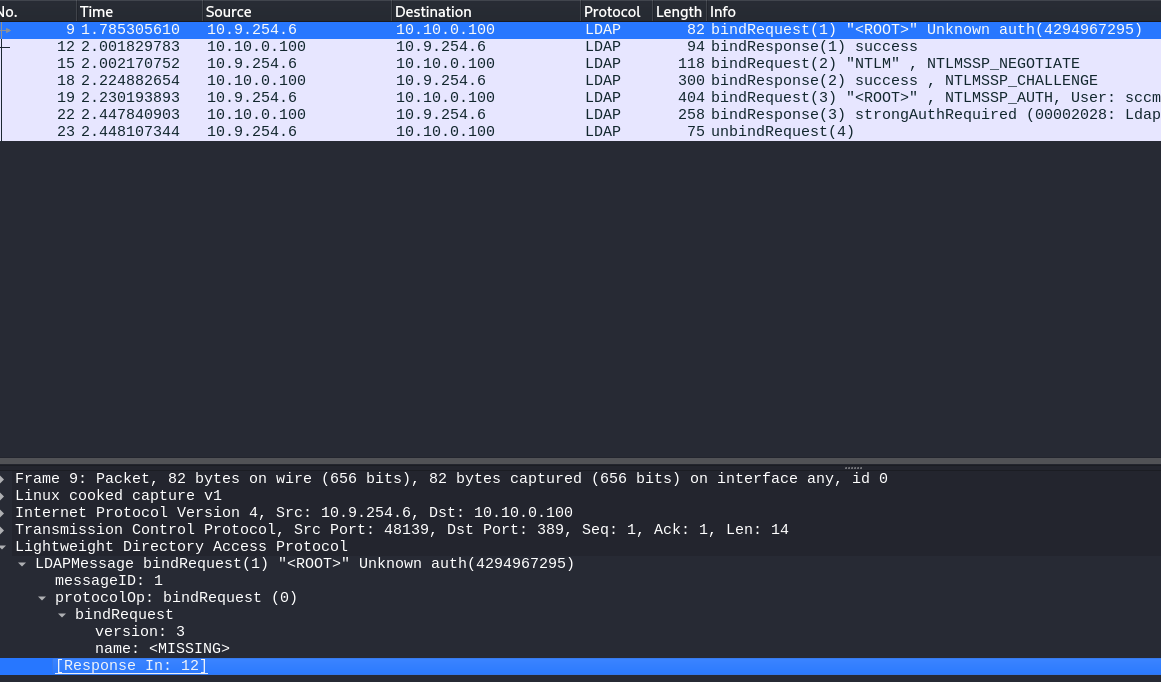
It’s using the “simple” authentication type. Note using NTLM will still also be “simple”
Packet 2: Server Response and our Follow Up
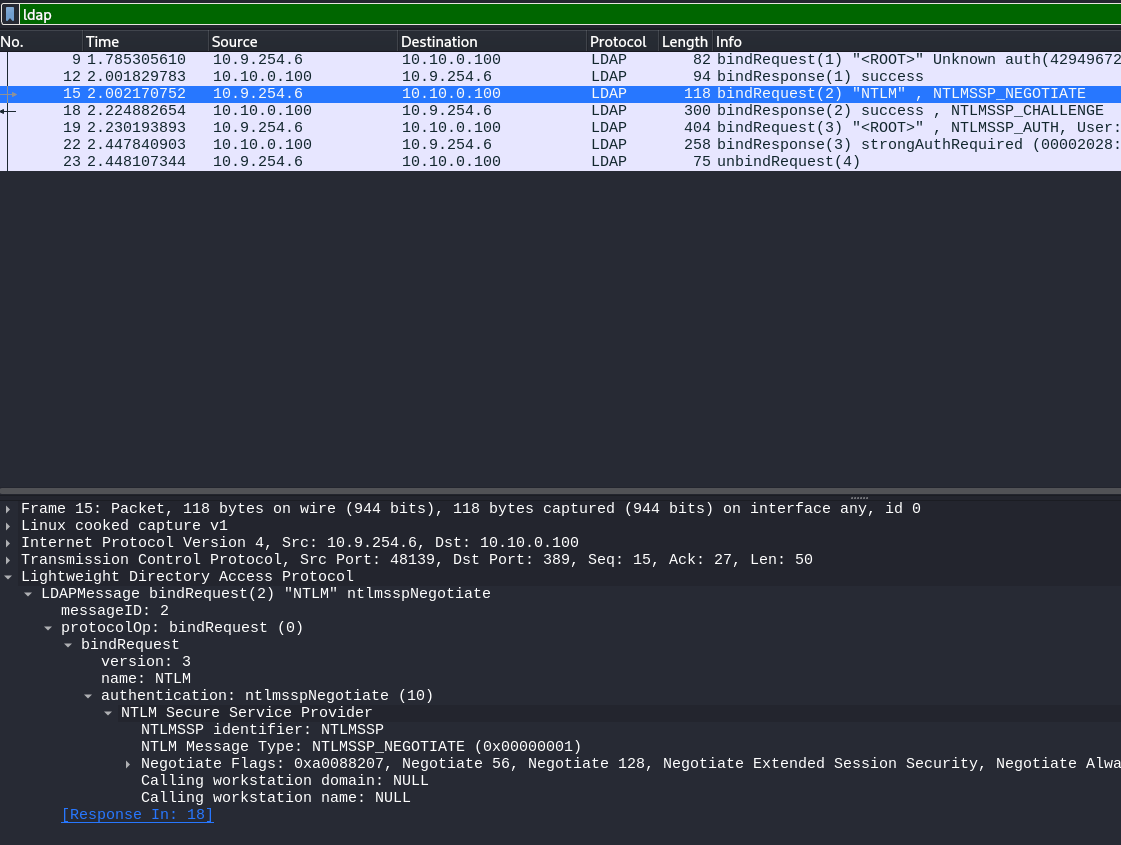
The DC then acknowledges our attempt at a simple bind, returning a success message. We then respond with selecting the NTLMSSP, or the NTLM Security Services Provider to continue.
NTLMSSP Is a part of the Microsoft Security Support Provider Interface (SSPI) that’s meant to facilitate NTLM Challenge-response authentication between peers.
Packet 3: Challenge and Response actually begins
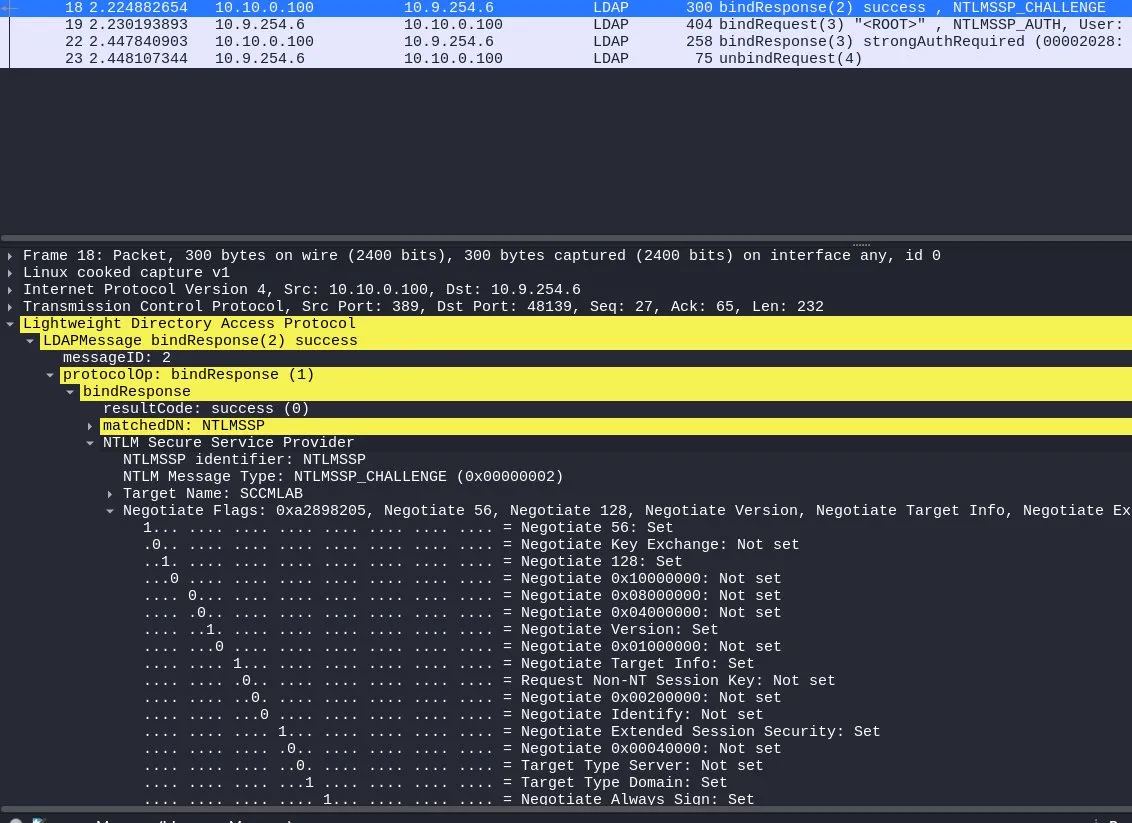
Once we have picked the NTLMSSP authentication method; we begin by preforming the negotiation. Note that NTLM is a challenge/response mechanism and so we exchange derivations of the secret/password not the actual one.
As we can see above, the NTLM challenge packet has non of the security feature sets we talked about in GSS-SPENGO/GSS-API/SASL. Another interesting feature is that we can see the Negotiate Always Sign: Set flag at the end of the screenshot. This is the flag that comes in with LDAP signing enforcement.
Packet 3: Rejection and insecurity like its highschool again
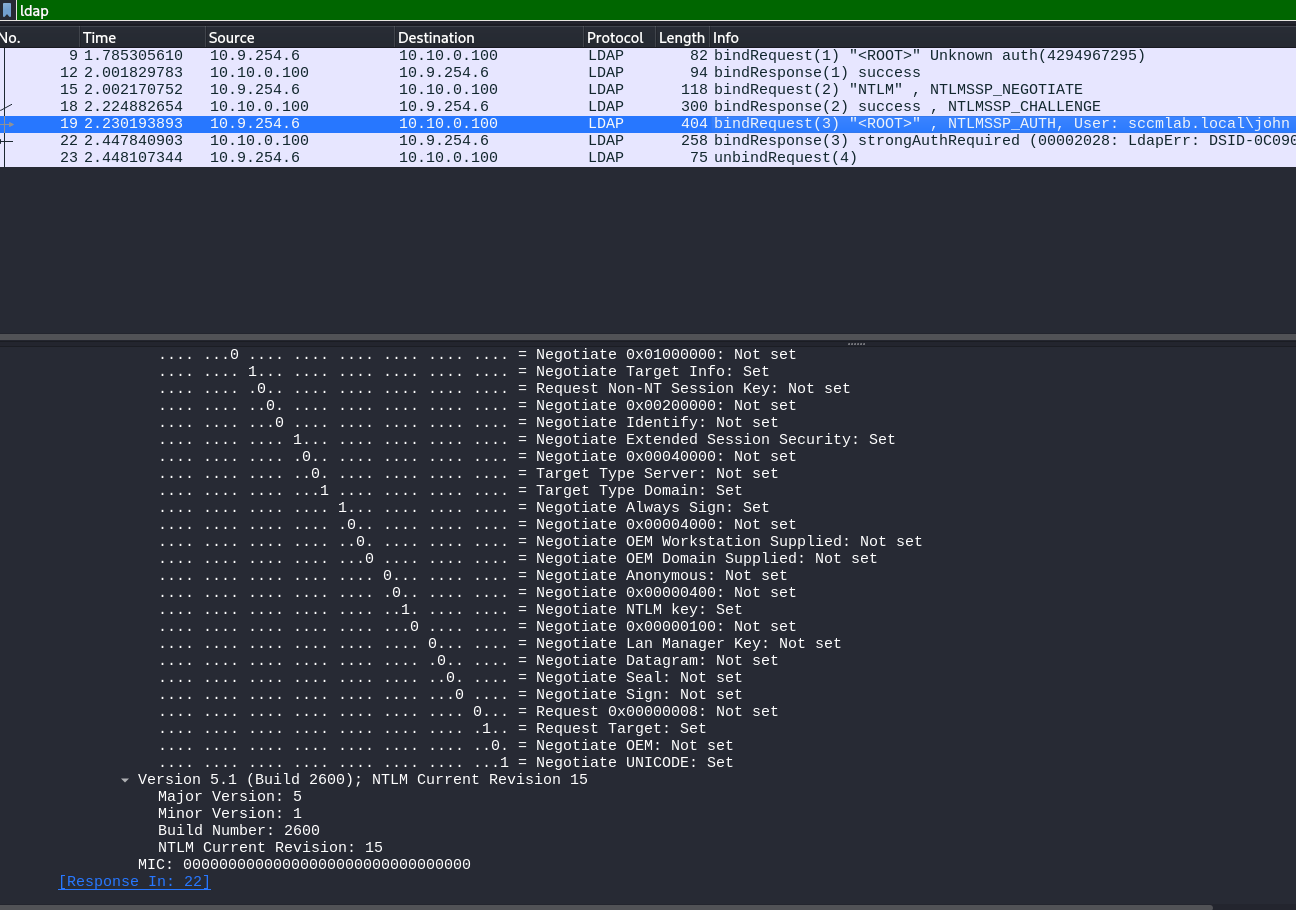
Since we knew the password to the user john, we were able to successfully reply to the challenge request provided by the DC and successfully confirm to the DC that we posses johns credential’s. If we focus on the screenshot, which is just an expansion of the Negotiate flags segment of the packet, we can see that we did not set any of the important/required information to not just confirm to the server that we have johns credential’s but that we are actually john and that we intended on authenticating to the DC. The MIC is empty(its a 0000 entry at the end above the response code), while the Negotiate Sign/Seal headers are also not set.
The end result of which is the domain controller rejecting the authentication request due to the LDAP signing requirement requiring us not only confirm we have johns credentials, but to confirm that indeed we are john, who intended to log into in the domain controller during this entire context session.
SASL Bind with GSS-SPNEGO: The Right Way
For my engagement I needed to enumerate for the badsuccesor vulnerability and so re-wrote the script to use the impackets ldap implementation(which supports SASL by default when using password/NTLM auth).
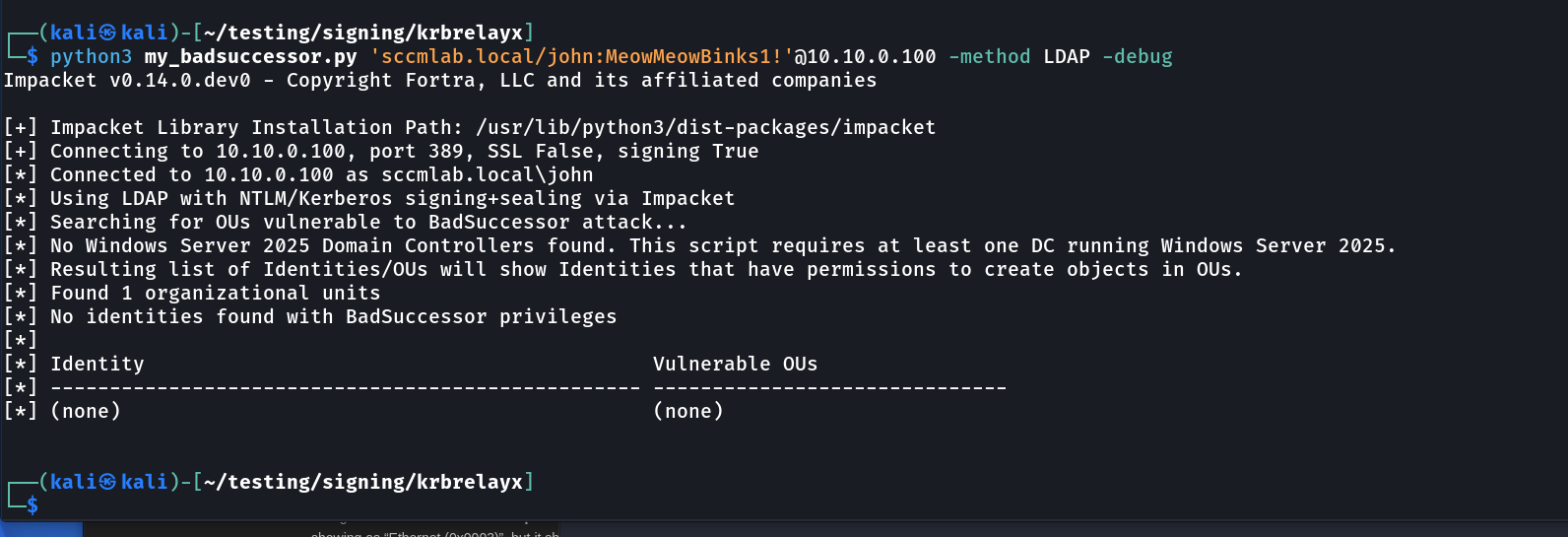
As we can see, successful authentication compared to the original. Using my version for reference, let’s look at a proper SASL bind with SPNEGO negotiation:
Packet 1: Initial LDAP Bind Request with SASL
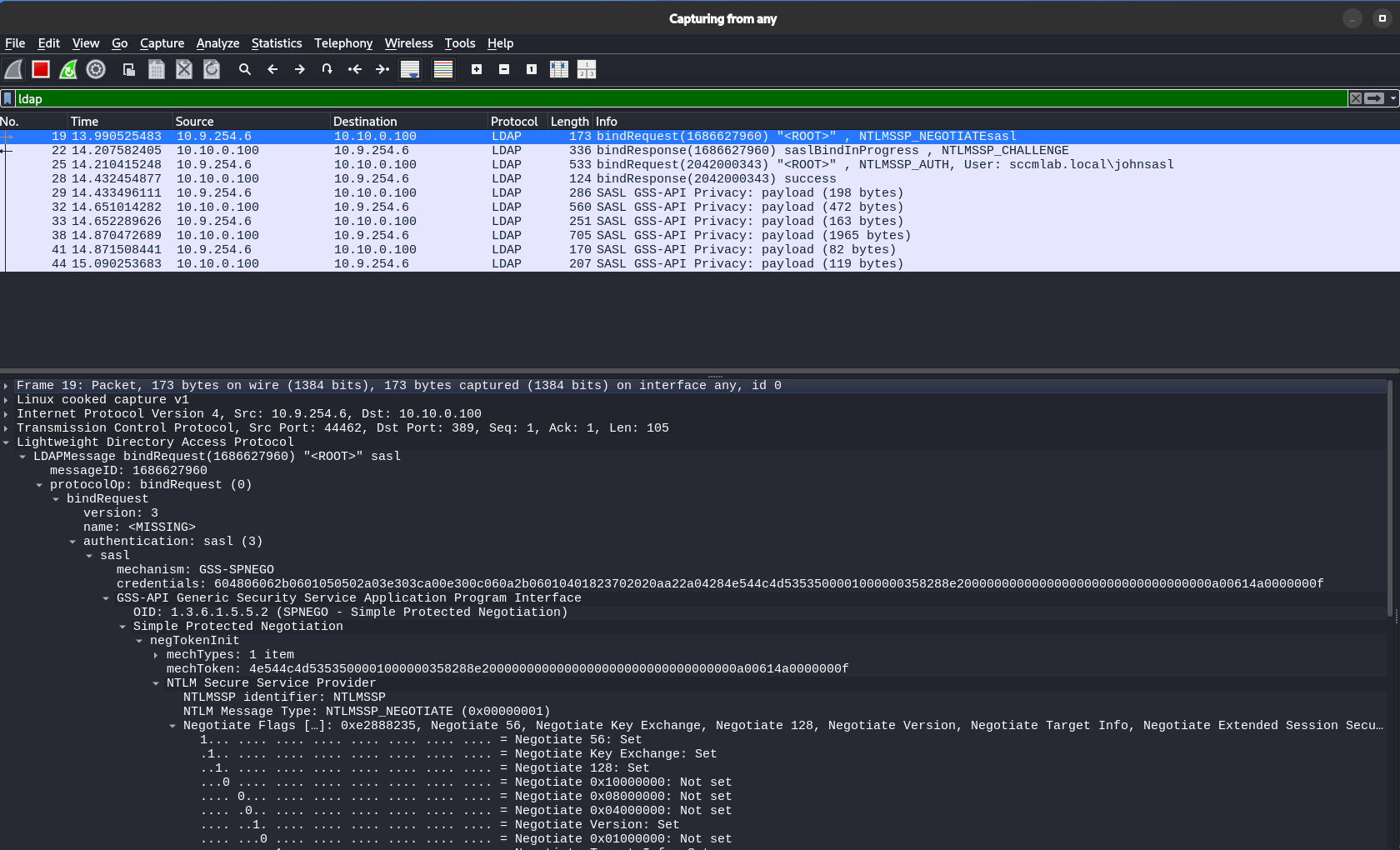 Things now are already different. The authentication choice is sasl, and the mechanism is GSS-SPNEGO (identified by its OID). We can also see that in our original/first bind request, we provided the negTokenInit, as well as the mechToken(to prove the mechList that tells the DC what authentication formats we can use) within our first iniator request.
Packet 2: NTLM_CHALLENGE:
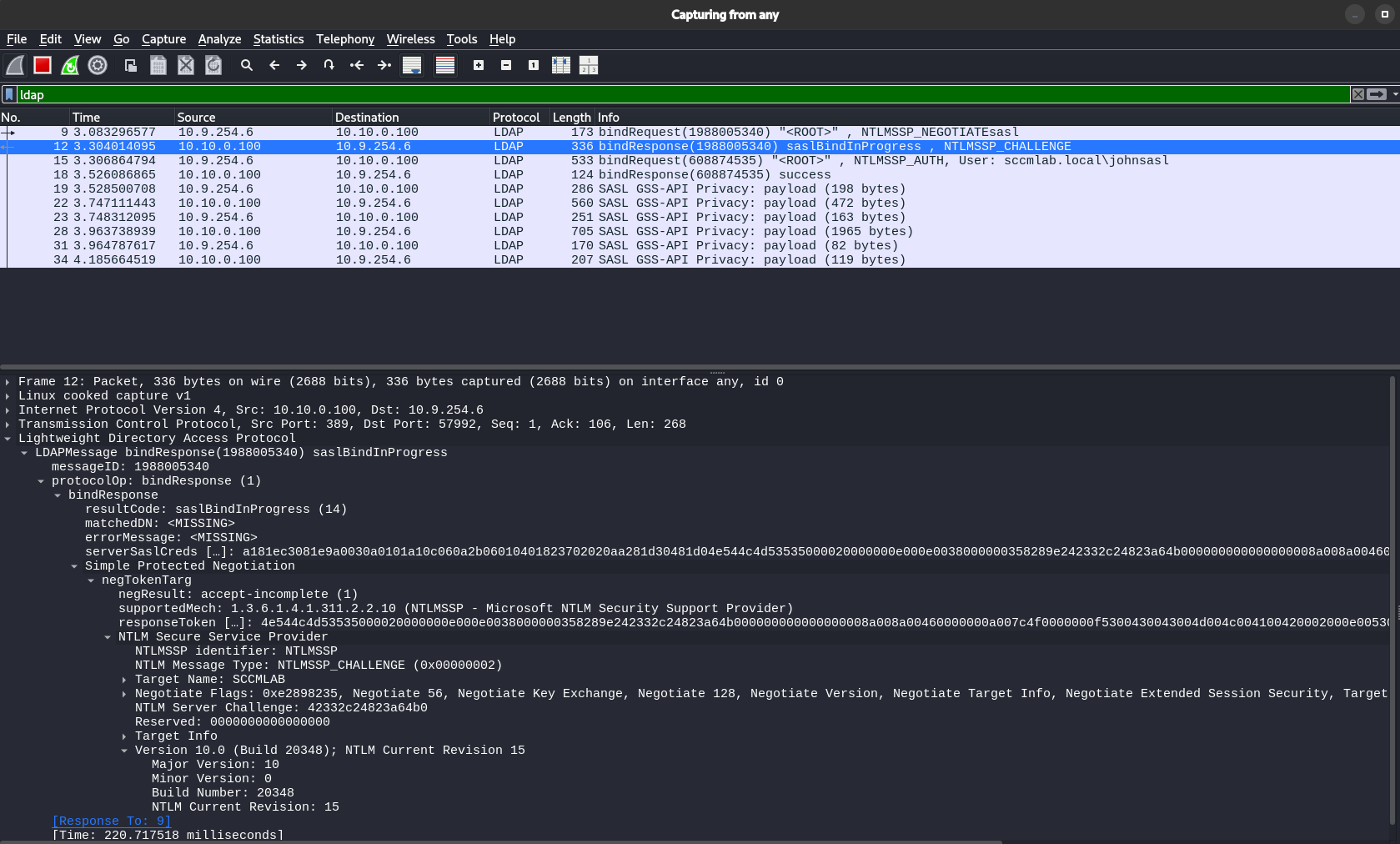
As we can see, the NTLMSSP_CHALLENGE reply the domain controller sends us(the client) includes a lot of additional details as is exposed and wrapped by GSS-SPENGO.
The NTLMSSP_NEGOTIATE Message:
Since we asked for NTLMSSP authentication through SASL, the mechToken contains the NTLMSSP_NEGOTIATE message
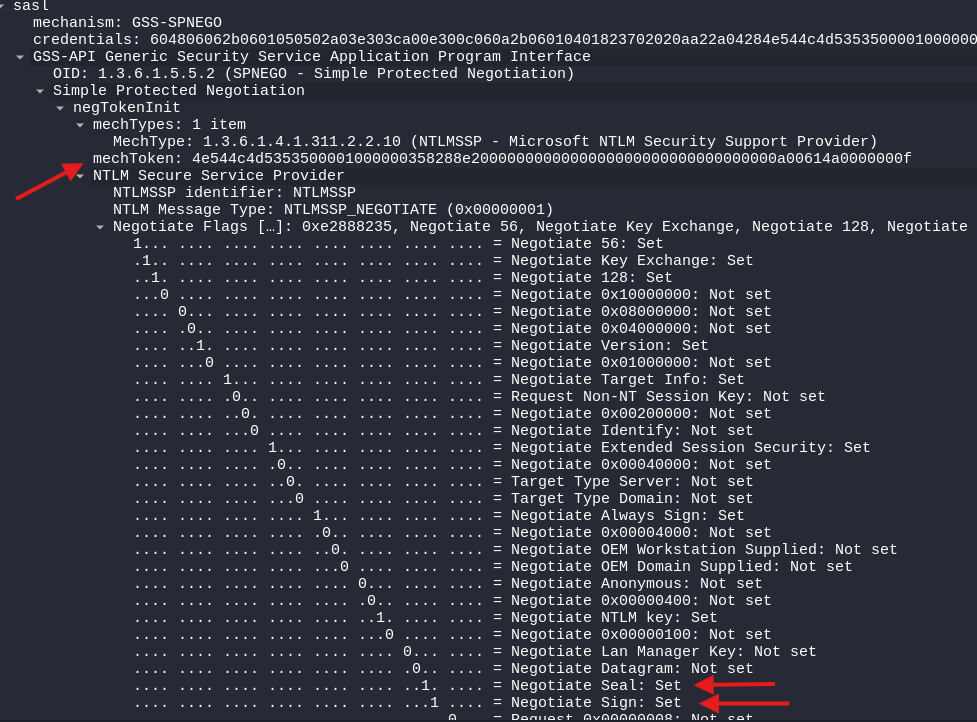 Notice the flags: Negotiate Sign and Negotiate Seal are SET. This is the client declaring its capabilities, it can sign and seal if the server requires it. We also have the mechToken since we provided a
 mechType. As we mentioned earlier, SASL can support 4 mechType elements.
The server has chosen NTLMSSP (NTLM) and so the server echoes back the signing/sealing flags and provides target information.
Packet 3: Client Authentication Response
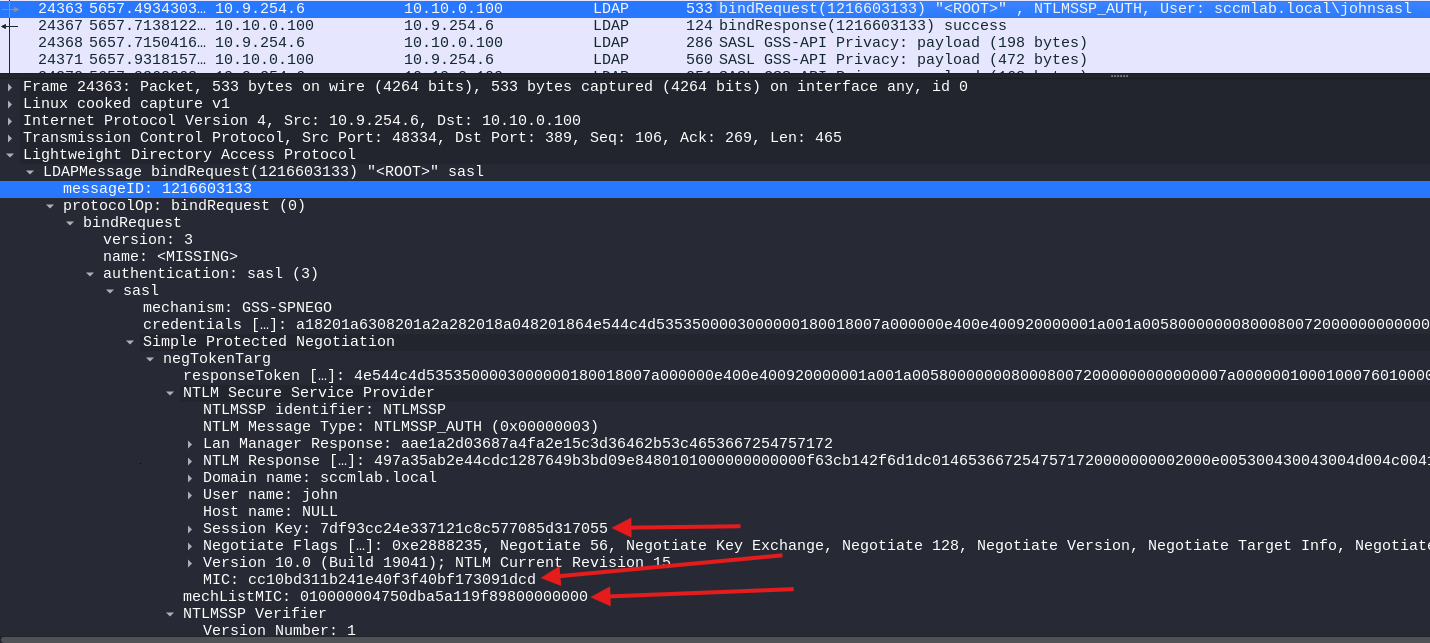
A key details now appears here with the fact that we have a valid Message Integrity Check(MIC) token and the correct mechListMIC, which proves the list of authentication mechanism we submitted were not tampered with or downgraded.
The MIC: A Barrier To NTLM Relay
The MIC (Message Integrity Code) in NTLMv2 is computed over the NTLM negotiate, challenge, and authenticate messages using the exported session key.
MIC = HMAC_MD5(ExportedSessionKey,
               NEGOTIATE_MESSAGE ||
               CHALLENGE_MESSAGE ||
               AUTHENTICATE_MESSAGE)
Conceptually, the MIC helps prove that key parts of the NTLM exchange were not modified in transit. That matters because we may often want to tamper with negotiation details during relay or downgrade scenarios, such as when relaying SMB auth obtained via petitpotam to the DC not enforcing LDAP signing but enforcing SMB signing.
The important caveat is that the MIC is best thought of as an anti-tampering control, not as a universal “this could not have been relayed” guarantee. It makes certain relay and downgrade tricks much harder, and only guarantees that the NTLM authentication was not modified/tampered with in any way.
Tying how all these play together is that we now have integrity protection in the negotiation: the NTLM MIC protects the NTLM message flow from tampering, while SPNEGO’s negotiation protection, mechTypeList token value, helps defend the authentication mechanism selection from downgrade/modification/tampering.
For those of you whom are keen on doing more research to play around with this, the following function in python can be used to generate a MIC value:
import hmac
import hashlib
import binascii

def compute_ntlm_mic(exported_session_key_hex, negotiate_hex, challenge_hex, authenticate_hex, mic_offset):
key = bytes.fromhex(exported_session_key_hex)
negotiate = bytes.fromhex(negotiate_hex)
challenge = bytes.fromhex(challenge_hex)
authenticate = bytearray.fromhex(authenticate_hex)

# Zero the MIC field in the AUTHENTICATE_MESSAGE
authenticate[mic_offset:mic_offset+16] = b"\x00" * 16

data = negotiate + challenge + bytes(authenticate)
mic = hmac.new(key, data, hashlib.md5).digest()
return mic.hex()

# example usage
mic = compute_ntlm_mic(
exported_session_key_hex="7df93cc24e337121c8c577085d317055",
negotiate_hex="", # full type 1 NTLMSSP message hex
challenge_hex="", # full type 2 NTLMSSP message hex
authenticate_hex="",# full type 3 NTLMSSP message hex
mic_offset=72 # common when Version is present
)
print(mic)
Authentication Flow: Simple vs. SASL
Lets summarize the key packet-level differences:
Simple Bind Attempt (FAILS with signing):
Client → Server: bindRequest(NTLMSSP_NEGOTIATE)
                  simple NTLMSSP_NEGOTIATE

Server → Client: bindResponse(simple)
                  simple NTLMSSP_CHALLENGE

Client → Server: bindRequest()
                  simple NTLMSSP_AUTH attempt

Server → Client: bindResponse(strongerAuthRequired)
[End]
SASL Bind with GSS-SPNEGO (SUCCEEDS):
Client → Server: bindRequest(sasl, NTLMSSP_NEGOTIATEsasl)
                  negTokenInit with mechTypes + NTLMSSP_NEGOTIATE

Server → Client: bindResponse(saslBindInProgress)
                  negTokenResp with NTLMSSP_CHALLENGE

Client → Server: bindRequest(sasl, GSS-SPNEGO)
                  negTokenResp with NTLMSSP_AUTH + MIC

Server → Client: bindResponse(success)
[Signed/Sealed LDAP session established]
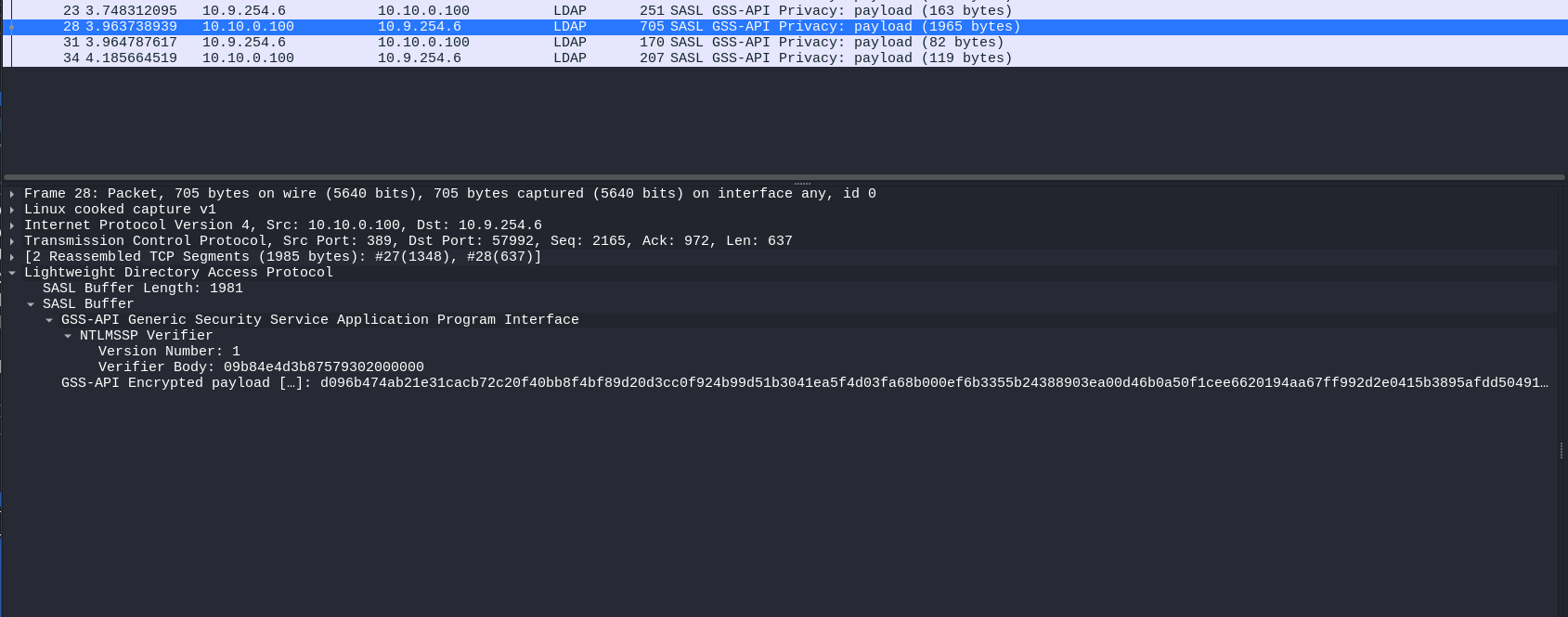
The difference is most obvious further down. When we successfully established the authentication with SASL, what ended up happening was our communication(Known as LDAP PDUs,the Protocol Data Unit) with the LDAP service is encrypted in a SASL GSS-API Privacy blob:
Why Python Tools Break: The ldap3 Library Limitation
When you use ldap3 with NTLM authentication or the rust-ldap3 library with NTLM/Password authentication, you end up hitting the wall since it goes with the auth process but it does so using a simple bind, not SASL. No GSS-SPENGO negotiation context is developed, and no sealing and signing wraps the NTLM negotiation to go through the LDAP signing enforced server.
This is also why:
- Kerberos authentication works fine - ldap3 supports Kerberos, which inherently uses GSS-API(Kerberos is signed and sealed as an inherent implementation of the protocol)
- LDAPS works - TLS/SSL provides the integrity protection
- TLS Over LDAP(Using start_tls): By wrapping the authentication in a TLS connection; we address the inherent encryption requirement.
- Plain NTLM authentication fails: No SASL support for plain NTLM authentication and so the simple bind subsequently fails
The same limitation exists in other libraries and tools (like the rust-ldap3 libraries used by rusthound-ce and many other rust based tooling).
So how do we fix this? There are several approaches:
Option 1: Use Kerberos
If you have Kerberos tickets (via impacket-getTGT or similar), use them:
impacket-getTGT corp.local/pentester:password
export KRB5CCNAME=pentester.ccache
bloodhound-python -c All -d corp.local -k --dc dc01.corp.local
SASL/GSS-API and Signing/Sealing are native functions of the Kerberos protocol, so this just works. We can see that here:
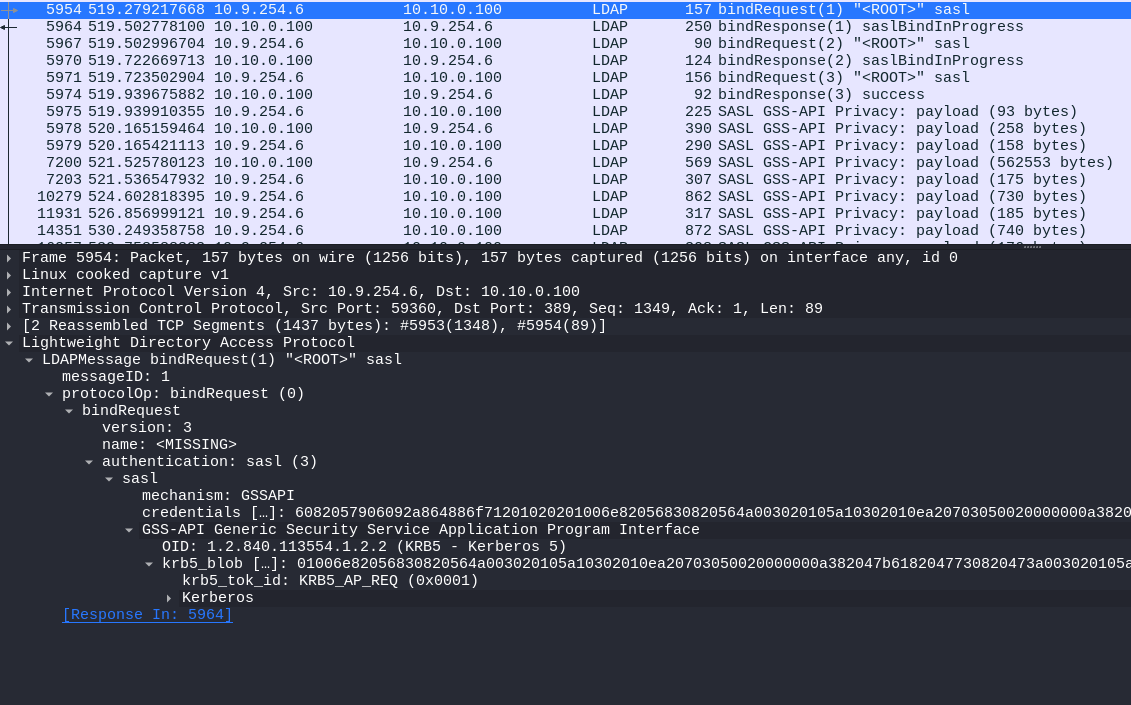
Some interesting differences that can be easily gleaned off between the two authentications include No negotiation needed since Kerberos is using GSSAPI directly, No challenge/response since we preform ticket presentation and lastly Signing is built-in via the authenticator + no MIC field needed since the relevant parts of the AS-REQ is cryptographically sealed.
Option 2: Use LDAPS
If the DC has a valid certificate and LDAPS or StartTLS is available, that also solves the problem because TLS gives the DC the protected channel it wants for the bind and the session that follows.
That is why a domain controller enforcing LDAP signing will still accept simple binds over TLS: the integrity protection is coming from TLS rather than from SASL signing. Making LDAPS a valid relay target if LDAP signing is enforced and LDAPS does not have CBT enforced
Option 3: Change the Library (My Way)
With the time constraints and the need for my tooling to work on the engagement, I found myself going through the process of modifying the various tools I needed for the engagement. A full view of the changes can be found here:
https://github.com/ThatTotallyRealMyth/SASL-CompatiblePythonTooling
But I would much prefer taking through everyone of the process and the kind of things I ended up learning along the way. This part isn’t too hard. All that’s needed really, is to take out the ldap3 ldapConnection API, and place in the impacket one. Which is not too dissimilar. The consumers downstream did need some editing here and there but that wasn’t too complex.
For example, in some places like in badsuccessor we needed to add and make other changes to replace the full functionality of the ldap3 library without re-writing the whole script.
Conclusion: The Importance of Understanding Fundamentals
What started as a broken tool ended up being a useful reminder: if you work in offensive security, understanding the underlying authentication stack matters. Chasing down the StrongerAuthRequired error forced me to spend time on SASL, SPNEGO, GSS-API, NTLM, and LDAP signing in a way I probably would not have otherwise, and that made me better at understanding both the failure and the environment.
That matters beyond fixing one tool. Knowing how Kerberos and NTLM differ, how the different authentication packages intersect in windows, why LDAP/SMB signing breaks certain applications/attacks, and where relay attacks do and do not still apply makes you a better operator and puts you in a much stronger position when adapting tooling due to environment specific hiccups or explaining real risk to a client.
Sometimes a broken workflow is the fastest way to actually learn the very thing you have been relying on. And for that I’m grateful as I have already gotten an idea and started working on what may be the next big MIC bypass.
References and Further Reading
- The most indepth analysis of the NTLM protcol
- Microsoft: LDAP Signing and Channel Binding
- OffSec Almond Consulting: LDAP Authentication in Active Directory
- RFC 4422: Simple Authentication and Security Layer (SASL)
- RFC 4178: The Simple and Protected GSS-API Negotiation Mechanism (SPNEGO)
- RFC 2743: Generic Security Service Application Program Interface (GSS-API)
- CVE-2019-1040: NTLM MIC Bypass Vulnerability
- Preempt Security: Drop the MIC - The Full Story
- Using Kerberos for Authentication Relay Attacks
- The Renaissance Of NTLM Relay Attacks; Everything You Need To Know